For product-led growth (PLG) companies, the marketing website is no longer a static brochure. It's a dynamic, experimentation-driven platform that evolves as quickly as your product itself. Every feature launch, pricing change, and go-to-market pivot requires rapid website updates. Yet traditional development shops and legacy platforms create bottlenecks that leave marketing teams waiting for the next sprint cycle.
This is where Webflow development agencies offer a fundamentally different approach, one designed specifically for companies that need speed, flexibility, and the ability to move independently of engineering constraints.
Most SaaS companies operate with a painful tension between product and marketing teams.
Product engineers are focused on shipping product features, improving infrastructure, and scaling the core application. Marketing needs to communicate those changes through landing pages, case studies, pricing pages, and feature comparison sections. But if the marketing website is built on a custom codebase, WordPress, or outdated CMS, every change becomes a formal request. Marketing waits for engineering availability. Engineering prioritizes product work. The website falls behind.
Fast-growing digital product companies experience this at scale. A SaaS company launching a new feature needs to update:
In traditional setups, these changes either require developer intervention or are delayed for weeks because the website wasn't architected for quick iteration.
Webflow development agencies solve this by building websites as platforms, not projects. The website becomes something marketing can evolve independently, without pulling engineering resources away from product work.
Understanding the structural differences between Webflow and traditional approaches is critical to recognizing why it's ideal for product-led companies.
Classic dev shops typically work with front-end developers, back-end developers, and a separate design phase. The workflow often looks like this:
This process takes weeks or months. For a PLG company that needs to test multiple landing page variations or add new product content weekly, this cycle is untenable.
WordPress, while faster to launch, has its own constraints. WordPress themes offer limited customization without custom CSS. Adding dynamic content requires plugins like ACF (Advanced Custom Fields) and Elementor, which create technical debt. Updates to the WordPress core, plugins, and themes can introduce bugs, security issues, or breaking changes. Non-developers can make basic edits, but anything beyond template changes requires developer knowledge.
Webflow flips this model entirely. The design tool IS the development environment. When a designer creates a button in Webflow, that button outputs clean HTML/CSS automatically. When a marketer needs to update, copy or add a new section, they don't need to understand code, they're working visually within the same system.
One of the most underrated advantages of Webflow is its component system. A Webflow component is a reusable, maintainable block of design that propagates across an entire site.
Consider a feature card component that appears on:
In WordPress or a custom codebase, you'd need to:
In Webflow, you create the component once. Update it once. Every instance updates automatically across the entire site.
This matters significantly for product-led companies. As your product evolves, you're constantly tweaking how you present features. With Webflow's component system, design consistency is enforced by architecture, not vigilance.
Webflow's CMS is fundamentally different from WordPress's post/page model.
In WordPress, your CMS structure is limited. You have posts (blog articles) and custom post types you create through plugins. Adding relationships between content, say, linking case studies to specific industries and company sizes, requires custom code or complex plugin configurations.
Webflow's CMS Collections are relational databases you build visually. For a SaaS company, this means:
And critically, Collections are relational. A blog post can reference multiple product features. A case study automatically pulls in relevant integrations. A team member page links to their webinar appearances.
This structure enables marketing teams to populate a CMS once and display that content across multiple pages, formats, and contexts automatically. When you update a case study in the CMS, it updates everywhere it's referenced on the site.
For WordPress to achieve this level of relational content, you'd need complex plugin stacks and likely custom development.
SaaS companies compete on user experience. Every 100ms delay in page load increases bounce rates. Webflow was built with performance in mind from the ground up.
Webflow's hosting infrastructure:
Compare this to WordPress hosting, where you're responsible for:
Webflow's built-in performance optimization means:
For a PLG company, these metrics directly impact SEO rankings and conversion rates. Better Core Web Vitals mean higher rankings in Google search results and lower bounce rates from organic traffic.
This is where Webflow development agencies compound their advantage for fast-growing companies.
A typical Webflow project timeline for a SaaS company:
Total timeline: 8-12 weeks from concept to launch.
Compare this to a custom development approach, which often takes 4-6 months:
The difference compounds when you need changes. With Webflow, a landing page redesign takes days. With custom website development, it takes weeks or months, requiring new specifications, design review, development, and QA cycles.
For product-led companies, rapid experimentation is essential to growth. This might include:
With a Webflow development agency, marketing can run these experiments independently:
Traditional dev shops require formal change requests, which slow experimentation velocity. WordPress allows some flexibility but still requires plugin configuration or custom code for advanced testing scenarios.
One of the most valuable outcomes of implementing Webflow for a SaaS company is reclaiming engineering bandwidth for product work.
A typical engineering team at a fast-growing SaaS company spends unexpected time on marketing website tasks:
These aren't product-critical tasks, but they consume engineering cycles. They interrupt focus and introduce context switching.
A Webflow development agency eliminates ~80% of these requests. Marketing can:
The remaining 20% of requests, complex custom functionality, advanced API integrations, or performance-critical optimizations, are handled by either the Webflow agency or your engineering team, but only when they're truly necessary.
For a growing company, this translates to real cost savings:
A mid-stage SaaS company might spend $200k-400k annually on marketing website maintenance when built on a custom stack. That budget could be invested in product development, sales tools, or customer success infrastructure instead.
Webflow represents a fundamental shift in how marketing websites are built, one that prioritizes velocity and accessibility over raw customization flexibility.
The barrier to entry for making changes is lower with Webflow than with any other platform:
This matters for staff retention. Many marketing teams include designers and content strategists who are genuinely interested in website optimization but lack coding skills. Traditional platforms force them to stay in their lane or require months of technical training. Webflow lets them contribute their expertise directly.
Here's where no-code platforms are often misunderstood: they're not limited to simple sites.
Webflow can handle sophisticated requirements:
What Webflow isn't ideal for: building the SaaS application itself. If you need to build authentication systems, complex data processing, or real-time collaboration features, you still need back-end development.
But for the marketing layer, the website that attracts, educates, and converts customers, Webflow operates at an optimal complexity level. It's powerful enough for sophisticated use cases but simple enough that non-developers can contribute meaningfully.
As a SaaS company grows, design consistency becomes harder. You have:
Without systematic design governance, you end up with inconsistency: buttons styled three different ways, color palettes that drift, typography that varies across pages, spacing that's misaligned.
Webflow's component system enforces consistency through architecture rather than discipline:
Primary CTA Button Component:
This scales beautifully. A company with 50+ pages, created by 10+ team members, maintains visual consistency because the design system is enforced at the platform level.
A Webflow development agency should provide comprehensive design system documentation:
This documentation lives in Webflow itself. New team members learn by exploring the site's existing pages and seeing how components are used.
One of the most underrated challenges in website management is content scaling. Your product team adds 5 new features. Your sales team has 8 new case studies. Your content team published 20 new blog posts. How do you integrate this content into the site's layout without manual rework?
Traditional websites often have rigid layouts: "feature showcase is 3 columns, always." If you have 5 features to showcase, you either:
In Webflow, the layout responds to content:
A collection list displaying all active features automatically:
Marketers add a case study to the CMS; it automatically appears in:
No manual page updates required. The content structure you build once propagates across multiple display contexts.
This scalability is critical for product-led companies. You're adding features, case studies, and use cases constantly. A well-architected Webflow site absorbs this growth without requiring redesign or developer intervention.
A Webflow development agency doesn't work in isolation. They integrate with your product team and engineering infrastructure.
Analytics Integration: Webflow sites connect to Google Analytics, Segment, Hotjar, and other analytics platforms natively. Marketing can track conversions, user behavior, and engagement without custom code.
CRM and Marketing Automation: Forms in Webflow integrate directly with HubSpot, Marketo, Salesforce, or Pipedrive via Zapier. When someone fills out a form, their information automatically syncs to your CRM, triggering nurture workflows.
Personalization and Experimentation: Webflow supports A/B testing through tools like Optimizely or native capabilities. Advanced scenarios use JavaScript to read user attributes (utm_source, segment, user ID) and dynamically change page content.
Product API Integration: If your product exposes an API (for user count, feature flags, pricing data), Webflow can call that API and display dynamic content. A usage dashboard on the company website could show real-time metrics.
Developer Handoff: Complex scenarios requiring custom logic are built with custom code within Webflow. For example, a sophisticated pricing calculator that adjusts quotes based on API lookups, or a real-time integration status dashboard.
This integration philosophy means Webflow sites don't operate independently, they're part of your broader marketing and product infrastructure.
Not all Webflow agencies are created equal. When evaluating potential partners, ask:
A B2B SaaS company with three core use cases wanted to test which resonated most with their target audience. Rather than launching separate landing pages manually, a Webflow development agency
Result: The company tested 12 landing page variations over 8 weeks. Without Webflow, the engineering team would have rejected this request as too time-consuming. With Webflow, marketing had full autonomy.
Winner messaging drove 2.5x higher conversion rates compared to other approaches. The winning message was adopted company-wide, informing product messaging, sales playbooks, and content strategy.
A product-led SaaS company launches new features every 2-3 weeks. Historically, the marketing website lagged behind announcements by weeks because updating the website required developer coordination.
After implementing Webflow with a dedicated CMS structure for features:
Now, new features appear on the website within hours of announcement, keeping marketing and product communication aligned.
A SaaS company wanted to optimize pricing page design for higher plan upgrades. They tested:
With a Webflow development agency, the company:
Within 3 months, conversion-to-paid increased 35% through iterative optimization. The engineering team was involved zero times; the entire project was managed by marketing and the Webflow agency.
Here's how Webflow compares to alternatives across key dimensions for SaaS companies:
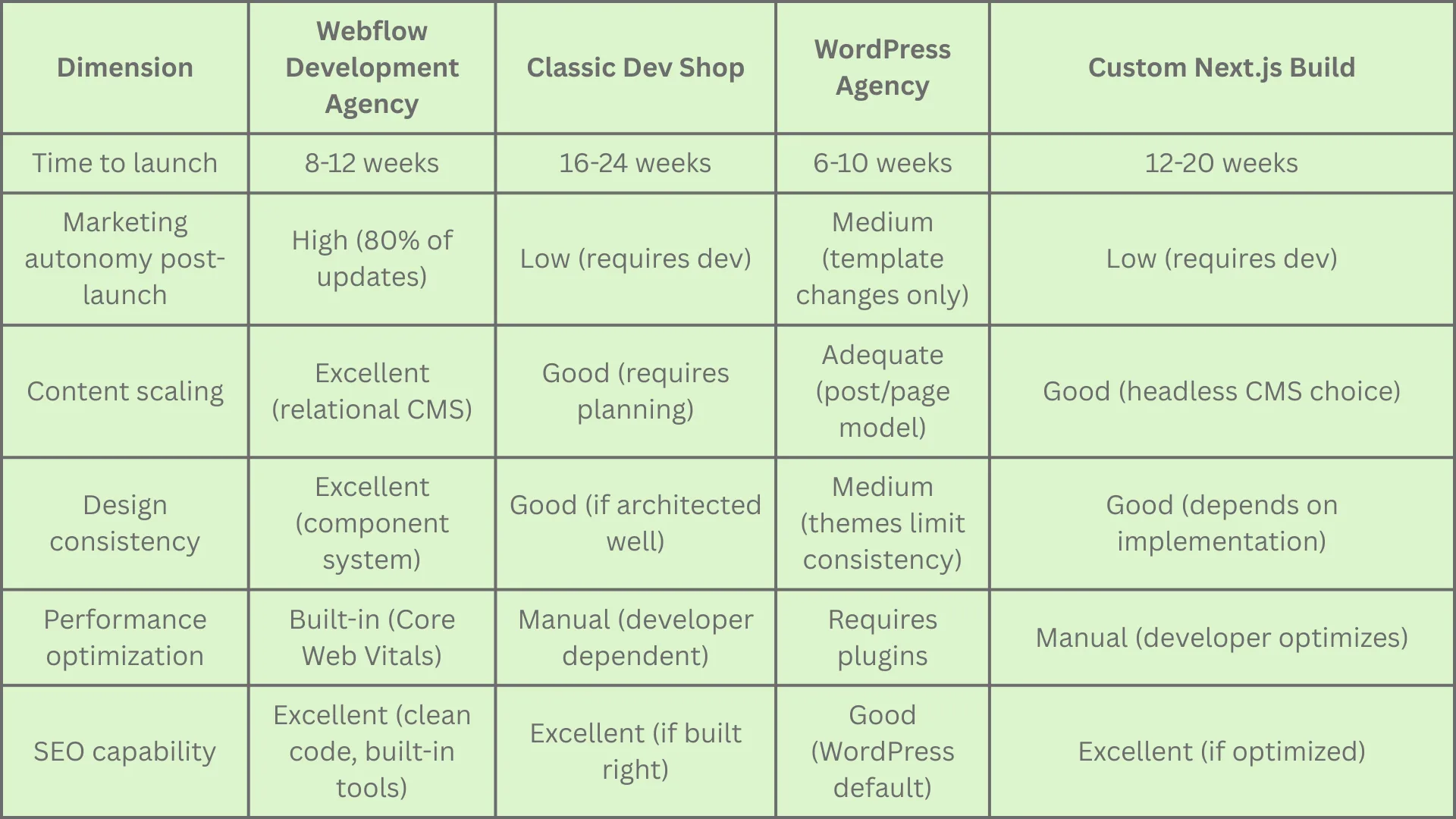
Webflow is ideal if your company:
Webflow may not be ideal if:
For product-led SaaS companies, the marketing website isn't a one-time project, it's a continuous growth lever. Every month, you're testing new positioning, launching features, and refining your customer acquisition strategy. Your website must evolve at the speed of your strategy.
A Webflow development agency removes the friction between strategy and execution. By combining a design-first, no-code platform with the expertise of specialists, you get:
The companies that outpace competition aren't those with the fanciest custom code, they're the ones that move fastest. Webflow development agencies enable exactly that: speed without sacrificing quality, flexibility without creating technical debt, and autonomy without chaos.
For fast-growing digital product companies, a Webflow development agency isn't a cost center, it's a growth accelerator. Launch faster. Iterate smarter. Choose Webflow experts. Contact the top webflow agency today.
Curious how this applies to your own project? See our Webflow Development services or explore everything we do.