Enterprise organizations face an unprecedented web infrastructure challenge: delivering high-performance, secure websites while maintaining governance across distributed teams, navigating complex compliance requirements, and integrating with sprawling technology stacks. A Webflow Enterprise agency addresses this challenge by combining the platform's advanced architecture with specialized expertise in governance, security, performance, and workflow automation, eliminating the false choice between speed and control.
Unlike traditional web development approaches that burden IT teams with infrastructure maintenance or legacy platforms that constrain design and marketing velocity, Webflow Enterprise agencies deliver fully managed, audit-ready websites built on AWS and Fastly infrastructure. They handle the entire lifecycle: from governance architecture and compliance strategy through multi-region deployment, advanced CMS modeling, enterprise integrations, and post-launch optimization.
This article explores how enterprise agencies leverage Webflow's platform to address the core pain points facing C-suite and IT leadership: maintaining compliance at scale, enabling safe collaboration across dozens of teams, ensuring sub-second global performance, and creating business continuity through robust security and uptime guarantees.
Understanding Webflow Enterprise and How It Differs from Standard Plans
What Is a Webflow Enterprise Plan?
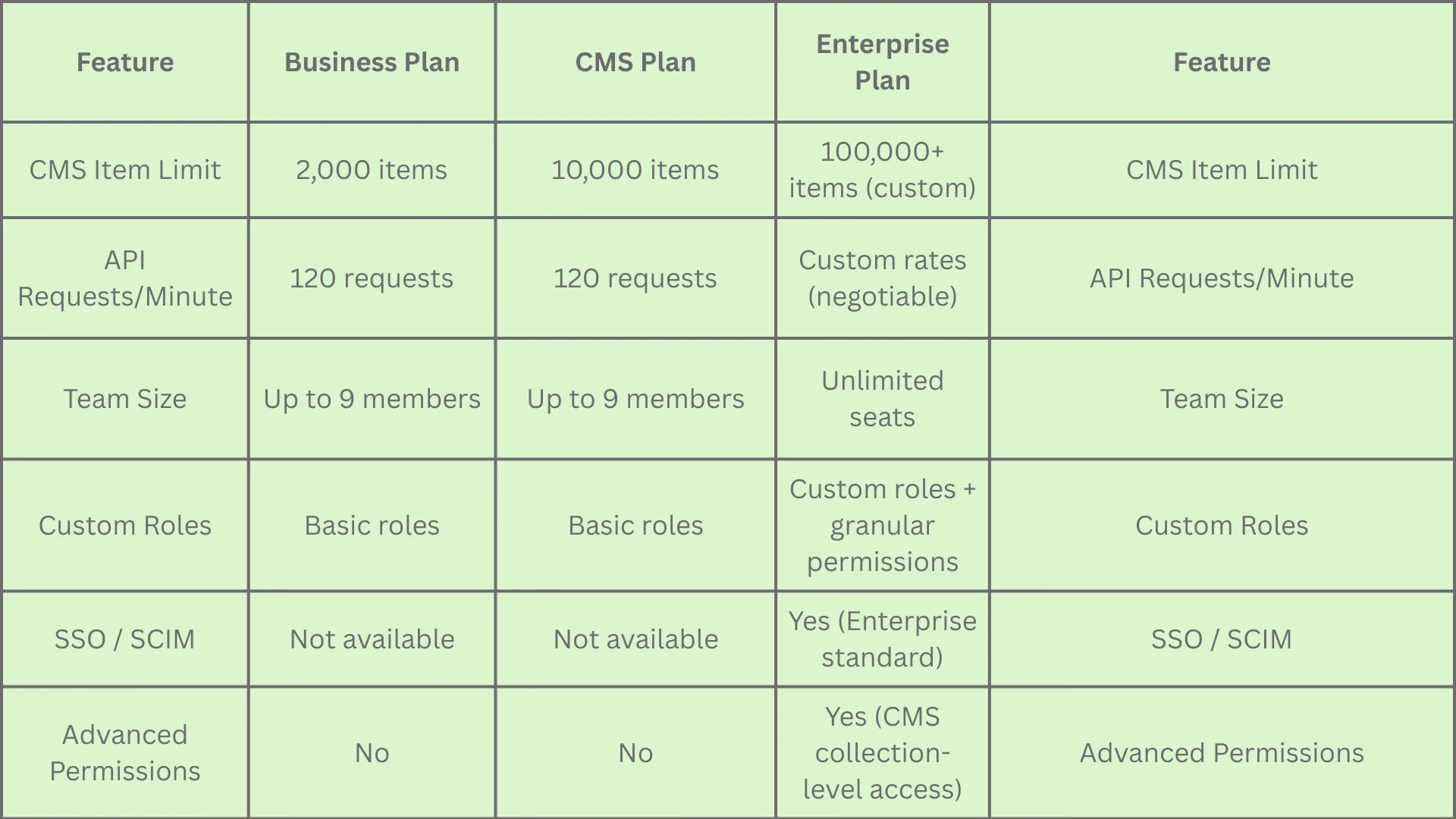
Webflow Enterprise is a custom-configured hosting and collaboration environment designed specifically for large organizations with complex, multi-stakeholder needs. Unlike the self-serve tiers (Business and CMS plans), Webflow Enterprise provides unlimited CMS items, custom API rate limits, dedicated support, and advanced governance controls tailored to an organization's specific requirements.
The platform operates on a managed hosting model built on Amazon Web Services (AWS) and Fastly Content Delivery Network (CDN), meaning organizations never manage servers, SSL certificates, or infrastructure patches. Webflow handles all updates and security maintenance automatically, reducing the attack surface compared to self-hosted alternatives like WordPress, which accounts for 90% of all hacked CMS sites due to plugin vulnerabilities and manual update failures.
Key Differences Between Enterprise and Self-Serve Plans
The Enterprise plan's most consequential differentiator is governance. While smaller teams benefit from Webflow's visual builder and CMS capabilities, enterprises need granular access controls, audit trails, change review workflows, and compliance reporting. Enterprise agencies build these governance layers into the site architecture from day one.
Why Webflow Enterprise Agencies Are Uniquely Equipped for Scale
The Agency Advantage: Beyond Platform Features
A Webflow Enterprise agency isn't simply a vendor that builds websites on Webflow; it's a strategic partner that interprets an organization's business needs, maps those needs to platform capabilities, and designs workflows that prevent the common failure patterns large organizations encounter: siloed teams, divergent brand standards, security gaps, performance degradation over time, and unmanageable technical debt.
Webflow Enterprise agencies excel at:
Governance Architecture Design: Creating role hierarchies, permission matrices, and approval workflows that balance team autonomy with brand/security control.
Integration Strategy: Designing data flows between Webflow and existing enterprise tools (Salesforce, HubSpot, analytics platforms, consent management systems) without creating security or data quality risks.
Performance Optimization at Scale: Implementing CMS structures, image delivery strategies, and caching policies that maintain sub-2-second Core Web Vitals even as content volume grows.
Change Management and Training: Equipping internal teams with documentation, runbooks, and training that enable them to operate the site independently post-launch.
What a Typical Enterprise Implementation Includes
A mature Webflow Enterprise agency provides:
Strategic Consulting Phase
Business stakeholder workshops aligning marketing, sales, product, IT, and legal around website objectives
Technical audit of current infrastructure, identifying performance, SEO, CMS, analytics, and integration gaps
Content strategy and information architecture design specific to enterprise audience segments and multi-region requirements
Webflow Enterprise meets or exceeds the security baseline expected by risk-conscious enterprises:
SOC 2 Type II Certification: Third-party audited controls for security, availability, processing integrity, confidentiality, and privacy over a specified period.
ISO/IEC 27001 and 27017/27018: International information security management standards covering data protection, encryption, and secure third-party management.
GDPR and CCPA Alignment: Data Processing Agreements (DPA) available, with support for data residency and deletion workflows.
DDoS Protection: AWS Shield Standard (automatic) + AWS Shield Advanced for Enterprise customers, providing protection against large-scale volumetric and application-layer attacks.
Encryption in Transit and at Rest: TLS 1.3 for all data in transit; AES-256 encryption for data at rest on AWS infrastructure.
Enterprise agencies work with your legal and security teams to:
Review the Webflow Security Questionnaire and Whistic Profile: Providing detailed answers to third-party risk questionnaires without requiring back-and-forth delays.
Map Compliance Requirements to Technical Implementation: For instance, if your organization requires data to remain in specific geographic regions, the agency can configure Webflow or recommend regional hosting partners (e.g., Wes for EU-based deployments).
Design Audit-Ready Documentation: Creating a security runbook that documents all controls, access policies, incident response procedures, and data handling practices.
Least-Privilege Access Model and Governance
Enterprise sites handle sensitive customer data, internal communications, and strategic information. A poorly configured permissions system exposes the organization to insider threats, accidental data exposure, and regulatory violations.
Webflow Enterprise agencies implement the least-privilege principle by default:
Workspace-Level Controls
Custom Roles: Beyond "Admin," "Editor," and "Guest," create roles such as "Content Editor - Staging Only," "Design System Manager," "CMS Admin," or "Publishing Manager."
SSO/SCIM Integration: Tie Webflow access to your identity provider (Okta, Azure AD, OneLogin), automating provisioning and deprovisioning when employees join or leave.
Billing Permissions: Restrict who can modify billing or subscription settings to finance and IT leadership only.
Site-Level Controls
Site-Specific Access: Control which team members can view or edit specific sites (e.g., product marketing team can only access the product site, not the investor relations site).
CMS Collection Access Control: Limit editors to specific content collections, marketing can edit blog posts but not pricing pages, which require approval from leadership.
Publishing Permissions: Separate the ability to edit from the ability to publish, ensuring changes pass through a review and approval workflow before going live.
Activity Monitoring
Site Activity Log: A detailed audit trail of who made what changes and when. Essential for compliance audits and incident response.
Audit Log API: For security-conscious enterprises, the Audit Log API exports raw event data (login activity, role changes, publishing events) to SIEM tools (Splunk, Datadog, Microsoft Sentinel) for continuous monitoring.
Version Control and Rollback: Every published version is preserved, allowing rapid rollback if a corrupted or inappropriate change reaches production.
Agencies establish quarterly access reviews as part of the governance cadence, ensuring that permissions remain aligned with current job responsibilities and that orphaned accounts (ex-employees, contractors) are promptly deprovisioned.
Collaboration and Workflow Governance
Page Branching and Staged Publishing
A critical governance feature for large teams is the ability to make changes in isolation, test them, seek approvals, and then merge them to production, without blocking other teams' work.
Webflow Enterprise's page branching enables this workflow:
Create a Branch: A team member creates a dedicated branch (e.g., "Q1-2025-Redesign") for a set of page changes.
Develop in Staging: All changes to pages, components, CMS, and settings are isolated to that branch. A branch staging URL allows stakeholders to preview changes before they're live.
Request a Review: The team member requests a review, tagging stakeholders (legal, brand, product, IT security).
Approve and Merge: Once reviewers sign off, the branch is merged back into the main site and published.
Rollback if Needed: If an issue is discovered post-merge, versions can be rolled back to the previous state instantly.
This model is critical for enterprises because:
Marketing teams can prepare seasonal campaigns without blocking product team updates.
Design system updates can be staged, tested with real data, and validated before affecting the live site.
Security patches can be deployed and tested before going live.
Experiments and A/B tests can be isolated to specific pages without affecting global changes.
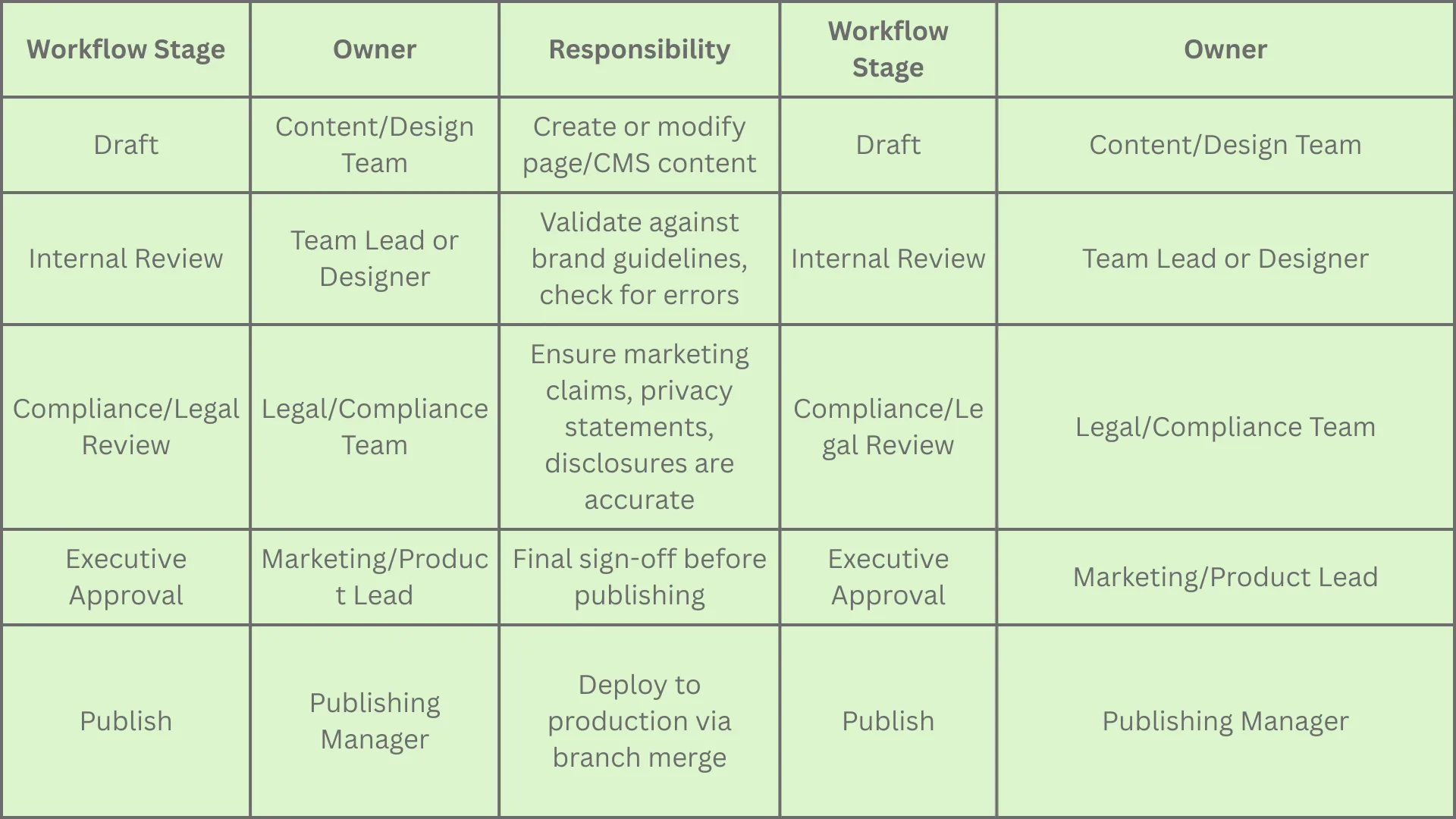
Multi-Stage Approval Workflows
Enterprise agencies design approval hierarchies that prevent common publishing errors:
For organizations managing multi-brand or multi-region sites, this workflow scales across dedicated workspace instances, each with its own approval hierarchy.
Performance at Scale: Multi-Region CDN and Optimization
Global Content Delivery Network
Enterprise websites serving customers across continents face a performance paradox: a user in Singapore experiences unacceptable latency if content is served from U.S. servers, but duplicating content across regions introduces management complexity and sync challenges.
Webflow leverages Fastly's global CDN to solve this:
Edge Caching: Content is cached on Fastly's 300+ points of presence (PoPs) worldwide. A user in Singapore, Frankfurt, or São Paulo retrieves cached assets from the nearest PoP, reducing latency to 50–100ms instead of 200–500ms.
Cache Invalidation: When a page is published, Webflow automatically purges the relevant cache entries across all PoPs, ensuring users receive fresh content within seconds.
Origin Shielding: An additional caching layer between edge and origin reduces load on Webflow's infrastructure and improves cache hit rates.
Geo-Routing: For enterprises with region-specific requirements, traffic can be routed to specific infrastructure zones.
Performance Benchmarks for Optimized Enterprise Sites:
Time to First Byte (TTFB): 0–200ms (reduced from 500–800ms on non-optimized sites)
First Contentful Paint (FCP): 0–1.2 seconds (under Google's "good" threshold)
Largest Contentful Paint (LCP): 0–2.0 seconds (exceeding Google's Core Web Vitals targets)
CMS Architecture: Designing collection structures and dynamic lists to avoid N+1 query patterns and excessive API calls.
Uptime and Service Level Agreements (SLAs)
Enterprise websites are business-critical. An e-commerce site losing 1 hour of uptime can cost $50,000–$500,000+ depending on traffic and conversion rates. A SaaS company losing access to its pricing or demo pages for 30 minutes loses qualified leads.
Webflow Enterprise provides:
99.9% Uptime SLA: Guaranteed uptime with maximum monthly downtime of 43.83 minutes.
Incident Response: Defined escalation paths and response SLAs. Critical issues escalated to senior engineers immediately.
Redundancy and Failover: Infrastructure is distributed across multiple AWS Availability Zones, with automatic failover if one zone experiences failure.
DDoS Mitigation: AWS Shield Advanced (included in Enterprise plans) detects and mitigates DDoS attacks, with a dedicated team providing live attack support.
Agencies work with IT to:
Define uptime targets for different site sections (e.g., homepage requires 99.99%, but a non-revenue blog post can tolerate 99.5%).
Implement synthetic monitoring across multiple geographies to validate uptime claims.
Establish incident communication protocols and post-incident reviews to prevent recurrence.
Advanced CMS and Content Governance
Large-Scale Content Architecture
Enterprise organizations often have 50,000+ pages of content across websites, regional variants, product documentation, case studies, blog posts, and more. Managing this at scale requires architectural rigor.
Webflow Enterprise agencies design CMS structures that prevent common pitfalls:
Collection Design Principles:
Normalize Content: Instead of duplicating content across multiple pages, create references between collections. For example, a Product collection is referenced by Pricing Pages, Case Studies, and Resource Hubs—ensuring that product updates automatically propagate to all pages.
Field Optimization: Webflow has a 60-field limit per collection. Agencies use multi-reference fields, nested collections, and external data sources to exceed this without workarounds.
Versioning Strategy: Use a "publish_status" field (Draft, Scheduled, Live, Archived) to manage content lifecycle without requiring multiple collections.
Localization Fields: For multi-language sites, design collections with language-specific fields (Title_EN, Title_FR, Title_ES) or use external translation APIs (Lokalise, Crowdin) for large-scale localization.
- Pricing Tiers (reference Products; used on pricing page)
- Use Cases (reference Products; tell stories of how customers use them)
- Case Studies (reference Products; link to customer success stories)
- Blog Posts (reference Products; contextual product mentions without duplication)
Result: A single product update in the Products collection instantly reflects across pricing, case studies, and blog posts.
Dynamic Content and Personalization
Webflow CMS supports dynamic rendering:
Dynamic Pages: A single page template can render differently based on URL parameters or visitor segments. For example, a pricing page template dynamically displays industry-specific pricing based on the URL slug (e.g., /pricing/financial-services vs. /pricing/healthcare).
Conditional Rendering: Use custom code or Webflow's built-in conditions to show/hide content based on visitor attributes (logged-in status, location, referrer, etc.).
CMS-Driven Navigation: Global navigation structures are stored in CMS collections and rendered dynamically, eliminating the need to manually update navigation in multiple places.
Recommendation Engines: Using Webflow API, external recommendation engines can fetch visitor data, compute recommendations, and inject personalized content.
Workflow and Editorial Calendar
For large editorial teams, a governance process prevents unpublished changes from being lost or conflicting updates from overwriting each other.
Agencies implement:
Editorial Calendar: A CMS collection tracking planned publish dates, allowing teams to coordinate content rollout.
Scheduled Publishing: Using Zapier or Make, trigger automatic publishing at specific times (e.g., blog posts go live at 9 AM PT on the scheduled date).
Content Review Workflow: A dedicated Slack bot or webhook notifies reviewers when content is submitted for approval, with links to branch staging for preview and approval buttons.
Analytics-Driven Decisions: After content goes live, track engagement (page views, time on page, conversion rate) in GA4 and use those metrics to inform future editorial decisions.
Enterprise Integrations: Connecting Webflow to Your Tech Stack
Salesforce and HubSpot Integration
For B2B companies, the website is often the first touchpoint in the sales funnel. Webflow sites must seamlessly capture leads, score them, and pass them to sales teams without manual data entry.
Webflow → HubSpot → Salesforce Flow:
A visitor fills out a contact form on a Webflow page.
The form submission triggers a webhook, which sends visitor data to HubSpot.
HubSpot receives the contact, assigns a lead score based on form fields and behavior, and places the lead in a nurturing workflow.
When the lead reaches a qualification threshold, HubSpot automatically syncs the contact to Salesforce.
The Salesforce sales rep sees the full visitor history (pages visited, content downloaded, email opens) and can follow up with contextual information.
Implementation:
Native HubSpot App: Webflow's official HubSpot app handles basic form embedding and tracking without custom code.
API Integration: For advanced use cases (progressive profiling, conditional form behavior, custom validation), Webflow's API connects to HubSpot's CRM API with bi-directional sync.
Rate Limiting: HubSpot's API has rate limits (190 requests/10 seconds for Professional and Enterprise accounts). Agencies implement exponential backoff and batch operations to stay within limits during high-traffic periods.
Analytics, Tracking, and Consent Management
Modern enterprises must track user behavior while respecting privacy regulations and obtaining explicit consent.
Custom events (form submissions, CTA clicks, video plays, downloads) are tracked via custom code.
Agencies set up GA4 audiences (e.g., "High-Intent Visitors," "Unengaged Users") for remarketing and reporting.
Consent Management Platform (CMP):
Regulations like GDPR and CCPA require explicit user consent before setting certain cookies or pixels.
Agencies integrate CMPs (OneTrust, TrustArc, Termly) that display consent banners and block scripts until users consent.
Once consent is obtained, CMPs trigger tag managers (GTM, Segment) to activate analytics, advertising, and personalization pixels.
GDPR Compliance Checklist:
Consent banner implemented before any tracking cookies are set
Opt-in for marketing tracking (not pre-checked)
Clear privacy policy linked in the footer
Data Processing Agreement (DPA) signed with Webflow
Ability to export or delete user data on request
Third-party tool vendors (analytics, CRM) also have DPAs in place
Marketing Automation and Workflow Integration
Enterprises use marketing automation platforms (Marketo, Salesforce Marketing Cloud, HubSpot) to nurture leads, segment audiences, and trigger campaigns based on behavior.
Zapier and Make Integration Patterns:
Webflow Form Submission → Slack Notification: Alert a sales team when a priority lead completes a form.
Webflow CMS Update → Email Trigger: When a new case study is published, automatically email existing customers in a segment.
External API → Webflow CMS: Populate Webflow collections with real-time data (stock prices, weather, job listings) from external APIs.
User Behavior → Lead Scoring: Track page visits, time on page, and interactions in an external system; pass back a lead score to display on the sales team's dashboard.
Governance for Legal and Security Teams
Legal and Compliance Reviews
Enterprise websites often contain complex legal language: terms of service, privacy policies, disclaimers, regulatory disclosures. Misstatements expose the organization to liability and regulatory fines.
Governance Model:
Legal Template Library: Create a CMS collection of approved legal clauses, disclaimers, and disclosures. Marketing and product teams compose pages using these pre-approved components.
Mandatory Legal Review: Require legal review before any legal text is published. Set up a workflow where legal has a 2-day SLA to approve or suggest changes.
Version Control: Track all changes to legal pages with a detailed changelog showing who changed what, when, and why.
Security Review and Penetration Testing
Before launch and periodically post-launch, enterprises conduct security reviews and penetration tests.
No hardcoded API keys, credentials, or secrets in source code
Third-party scripts (analytics, chat, CDN) vetted and monitored
Form data encryption and secure transmission
Access control and permissions audit
DDoS protection and rate limiting
Compliance audit (GDPR, CCPA, HIPAA if applicable)
Webflow Enterprise provides:
Whistic Profile: A pre-filled security questionnaire that can be shared with auditors, reducing back-and-forth.
Incident Response SLA: A defined escalation path for security issues, with a dedicated team.
Audit Log API: Export access and publishing logs to your SIEM for continuous monitoring.
The Enterprise Implementation Process
Phase 1: Discovery and Assessment (Weeks 1–4)
Objectives: Understand business goals, technical requirements, organizational structure, and success metrics.
Activities:
Business Stakeholder Workshops: Align marketing, sales, product, IT, legal, and finance around website goals, target audiences, and key performance indicators (KPIs). Example KPIs: increase qualified leads by 30%, reduce time-to-value from demo to contract by 2 weeks, improve customer onboarding NPS by 15 points.
Current State Technical Audit: Document existing infrastructure, CMS, integrations, performance baselines, security posture, and compliance requirements.
Competitive Analysis: Review competitor websites for design trends, feature parity, and market positioning.
Compliance Mapping: Document regulatory requirements (GDPR, CCPA, industry-specific regulations) and map them to technical implementation.
Content Inventory and Strategy: Catalog existing content, identify gaps, and plan content migration or refresh.
Deliverables:
Business requirements document (BRD) with goals, audience, KPIs
Technical requirements document (TRD) with integrations, CMS needs, performance targets
Content strategy and IA (information architecture) diagram
Project timeline, budget estimate, and risk assessment
Phase 2: Strategy and Planning (Weeks 5–8)
Objectives: Define site structure, governance, technology decisions, and project roadmap.
Activities:
Information Architecture and Wireframing: Create a sitemap and low-fidelity wireframes showing page templates, navigation structure, and user flows.
Governance Model Design: Define roles (Admin, Editor, Content Manager, etc.), permissions, approval workflows, and access policies.
CMS Strategy: Design collection structure, field definitions, relationships, and content modeling for scalability.
Integrations Planning: Document data flows between Webflow and CRM, analytics, marketing automation, and other tools.
Design System Brief: Define visual design language, component library, accessibility standards, and brand guidelines interpretation.
Client Success/Training: Documentation, training, knowledge transfer (1 FTE)
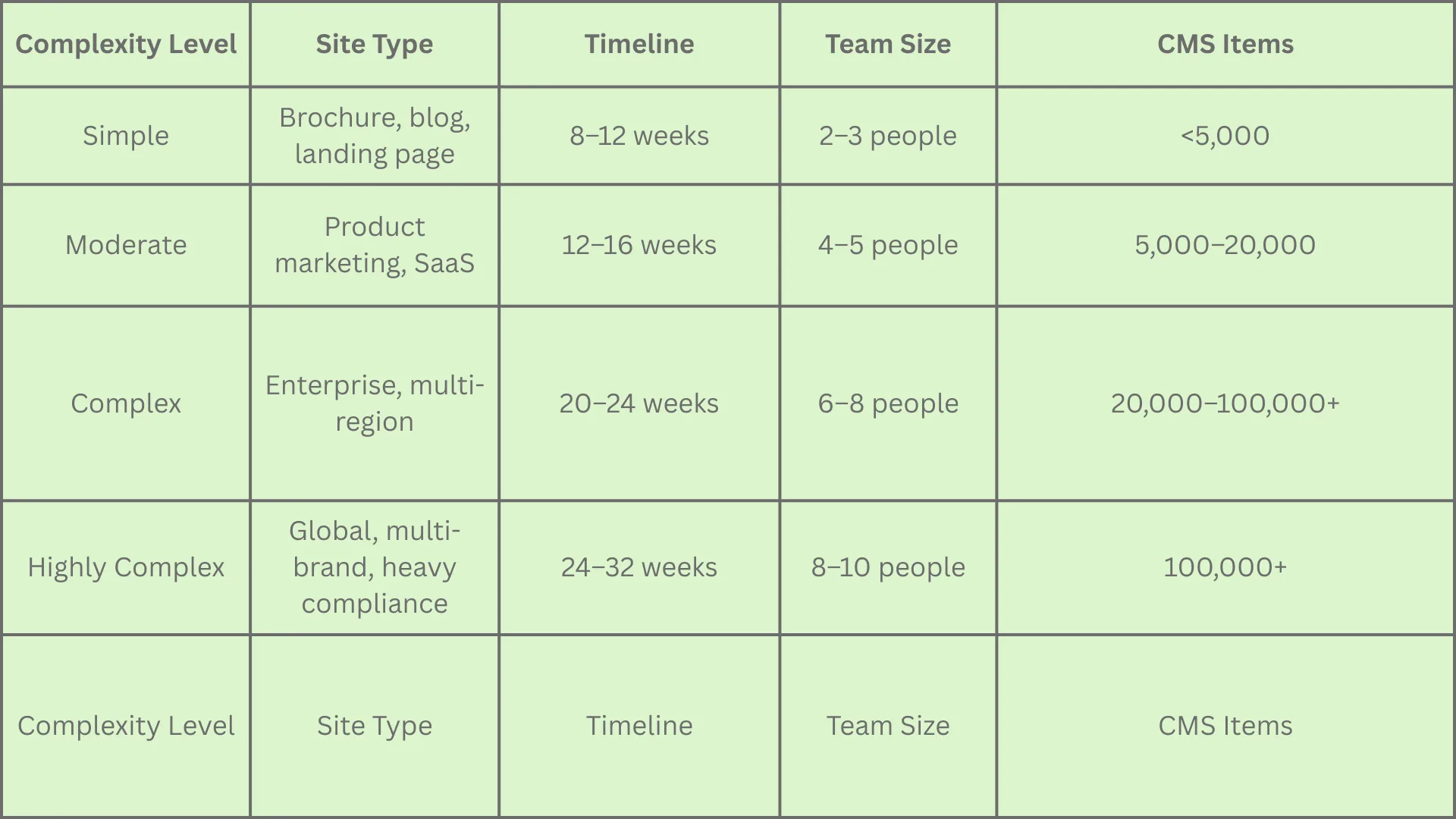
Total Estimated Hours: 2,000–3,000 hours (highly complex projects can exceed 4,000 hours)
Typical Project Cost Range: $75,000–$350,000+ depending on complexity, scope, and agency location.
Selection Criteria for Choosing a Webflow Enterprise Agency
1. Proven Enterprise Experience
Look for agencies with a track record of delivering complex sites:
Enterprise Partner Status: Check Webflow's official partner directory for "Webflow Enterprise Partners," indicating vetting and proven expertise.
Portfolio Case Studies: Review actual project outcomes, not just design aesthetics. Examples: "Reduced page load time from 4.2s to 1.8s," "Launched 12-language site in 6 weeks," "Migrated 50,000 pages from WordPress with zero ranking loss."
Team Certifications: Team members should have Webflow Certification and ideally expertise in related areas (CMS architecture, performance optimization, compliance, integrations).
2. Governance and Compliance Expertise
Enterprise implementations fail when agencies overlook governance. Ask:
"Can you provide a sample governance playbook from a previous project?" (Expect examples of role matrices, approval workflows, access policies.)
"How do you handle legal and compliance reviews?" (Expect documented workflows with review gates.)
"Have you implemented SSO/SCIM or integrated with identity providers?" (Expect hands-on experience with Okta, Azure AD, etc.)
"How do you approach data privacy and GDPR compliance?" (Expect documentation of DPA requirements, cookie consent, data handling.)
3. CMS Architecture and Scalability
Ask to see examples of large-scale CMS implementations:
"How have you structured CMS for sites with >50,000 items?" (Look for normalized data models, reference field usage, external data source integration.)
"How do you handle multi-language content management systems?" (Expect discussion of localization strategies, hreflang implementation, translation workflows.)
"What's your approach to preventing common CMS issues (slow queries, broken references, content inconsistency)?" (Expect data validation processes, audit logs, content governance.)
4. Performance and Optimization Expertise
Performance is often overlooked until post-launch, when it becomes expensive to fix.
"What are your Core Web Vitals targets and optimization process?" (Expect metrics: LCP <2.0s, FID <100ms, CLS <0.1.)
"How do you optimize images and handle CDN caching?" (Expect discussion of responsive images, WebP, lazy-loading, cache invalidation.)
"Can you provide performance benchmarks from past projects?" (Expect concrete before/after metrics.)
5. Integration Capability
Enterprises rely on integrations to function. Verify the agency has deep integration experience:
"Have you integrated Salesforce or HubSpot at scale?" (Expect discussion of data sync complexity, rate limiting, error handling.)
"How do you approach marketing automation workflows?" (Expect familiarity with Zapier, Make, or Webflow API.)
"What's your experience with analytics platforms (GA4, Segment, CDP)?" (Expect event tracking strategy, audience segmentation expertise.)
6. Post-Launch Support Model
A good partner doesn't disappear after launch.
"What's included in post-launch support?" (Expect: bug fixes, performance monitoring, content updates, optimization iteration, training.)
"How are ongoing requests prioritized and managed?" (Expect: ticketing system, SLA for critical issues, clear escalation path.)
"Do you provide analytics reports and recommendations?" (Expect: monthly KPI reports, optimization recommendations based on data.)
7. Communication and Team Fit
Technical excellence means little if communication is poor.
"How often will we have status meetings?" (Expect: weekly standups, bi-weekly stakeholder updates, ad-hoc availability for urgent issues.)
"What's your escalation process if issues arise?" (Expect: clear escalation path, dedicated point of contact, response SLAs.)
"Can you provide references from similar organizations?" (Always call and ask about communication, responsiveness, and problem-solving approaches.)
Conclusion: The Strategic Value of a Webflow Enterprise Agency
Webflow Enterprise platforms are powerful, but they're tools—not complete solutions. The difference between a mediocre enterprise website and one that drives measurable business value comes from strategic implementation, governance discipline, integration expertise, and ongoing optimization.
A mature Webflow Enterprise agency brings four critical advantages:
Governance Architecture: They understand the organizational complexity of large teams and design permission systems, approval workflows, and audit trails that prevent mistakes while enabling velocity.
Security and Compliance by Design: Rather than bolting security on post-launch, they weave compliance requirements into the architecture from day one, reducing risk and audit friction.
Integration Strategy: They don't just implement Salesforce integration; they design end-to-end data flows, error handling, and automation that connects your website to your entire business system.
Performance Optimization: They ensure your site maintains sub-2-second load times and 99.9% uptime even as content volume grows and traffic increases, protecting both user experience and revenue.
For enterprise marketing, digital, and IT leaders, the decision to engage a specialized Webflow Enterprise agency is less about building a website and more about building a competitive asset: a website that serves as the digital centerpiece of the organization, trusted by security teams, loved by marketing teams, and optimized for the business outcomes that matter most.
The investment in a mature implementation process, discovery, strategic planning, careful governance design, rigorous testing, and ongoing optimization, compounds over years as the site scales, enables new use cases, and adapts to evolving business needs without requiring a redesign.
Choose a partner that understands not just Webflow's platform capabilities, but the operating model, security posture, and business outcomes your organization demands.Enterprise-grade websites without enterprise friction. Contact the top webflow agency today.