Have you ever felt on the verge of a breakdown while trying to get a website live? If so, you’re not alone.
Building a website especially through old and conventional methods can be an emotional rollercoaster. It is a slow poison, a way to commit digital suicide.
One day you’re excited about a fresh design; the next, you’re tearing your hair out because a plugin update broke half your site or your developer missed another deadline. It starts with a simple need and before you know it turns into miscommunications and technical nightmares.
Picture this familiar scenario: You hire a web developer or agency to create your site. They promise a quick turnaround. Weeks pass with minimal updates.
You log into your content management system to maybe make a small text edit and are greeted by a labyrinth of menus and settings that make no sense. The dashboard might as well be a cockpit, full of switches labeled in jargon. Better not touch anything, you think, or I’ll break it. So you email the developer to change a headline or replace an image. They’re busy, so you wait... and wait. By the time the change is made, your promotion or news update is yesterday’s story.
Then there are the plugin gremlins. Perhaps you chose a popular platform like WordPress for your site. It looked easy at first, until you realized WordPress relies on dozens of third-party plugins for anything beyond basic blogging. Those plugins need constant updating, and every update carries a risk.
One day, a simple update for your contact form plugin could bring your entire site down. It’s not paranoia; it’s common. WordPress sites need extensive ongoing maintenance with constant plugin updates, security patches, and compatibility testing to keep everything working. In an open ecosystem where any new plugin can conflict with another, you live in fear that clicking Update might unleash the White Screen of Death. As one tech firm put it, Webflow handles all platform maintenance automatically...your site continues working without any technical intervention, whereas on WordPress you’re on the hook for every little update to avoid breakdowns. And if you ignore those updates? Cue the mysterious error messages and broken features that can make even the calmest business owner want to close the laptop and walk away. It’s enough to test anyone’s sanity.
Communication woes add another layer of pain. Have you ever had a developer go radio-silent for days or weeks? The project’s momentum just vanishes. You send an email with no reply. You Slack them, they'll get back to you soon. Meanwhile, your boss or client is asking for progress and you have nothing to show.
The frustration builds up. In fact, experienced web consultants warn that losing regular contact is a project killer. It’s critical to maintain momentum throughout a web design project as soon as the designer or developer stops communicating, the project stalls. The emotional toll of this is real: you start wondering if the project will ever finish, or if you made a mistake hiring this team. Every day of delay feels like a personal stress event. Your vision of a shiny new website turns into a fog of uncertainty and anxiety.
Even when you get the finished site, the struggle remains standing. You might find the editing experience confusing. Instead of simply clicking on the page and changing text (as you imagined), you’re often dealing with abstract forms in a backend dashboard.
For example, in WordPress, to change a simple banner image you might have to navigate through Appearance settings, locate a theme options panel, or find where a page builder stored that content. It’s like having to find hidden levers behind the scenes, the opposite of intuitive.
No wonder many business owners just keep paying developers for every content tweak; they feel locked out of their own website’s controls. And if you decide to DIY those changes, you risk clicking the wrong thing and inadvertently wrecking a layout. The fear of breaking the site is constant and very real for non-technical users.
By this point, you might be thinking: There has to be a better way. There is and it’s already here, gaining massive traction. Enter the no-code revolution.
If traditional web development feels like navigating a minefield blindfolded, the no-code movement is like someone handing you a map, a flashlight, and saying it’s OK, you can do this. No-code tools let you build software (including websites) through visual interfaces instead of writing code. For websites, that means a platform where you design and configure everything with clicks and drag-and-drop, and the code is generated for you in the background.
You might have heard of some Webflow, Wix, Squarespace, and others each tackle this idea in their own way. Webflow in particular has surged in popularity for professional-quality sites. It’s not hard to see why this shift is happening. The world is tired of wrestling with tech when easier solutions exist.
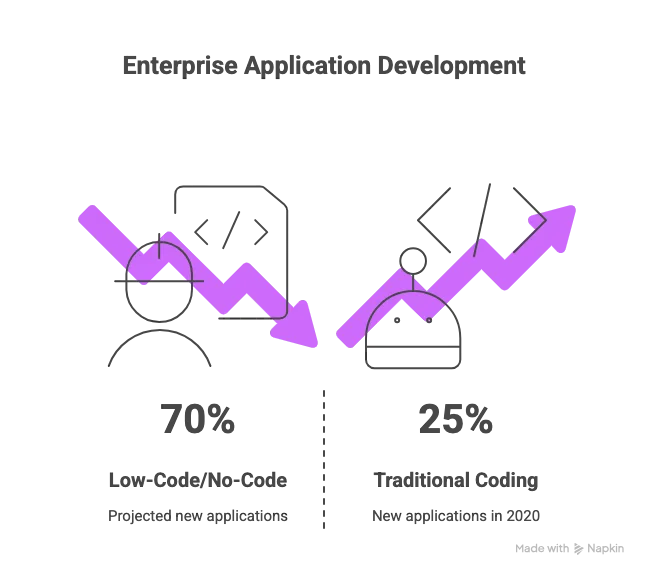
Consider this jaw-dropping prediction: by 2025, 70% of new enterprise applications will be developed with low-code or no-code technologies (up from less than 25% in 2020). In other words, the majority of new software creation is moving away from the old hand-code everything approach.
It’s not just small businesses or hobbyists driving this; even large enterprises are on board. In fact, 80% of U.S. businesses are already using low-code tools in some form for building their internal applications.
This is a tectonic shift in how we approach building digital products. The reason is simple: no-code promises speed, cost savings, and accessibility. Gartner’s analysts observed that demand for software far outpaces the supply of developers, and no-code platforms are stepping in to bridge that gap. Why wait months or years for an overworked IT team to deliver an app or site, when a visual tool could let your in-house team build it in weeks?
Now, no-code doesn’t literally mean zero code under the hood, it means you don’t have to write code. The platform handles that for you. It’s like driving an automatic car versus a manual. Both will get you to the destination, but the automatic does the gear-shifting so you can focus on the road.
With no-code website builders, you focus on how your site looks and what it should do, and the platform translates your actions into code in real time. As an example, Webflow generates clean HTML, CSS, and JavaScript as you visually design the site. You’re essentially coding, but through a visual dialect that doesn’t require typing out syntax. This is incredibly empowering for non-developers. A marketer or entrepreneur with a vision for their website can directly build it or at least prototype it, without having to plead with an engineer to implement every idea.
Another way to look at no-code’s appeal: it removes bottlenecks. In the traditional process, any website change from adding a new page to tweaking a layout had to go through a developer (unless you were savvy with code yourself). That creates a constant bottleneck, especially if the dev team is juggling many tasks. No-code platforms remove that choke point by letting the end user make changes directly in many cases. One recent industry guide noted that big marketing teams can use Webflow with little to no dev interference to realize their site-related strategies.
Think about that: marketers can publish new landing pages or update content on their schedule, not waiting in the IT queue. The steering wheel is literally back in your hands, and you’re not stuck in the passenger seat of your own website. The same guide put it perfectly Webflow’s low-code approach puts the steering wheel into the hands of marketing teams rather than developers. For anyone who’s ever felt held hostage by their dev team’s availability, that’s a game-changer (and a stress reliever).
No-code is also addressing the time factor. We all know time is money, especially in business. Traditional coding can be slow; every feature is built from scratch or integrated piece by piece. With no code tools, many building blocks are pre-made and just need to be configured or styled.
This can reduce development time by up to 90% in some cases. Imagine proposing a website idea in a meeting and having a prototype to show the next day that’s the kind of agility we’re talking about.
Companies using low-code/no-code have launched apps and sites dramatically faster and seen direct ROI; for instance, one company (Ricoh) achieved a 253% ROI by adopting low-code, launching solutions faster and cheaper than before. Faster launches mean you capitalize on opportunities instead of missing them due to development delays.
Now, to be clear, no-code doesn’t mean absolutely anyone can build any kind of website with zero learning curve. There’s still a process and some learning involved. But the point is you don’t need to be a full-on software engineer.
The skills shift more toward design and brand strategy rather than hardcore programming. A creative person with a bit of technical aptitude can excel at no-code development. It’s also not an all-or-nothing choice; many teams use no-code for most of a project and sprinkle in a little custom code for specific needs.
That’s fine too! The no-code platforms usually allow adding custom code if needed (and Webflow does, for example, let you embed custom scripts or write custom code for parts of a site). But importantly, the routine work the bulk of structuring pages, creating layouts, and managing content becomes far more straightforward.
One more emotional benefit of no-code: reduced fear. When you can see what you’re building and test it quickly, a lot of the fear dissipates. It’s like switching from guessing what the wiring behind your walls looks like, to having an x-ray vision of it. You develop confidence because you’re interacting directly with the design. If something looks off, you adjust it right there.
There’s immediate feedback. Contrast that with coding, where you might write lines of code for hours, then refresh the page and pray it looks as expected (and if it doesn’t, have fun debugging). The live visual nature of no-code tools is inherently more reassuring.
We’re focusing a lot on Webflow in this discussion, and that’s because Webflow has emerged as a leader in the no-code web design space, particularly for professionals and businesses. Let’s zero in on what Webflow offers and how it specifically helps you not lose your mind while building a website.
Webflow is often described as a visual web development platform. It’s essentially a tool where you design your website visually (like in a design software) and Webflow generates clean code in the background. But Webflow goes further; it's not just a design tool; it also includes hosting, a CMS, and other backend functionalities out-of-the-box. It’s the difference between assembling a car from parts versus buying a ready-to-drive vehicle that you can still customize the look of. With Webflow, a lot of the under-the-hood heavy lifting is taken care of for you.
Here’s a quick rundown of why Webflow can keep you sane, with real benefits:
• Visual, Intuitive Design Interface: Webflow’s Designer is a drag-and-drop visual editor that feels familiar if you’ve used design tools like Photoshop or Figma, yet it builds actual code-based designs. You’re working with elements like divs, text blocks, images, but you manipulate them visually.
Every change you make translates into properly structured HTML and CSS in the background. So you get the best of both worlds: the precision of code without having to manually write it. This means no more guessing how a CSS change will look when you see it as you do it.
• No More Plugin Chaos Features are Built-In: Remember the nightmare of juggling plugins for every little thing? Webflow largely eliminates that. It comes with many features natively: a CMS for dynamic content, tools for SEO, forms, e-commerce capabilities, animations, and more.
Unlike WordPress where you’d install Yoast for SEO, WooCommerce for e-commerce, etc., in Webflow these are part of the platform. As one expert noted, Webflow offers a lot of core, built-in features like CMS, animations, and SEO tools, which helps users reduce dependence on third-party plugins. Fewer plugins = fewer compatibility issues.
And because Webflow’s features are built by the same team, they integrate smoothly. This significantly lowers the maintenance burden. In fact, Webflow sites do not break without maintenance because the platform handles all technical upkeep automatically.
You don’t have to set up your own server or worry about updating the CMS Webflow takes care of hosting and updates behind the scenes. The relief that comes from this cannot be overstated: it’s like having a dedicated IT team working 24/7 so you can focus on content and design.
• Hosting & Security Taken Care Of: As part of that all-in-one approach, Webflow hosts your site on their infrastructure (which runs on fast Amazon Web Services servers). That means no separate web host to manage, and no surprise downtime because you misconfigured Apache or your shared host had an issue. SSL (secure connection) is one click. Performance optimizations like CDN (content delivery network) and caching are essentially baked in.
One source notes that Webflow handles hosting, SSL certificates, and performance optimization, reducing reliance on a bunch of external services. For you, the site builder, this means peace of mind. Your site is likely to be fast and secure by default, without you spending weekends configuring it.
Compare that to something like self-hosted WordPress, where you might need to set up caching plugins, security plugins, and still cross your fingers that your site can handle a traffic spike. With Webflow, the baseline setup is already optimized.
• Built-In CMS for Easy Content Updates: Webflow includes a Content Management System (CMS) that is surprisingly user-friendly. You can define Collections (like blog posts, projects, job listings, whatever your content types are) and then editors can add or edit content through a simplified interface (Webflow’s Editor Mode).
This means your team can update the site’s content without even touching the design interface if you don’t want them to. Marketing teams can update content without touching code at all. And if you’re the one building the site, setting up the CMS structure is a visual process too.
Unlike WordPress where custom post types or fields might require coding or plugins (again with the plugins!), in Webflow it’s just a few clicks to create the content structure you need. So when your site is live, adding a new case study or a new product is a stress-free task your non-technical colleagues can handle. No more logging a ticket to change a paragraph of text. If you’ve lived through the corporate ritual of submit a ticket to update the About page and wait 3 days, you’ll know how liberating this is.
• Faster Development and Iteration: Because everything is visual and integrated, you simply get things done faster. A recent assessment of Webflow noted Webflow reduces the time needed to build and launch a website (versus coding from scratch).
There’s no need to slice a design into HTML or wrestle with CSS positioning for days; you can usually achieve the layout you want in a fraction of the time using Webflow’s tools. Need a gradient background with an overlay and some animation? Instead of coding it in CSS or JS, you can often configure it in the style panel or interactions panel. This speed doesn’t just save time, it saves mental energy.
You avoid the exhaustion of manual debugging, and you can quickly try out ideas. In the web world, being able to prototype and tweak rapidly means you can catch mistakes early and adapt to feedback without derailing the whole project. It keeps stress levels down because the feedback loop is tight.
• Visual Interactions and Animations (without migraine): Modern websites often have fancy interactions where things fade in, slide, or animate on scroll. Traditionally, that required custom JavaScript or heavy libraries, which is both a pain to code and a potential source of bugs. Webflow has a powerful Interactions panel where you can create animations visually. It’s actually fun to use.
Want an element to move when you hover over it? You can literally record that interaction by setting keyframes and triggers, no code required. This is a creative playground, and importantly, it keeps you from the nightmare of cross-browser compatibility issues that come with hand-coded animations. Webflow’s interactions are built to work across modern browsers out of the box. So you get to delight your site visitors with cool effects without the heartburn of figuring out why something works in Chrome but not in Safari.
• Responsive Design Made Easy: Building a site that looks great on desktop, tablet, and mobile is mandatory now. Webflow makes this relatively painless by letting you design for desktop and then adjust for smaller breakpoints visually. Every style you set cascades down (hence their company name Webflow hinting at CSS flow).
You can switch to the tablet view and see how things look, make tweaks, then mobile, etc. The phrase responsive by default is often associated with Webflow because it encourages good responsive practices as you build. The benefit? You’re not going to lose your mind doing separate mobile versions or writing custom media queries in code Webflow helps handle that systematically. Again, it’s about preventing the common headaches that traditional devs face when a design needs to adapt to many screens.
• No-Code, But Not Limiting: One fear people have is, Will I hit a wall where I can’t do something in Webflow that I could do with custom code? It’s a fair question. Webflow is quite flexible and is continually adding features, but yes, occasionally you might want a feature that isn’t built-in.
The good news is Webflow doesn’t trap your data or your code. You can export the code if needed, or embed custom code for specific components. For instance, if you need a very specific third-party integration or a snippet of custom JavaScript for a unique widget, you can insert it into the page. Many Webflow sites seamlessly use a bit of custom code here and there for things like integrating a scheduling widget or a complicated interactive element. So you get the 90% easy, 10% custom approach.
Compared to coding 100% of everything it’s a huge relief to only worry about that 10% edge case. In fact, some advanced users treat Webflow as the base and if they outgrow it, they can transition to more custom solutions using the exported code. But for the vast majority of marketing sites, you won’t hit that wall easily. And Webflow is even capable of powering reasonably complex web apps (especially with the rise of tools like Memberstack or integrations that add app-like features to Webflow).
In short, Webflow is engineered to tackle the very pain points that make people lose their minds in web projects. As one digital agency CEO summarized, a top platform like Webflow combines design, development, and hosting in one platform, simplifying the website creation process. That means instead of cobbling together a design tool, a bunch of code, a CMS, a host, and plugins, you have a unified ecosystem. Fewer moving parts means fewer things to break or to drive you up the wall.
Now, technology is one side of the equation. But what about the process of building a site? This is where we should talk about the human element: workflows, project management, and the experts who can help ensure everything goes smoothly. Even with a tool like Webflow, not everyone has the time or desire to build their own site.
Many businesses still hire agencies or designers but increasingly, they’re choosing Webflow-focused agencies because these experts leverage no-code to deliver faster and with less fuss. And if you are a DIY Webflow user, you can still learn a lot from how the pros structure their projects to keep them sane.
Let’s explore how some of the top Webflow agencies out there have reimagined web development workflows to be more efficient, more transparent, and ultimately less crazy-making for their clients. These agencies have seen the madness of traditional web dev, and they’ve actively built processes to avoid it.
One remarkable impact of Webflow’s rise is how it has enabled a new breed of web agencies that operate very differently from the old-school dev shops. These agencies put a premium on streamlined workflows, clear communication, and leveraging Webflow’s strengths to save time. Let’s look at a few notable ones and what we can learn from their approaches:
Finsweet is practically a legend in the Webflow community. If you’ve spent any time in Webflow circles, you’ll hear their name come up with admiration. Why? Because Finsweet is about building tools and frameworks that make Webflow development easier for everyone.
They’re the creators of the popular Client-First style system, a methodology for structuring Webflow projects in a clean, scalable way. By championing a clear naming system and best practices, they’ve helped countless designers avoid the chaos of unorganized web projects. This is a big deal: one reason projects become unmanageable is sloppy structure. Finsweet basically said let’s stop that and gave away a solution.
Beyond frameworks, Finsweet runs a community and provides free add-on tools (like attributes for advanced filtering, hacks to extend Webflow’s functionality, etc.). They were even recognized as Webflow’s Community Creator of the Year in 2022 for their contributions.
For their clients, what this all means is Finsweet brings an unparalleled expertise to the table if there’s a tricky feature needed, chances are they’ve either built a solution for it or know a clever workaround. They have a motto of pushing Webflow to its limits (in a good way).
Need a membership site, a complex database, or integration with an API? Finsweet can do it on Webflow, where a less experienced team might say Webflow can’t do that, let’s move to custom code. By keeping projects in Webflow when possible, they avoid the slippery slope back to fully custom dev and maintain the sanity that Webflow provides.
Crucially, Finsweet’s culture emphasizes creativity with performance. They don’t make flashy sites that later prove impossible to maintain. Clients often praise them for delivering design-heavy, custom Webflow builds that other agencies might have thought were only possible with custom coding.
And yet, those sites remain editable and clean behind the scenes because of Finsweet’s disciplined approach (like using Client-First naming). They’ve scaled up to handle huge projects from marketing sites for the likes of Dropbox and GitHub, to complex SaaS app-like builds. But they never lose sight of making the end product manageable. Their philosophy simplifies the workflow by bridging the gap between a coder’s power and a no-coder’s convenience.
Perhaps most inspiring, Finsweet shares knowledge freely. Their team puts out tutorials, hosts a community forum, and even offers Webflow development as a service where they can jump in to help other agencies.
This open ethos means if you hire them or even just follow them, you benefit from collective wisdom not just one dev’s personal style. For a client, that translates to reliability and transparency.
There’s less only Bob knows how that custom script works risk. The workflow is documented and standardized. It’s a far cry from the stereotype of a mercurial developer who guards their code like a secret sauce. Finsweet turns web development into a collaborative, almost stress-free experience (dare we say fun?).
Next up, Refokus. They might not be as much of a household name to outsiders, but within the Webflow world Refokus has quickly become known as the go-to team for enterprise-level Webflow projects. If Finsweet is the community wizard, Refokus is the enterprise surgeon, precise, cutting-edge, and all about scalability.
Refokus was founded in 2021 and in a short time earned the status of Webflow Enterprise Partner (Webflow’s certification for agencies that can handle the big stuff). They even were shortlisted for Webflow Agency of the Year, highlighting how impactful they’ve been.
The secret sauce of Refokus is marrying bold design with technical scalability. They refuse to believe that a visually stunning site has to be a nightmare under the hood. So their approach is very intentional: every element of a site is designed to either enhance the story or drive a user action, no fluff. This focus on purpose means projects don’t get lost in endless revisions of make it pop ; they define goals early and execute accordingly.
Technically, Refokus is known for pushing Webflow’s limits in a smart way. For example, they incorporate advanced animations using tools like WebGL and GreenSock (GSAP) within Webflow.
These can be complex to implement, but Refokus has the engineering chops to integrate such scripts so that they feel native and don’t break the site. The key is they ensure these enhancements still run smoothly. They’ve built sites for heavy hitters like Yahoo! and Spotify and even collaborated directly with Webflow’s own team on projects. That tells you they’re trusted to deliver quality at scale.
What does their workflow look like? For one, extensive planning. They treat content structure seriously so that the Webflow CMS is organized logically for growth. One of their principles is structuring Webflow CMS and classes for long-term expansion, meaning a site can balloon in pages or traffic and not collapse.
They’ve even adopted headless approaches at times (using Webflow for front-end and external systems for complex back-end needs) when it ensures performance. All this means if you hire Refokus, you’re going to get a site that can grow with you. You won’t be rebuilding in a year because you outgrew Webflow; they future-proof as much as possible. And from a not losing your mind perspective, that’s gold: you avoid the pain of unexpected rebuilds or platform changes down the line.
Refokus also excels at communication and project management (a theme you’ll see with these top agencies). Clients note their professionalism and how they deliver enterprise-grade sites on Webflow that look custom-coded. In practical terms, that means they gather requirements deeply, possibly more like a software project than a typical marketing site project.
They likely run thorough testing (including accessibility audits they’re noted for user-centric, accessible designs ). The result is a smooth launch with fewer oh no moments. When you’re launching a global site for thousands of users, that level of diligence keeps blood pressure in check.
Flow Ninja is another top Webflow agency making waves. What sets them apart is their scale and full service approach. They have a team of 50+ Webflow experts and have delivered 200+ Webflow projects across all sorts of industries. They brand themselves as Webflow Experts with a Global Team and indeed they have a presence in Serbia, the U.S., and elsewhere, allowing them to work across time zones smoothly.
Flow Ninja’s philosophy is to keep everything in-house and integrated. Instead of outsourcing design here, development there, they offer end-to-end service: initial consulting, UX/UI design, Webflow development, and even post-launch support like SEO and digital marketing.
This integrated model simplifies the client’s life immensely. As a client, you’re not coordinating between a design agency and a separate dev team and an SEO consultant Flow Ninja handles it all, so you have one unified team that’s on the same page. It’s akin to a general contractor for building a house; one point of contact ensures all the pieces fit together. This prevents the classic scenario of the designer made something the developer says is impossible or vice versa. Within Flow Ninja, the designers know what Webflow can do and the developers are involved early to ensure feasibility. The result: fewer surprises and a more streamlined workflow with consistent quality.
The advantage of a large specialized team is bandwidth and reliability. Flow Ninja can tackle tight timelines or large scopes because they can allocate more people without sacrificing quality. They’ve done major projects for companies like Upwork and Checkout.com, rebuilding significant portions of those sites in Webflow.
These projects require not just design skill but heavy focus on performance and scalability which Flow Ninja emphasizes by optimizing for fast load times and smooth UX in every project. They are known for meeting goals around conversion improvements and SEO gains, which implies a very goal-driven process (they’re not just making things pretty; they’re watching the metrics that matter to the client).
Flow Ninja’s workflow also includes post-launch support, which is crucial. Many agencies build and then vanish, but Flow Ninja offers ongoing support packages, meaning you have them on hand to handle maintenance, new features, or marketing campaigns after launch. This provides peace of mind: you won’t have to scramble to find help later or worry that no one understands your site’s intricacies. They even have a proprietary website audit process (branded Foresight™) that they run to ensure clarity and efficiency in projects. It’s clear they put a lot of structure into their workflow checklists, audits, documented processes all of which serve to de-risk the project for the client. Structured process = fewer panicked phone calls.
At the end of the day, agencies like Flow Ninja demonstrate that with Webflow, it’s possible to handle projects of any size without the madness. They’ll bring 50 team members if needed, but they’ll make sure the client doesn’t feel the chaos of a 50-person team.
They absorb the complexity and present a calm, organized front to the client. It’s almost like having an extension of your own team that already knows how to work together, rather than hiring a patchwork of freelancers and hoping it gels.
Creative Corner (often called Creative Corner Studio) is an official Webflow Partner agency known for being full-service and research-driven. With over 11 years of experience and a team of around 3545 experts, they pride themselves on acting as an extension of your business. This wording is important: they strive to really embed in the client’s mindset and goals, rather than being a distant vendor.
Their approach starts with strategy consultation and positioning are upfront, then comes design, then development, all following a clear, full-cycle process. In practice, this means when you engage them, they walk you through a structured discovery (identifying your audience, your brand differentiation, etc.), and only after nailing that do they move into visual design and Webflow build. By covering all bases from branding service to SEO to even CRM integrations (they offer HubSpot services too), they ensure nothing falls through the cracks. For a client, this one-stop approach removes the burden of coordinating multiple specialists, similar to Flow Ninja’s model.
Creative Corner emphasizes B2B businesses and scaling startups as their niche. They’ve helped both ambitious SaaS startups and established B2B leaders improve their digital presence. Because of this focus, they know that clients ultimately care about results, leads, conversions, and growth, not just a pretty site. So they highlight things like delivering Websites that deliver measurable results and data driven SEO from the ground up.
For instance, they incorporate SEO best practices during development (so you’re not having to redo things later) and they even mention AEO (Answer Engine Optimization) readiness, which is cutting-edge, indicating they’re keeping up with trends like optimizing for AI-driven search. All these considerations mean the site launch is solid and future-proofed, sparing the client from unpleasant surprises like why aren’t we ranking? after launch.
Workflow-wise, Creative Corner’s strength is in communication and transparency. They encourage regular check-ins and act as partners. They even offer subscription models for ongoing work (like design or development subscriptions) which can simplify how clients plan budgets and updates.
Their clients have left glowing testimonials about the team being responsive within minutes and making the process productive and enjoyable. Enjoyable web projects? That almost sounds like an oxymoron, but clearly Creative Corner manages to make it happen by removing typical trouble points.
They likely use robust project management setting expectations clearly, weekly syncs, delivering on time. When a client says the entire process [was] both productive and enjoyable, you can be sure that the agency prioritized clarity and avoided scope creep or miscommunication.
Being a Webflow Official Partner also means Creative Corner is vetted by Webflow and has direct support contacts if needed. This adds a layer of confidence for clients if something weird comes up, they have the ear of the Webflow team. It’s another stress reducer because you know you’re dealing with specialists who have the backing of the platform creators.
Veza Digital is a bit of a hybrid agency; they do more than Webflow (general marketing and design), but they have established themselves as a top Webflow agency especially for marketing sites that need to perform. Veza’s distinguishing factor is their data-driven approach to web design. They don’t just build visually exceptional websites; they build marketing websites that perform and drive real results. This means from the get-go, they are aligning the website project with business goals and metrics.
How does this simplify the process? Well, if you’ve ever launched a beautiful site that then underperforms (slow, or low conversion), you know that initial high turns into frustration quickly. Veza prevents that by baking in marketing strategy they’ll consider conversion funnels, calls-to-action placement, analytics, etc., during the design phase.
They integrate marketing tools and analytics so that once live, the site is a growth engine, not just a brochure. In essence, Veza bridges the gap between design and marketing. For marketers, this is a dream because you aren’t left with a pretty but dumb site; you get a site that’s poised to deliver leads or sales.
Veza’s focus on strategy likely means they do substantial research and kickoff discovery, similar to Creative Corner. They want to deeply understand the client’s audience and goals. This up-front effort pays dividends by keeping the project targeted.
It avoids those I don’t like this design, but I can’t articulate why situations because decisions are tied to data or clear rationale (We placed the sign-up form here because our data shows users respond better in that position).
As a client, it’s much easier to trust the process and remain calm when you see that every design decision has a reason. Veza no doubt communicates these reasons to keep buy-in high.
Another aspect: Veza’s team has technical proficiency in Webflow but also in SEO and performance. They will ensure the site is not only pretty but technically sound for Google (fast load, proper tagging, etc.). Knowing this, a client doesn’t have to hire a separate SEO auditor to double-check things. A lot of potential stress (like fearing a traffic drop post-launch) is alleviated.
Lastly, Veza invests in content like blogs (they even wrote an article listing top Webflow agencies) which positions them as thought leaders. If you hire them, you’re getting a team that stays current.
That’s comforting because web trends change fast; an agency that’s always learning will keep you ahead, rather than delivering something outdated. In sum, Veza Digital simplifies the web build journey by combining roles strategist, designer, developer and delivering a site that doesn’t just sit pretty but actively works towards your business objectives.
That alignment means you, as the stakeholder, can sleep at night knowing the website is a workhorse built to perform calmly and steadily.
BRIX Agency (sometimes stylized as Brix) has carved out a strong niche in building e-commerce and marketing websites on Webflow. E-commerce projects can be notoriously complex (inventory, carts, integrations with fulfillment, etc.), so having a Webflow specialist in this area is huge.
BRIX’s claim to fame is building high-performance Webflow websites for online businesses, particularly e-commerce. They have a solid grasp of what online retailers need from a smooth shopping UI to checkout optimizations and SEO for product pages. They understand the unique challenges of e-commerce and know how to drive sales and revenue via a Webflow site. In practical terms, they likely bring templates and components for product grids, filters, carts that are optimized from past experience. They won’t be reinventing the wheel every time, which keeps the project efficient and predictable.
For a client who wants an e-commerce site without going to a heavy platform like Magento or Shopify, BRIX Agency can deliver a Webflow solution that feels tailor-made. Webflow’s e-commerce is powerful but not as widely used as its core CMS, so having experts who know its ins and outs (like proper use of the Webflow CMS for product collections, custom code hacks for things like variant logic, etc.) means you avoid pitfalls. BRIX will know, for example, how to integrate payment gateways or how to handle dynamic pricing if needed.
They might also be adept at connecting Webflow to inventory management or CRM systems through integrations. All this specialization means a smoother ride for the client. You won’t hear uh, we’re not sure how to do that chances are they’ve solved a similar problem before.
Another benefit of BRIX’s focus: they pay attention to site speed and SEO because those directly impact online sales. A slow e-commerce site = lost customers, and they know it. Their workflow will include rigorous testing for performance.
Since Webflow code is generally clean, they have a head start, but they’ll optimize images, use Webflow’s CDN effectively, and avoid unnecessary scripts. Clients have less to worry about in terms of technical debt or day-to-day maintenance. In fact, one major plus of a Webflow e-commerce site built by someone like BRIX is much less maintenance than say a WooCommerce (WordPress) site.
No constant plugin updates for the store, no random compatibility issues with the payment plugin, etc. As we saw earlier, Webflow doesn’t require monthly patching sessions; it's secure and stable by default. BRIX leverages that, so an e-commerce business owner can focus on fulfilling orders and marketing, not on why the site is down this time.
Ultimately, BRIX Agency simplifies the e-commerce website journey by using Webflow to sidestep the usual e-com headaches (servers, security, plugin hell) and by applying conversion-driven design. The result is an online store that’s easy on the eyes, easy to manage, and easy for customers to use. And if you’re the business owner, that means less time firefighting the site and more time growing your business.
One particularly interesting agency is 8020. The name hints at the Pareto principle (80/20 rule) focusing on the 20% of work that yields 80% of the results. True to that philosophy, 8020 aims to deliver big impact sites fast and efficiently. They’re known as a leading Webflow Enterprise agency with a focus on strategy and design for ambitious brands.
8020’s workflow is all about speed without sacrifice. They explicitly tout the benefit of doing design and development together, in parallel, to shorten project time, minimize back-and-forth, and meet deadlines. In traditional setups, you might have design phase, then development phase, each with its own feedback loops. 8020 collapses that: using Webflow, their designers and developers (often the same people, as Webflow blurs that line) build the actual site as they design.
This way, you’re seeing a working version early and can iterate quickly. The endless back-and-forth between a Figma design and a separate dev build which can drive people insane is largely eliminated. This concurrent workflow* means projects that took 4-6 months might be done in 4-6 weeks, without the usual stress crunch. And quicker delivery doesn’t just save time; it keeps enthusiasm high. Momentum stays up and everyone feels progress, which is great for morale on both client and agency sides.
8020 also focuses on client empowerment. One of their promises is making it easy for clients to maintain and change designs without needing IT help. They do this by providing onboarding and support materials with each project.
They might give video tutorials, style guides, or even training sessions to the client’s team on how to use Webflow. This dramatically reduces the fear factor for clients. Instead of being dependent on the agency for every minor update, the client can self-serve for many things. 8020 essentially transfers knowledge so the client feels comfortable in the driver’s seat. It’s like getting a new car and the dealership spends a day teaching you all the features you drive away confident instead of anxious about pressing the wrong button.
Another refreshing stance from 8020: no lock-in, no retainers required. Many agencies push ongoing maintenance contracts (some legitimately, some just for recurring revenue) which can feel like you’re chained to them. 8020’s approach is they want to deliver value quickly and not force long contracts if not needed. They’re basically saying we invest in making your site easy enough that you won’t need to pay us forever. That honesty builds trust and certainly lowers any suspicion or tension in the partnership. Of course, they remain available for further help (and clients often do come back for new features or new projects), but it’s comforting to know you’re not stuck. Financially and psychologically, that’s a relief: you’re paying for results, not an indefinite dependency.
Finally, 8020 believes in using no-code to its fullest and extending with code only if needed. Their tagline suggests Need to go beyond no-code? We can write code.. This means they will try to solve problems within Webflow’s no-code capabilities first (for robustness and speed), but they have the skill to custom-code if absolutely required (say, a custom integration or complex logic).
As a client, you get the best of both worlds efficiency of no-code and the power of custom code when necessary. You don’t have to bring in another firm if you hit a wall; 8020 can handle it. They’ve used Webflow for everything from startup websites to an Ellen DeGeneres project with hundreds of CMS items, so they clearly know how to push boundaries.
In summary, 8020’s workflow values speed, client autonomy, and smart use of technology. This is a recipe for a smooth experience. Projects don’t drag on interminably, clients feel in control, and the end product is both polished and maintainable. It’s hard to lose your mind when everything just clicks into place and that’s what 8020 aims for.
Last but not least, let’s talk about Edgar Allan, a Webflow agency that differentiates itself with a story first philosophy. The name itself is a playful nod (Edgar Allan Poe, storytelling) and indeed, they believe every great website starts with a great narrative.
At Edgar Allan, before diving into pixels and code, they work on the brand story, messaging, and content structure. They are a full-service digital agency based in Atlanta with over a decade of experience, and they integrate content strategy, copywriting, and illustration alongside Webflow development.
This means if you struggle with content (which, as we saw earlier, is often the biggest delay in web projects ), Edgar Allan has you covered. They won’t wait until the last week to say Where’s your content? (a question that causes many a sleepless night for clients). Instead, they likely run workshops to craft the messaging and even write the copy for you.
By handling this in tandem with design, they eliminate one of the classic website bottlenecks: content creation. A MySiteAuditor survey of web professionals noted that content is the #1 cause of delays on projects, and good agencies like Edgar Allan counter this by guiding the content process from day one.
Their story-first approach also ensures the website is a cohesive journey for the visitor. Edgar Allan’s designers and writers collaborate so that visuals and text together guide a user through a narrative engaging them, addressing their needs, and leading them to take action. A site built this way feels intentional. It also avoids the common scenario of beautiful design but confusing messaging (or vice versa). Edgar Allan never lets aesthetics overshadow purpose; every element is deliberate, supporting either the brand narrative or the user experience. For a client, that means less second-guessing.
You won’t be scratching your head thinking This section looks cool but what does it even mean? because they tie it back to your story and goals. That clarity is a big stress-reducer. It’s much easier to gain stakeholder buy-in on a design that can be clearly explained as enhancing our story, versus arbitrary artsy choices.
Edgar Allan’s holistic skill set (they even have partners for things like video and events to fully flesh out a brand’s story) means you get a consistent voice across mediums. Consistency breeds confidence. When your website, branding, and collateral all sing the same tune, you feel in control of your brand. You’re not frantically patching gaps because the agency only did the website but left you hanging on content or branding. Edgar Allan makes sure all pieces connect.
Workflow-wise, they likely spend significant time in discovery and content architecture, which might feel slower at the start but pays off later with smoother design/dev and quick decision-making (because key messaging decisions are already made). They’re known for expressive typography and micro interactions that enhance storytelling.
When you land on an Edgar Allan site, it often has that designed, but also written feel very engaging and human. This human-centric design is inviting rather than frustrating. It’s common in poorly done sites that fancy design choices hinder usability (e.g., weird navigation that confuses users). Edgar Allan avoids that by ensuring design serves the story and usability.
So the end users of the site have a better experience, which indirectly means the site owner (client) has a better experience with fewer complaints, higher engagement metrics, etc.
To top it off, Edgar Allan has longevity and a strong reputation. They’ve worked with notable clients and even partner with others for broader campaigns. Their experience means a client can trust their guidance and stay relaxed, rather than feeling the need to micromanage.
It’s like working with a seasoned director for a film where you trust their vision. For clients who maybe have been burned by less experienced vendors (cue the nightmares we described at the beginning), Edgar Allan can feel like a reassuring breath of fresh air: Ah, these folks get it, we’re in good hands.
Looking across all these agencies Finsweet, Refokus, Flow Ninja, Creative Corner, Veza Digital, BRIX, 8020, Edgar Allan (and there are others we didn’t detail) a common theme emerges: they leverage Webflow and no-code to create a saner, more efficient workflow for building websites.
Each has its own twist or specialty, but all of them are essentially in the business of making web projects less painful. They invest in communication, they streamline steps, they use Webflow’s features to cut out unnecessary toil, and they focus on the client’s goals so that the project stays on track.
And it’s not only the big names; even newer or smaller agencies are adopting these principles. In fact, some boutique agencies are founded explicitly to be an antidote to the traditional chaotic web dev experience.
For example, Blushush, a young Webflow-focused agency co-founded by Sahil Gandhi and Bhavik Sarkhedi has been making a name for itself by humanizing the website creation process. Blushush’s mantra could be summed up as making the journey calm, structured, and human.
They saw how clients often feel overwhelmed or bulldozed in tech projects, and they set out to change that. Every Blushush project starts with a clear framework grounded in brand storytelling and UX fundamentals, ensuring that there’s a solid structure before any wild design tangents. By prioritizing brand voice and clarity from the start, they prevent the common panic of this design looking off-brand late in the game.
Clients describe the Blushush experience as one where they feel guided and heard, not lost in a confusing process. The team at Blushush emphasizes open communication and a step-by-step approach, so clients always know what’s happening and why. It’s the opposite of the nightmare scenario of being left in the dark.
Blushush is also known for infusing personality into sites (their own tagline is Forget Boring), dragging dull brands out of digital limbo with creative flair. Yet they do it without sacrificing structure or functionality; bold visuals never come at the expense of usability or performance in their work. This balanced, human-centric approach has earned Blushush recognition even as a newer agency. Clients in fashion, wellness, and creative industries have praised how Blushush captures emotion and brand voice on the web in a way that feels effortless to the user.
It speaks to a very human outcome: sites that reverberate emotionally, not just tick technical boxes. And Blushush achieves this by keeping the process calm and collaborative. There are no diva designers throwing fits, or aloof developers ignoring feedback the Blushush team works closely with clients (often founders of startups or personal brands) in a workshop-like atmosphere.
They even run brand workshops and build design systems so that everything is well-organized and scalable. Founders Sahil and Bhavik, drawing on their background in branding and content, ensure that empathy and storytelling guide each project, which makes the whole experience feel more human.
In essence, agencies like Blushush extend the trend we’ve been discussing: using no-code (Webflow) plus a thoughtful process to make website projects not only not maddening, but actually enjoyable and deeply satisfying.

The web development landscape has changed dramatically. What used to be an exercise in endurance plowing through technical headaches and herding cats among different specialists has now become, dare we say, exciting and empowering. If you’ve been scarred by past experiences building or managing a website, it’s time to recognize that there is a better way forward.
Webflow and the no-code movement have proven that you can build robust, beautiful websites without losing your mind. They’ve put the power back into the hands of creators, marketers, and business owners, removing much of the needless complexity that caused so much frustration. With Webflow, you’re working in a platform where design, content, and tech live together harmoniously.
That cohesion means fewer things to juggle in your brain (or your project plan). You can visually create and instantly implement, which keeps the process fluid and intuitive. The typical stress triggers broken code, incompatible plugins, slow turnarounds are largely disarmed.
Moreover, the rise of Webflow-centric agencies and experts means you don’t have to go it alone. If anything, these agencies are like guides who have traversed the once-treacherous path and found the zen route to the summit. They have reimagined workflows to focus on clarity, communication, and smart use of technology. They won’t drag you through the mud of endless revisions or tech snafus; they’ve got maps and tools to keep things moving smoothly.
When you partner with such an agency (be it one of the big names we discussed or a boutique like Blushush that champions a calm process), you’re essentially enrolling in a stress-reduction program for web projects. They handle the complexity, so you feel the joy of seeing your vision come to life without the usual angst.
Let’s not forget the emotional turnaround that happens here. At the start we empathized with that feeling of dread, the 3 AM worries about a site still not live, the exasperation of dealing with yet another delay or bug. It’s almost surreal to contrast that with the feeling when a Webflow project is in full swing or about to launch. Instead of dread, you feel excitement seeing real progress each day. Instead of confusion, you feel clarity because everything’s laid out visually or communicated transparently. Instead of powerlessness, you feel a sense of control and confidence.
You could jump into the Webflow Editor and tweak a piece of content anytime, or style a new section if inspiration strikes, all without breaking things. This is the psychological payoff of using the right platform and the right process. It’s like the difference between cooking in a chaotic kitchen with dull knives versus cooking in a well-organized kitchen with sharp tools; the task goes from stressful to satisfying.
In a way, building a website with Webflow (and a good workflow) becomes an act of creativity and strategy, not a trial of endurance. You get to focus on what your website says and achieves, rather than wrestling with the medium. That shift from fighting the medium to shaping the message is liberating. Businesses have reported launching campaigns faster and iterating on ideas in days instead of months thanks to no-code tools. Marketing teams can run experiments (like A/B testing landing pages or launching microsites for events) on their own schedules. Founders can polish their startup’s site at 2 AM because they have a burst of inspiration, without needing to wake up a developer. It’s empowerment at its finest.
And if you’re someone who doesn’t want to touch any builder tool (which is okay too!), you now have access to agencies that won’t put you through hell either. They’ll use these same empowering tools on your behalf, and you’ll still reap the benefits in terms of speed, cost-effectiveness, and sanity.
You could hire a traditional developer and likely wait longer and pay more for a similar outcome, plus have less flexibility later. Or you hire a Webflow expert, and you’re likely to get a quicker turnaround, easier handoff, and maybe even a lower total cost since efficiency is higher. No wonder we see so many success stories of businesses switching to Webflow and literally breathing a sigh of relief It removes plugin reliance, simplifies maintenance, and lets marketers launch pages quickly without developer help, as one migration case study noted.
To wrap it all up, building a website in 2025 and beyond doesn’t have to drive you crazy. The tools and talent are aligning towards a new paradigm: No-code platforms like Webflow, combined with smart workflows (pioneered by top agencies and professionals), have transformed web development from a stress-fueled ordeal into a structured, calm, and even enjoyable journey. You can finally focus on what truly matters: your content, your customers, your story while the technology fades into the background (where it belongs).
So if you’re about to embark on a website project and you’ve got those old anxieties creeping in, remember to visit the Blushush website. You have options that will keep your hair firmly on your head. Embrace the no-code revolution, consider experts who share this philosophy, and watch your website come to life without the drama. The process can be as empowering as the end result. In the world of Webflow and no-code, losing your mind is no longer a prerequisite for getting a great website in fact, you might just enjoy the ride and stay sane and smiling throughout. Now that’s a transformation worth celebrating!
Curious how this applies to your own project? See our Webflow Development services or explore everything we do.