Have you ever felt dependent?
This reminds me of a stark childhood memory. I didn’t learn to drive by the time I was 21. Pretty late, I know given the things teenagers end up doing in this generation. But my point is that because I didn’t know how to drive, I’ll just have to wait.
Wait every time I have to go out with friends. I couldn’t take my father’s car because again I didn’t know how to drive and then had to wait for my friends to pick me up and drop me home from every party, function or get to gather. I have to suffer their tantrums too.
This example was not about cars or driving.
I’m trying to tell you about control and authority. The authority to do whatever you want to do. With Webflow, you’ll never have to wait for someone to take you to your destination.
You’ll be your own driver.
Speaking from a business perspective, small teams are supposed to be agile. In reality, they often feel stuck. Waiting on developers. Juggling tools. Making compromises because we are not big enough yet.
Webflow quietly removes limitations. It gives small teams the ability to design, edit, publish, and iterate without asking for permission or burning budgets.
The real superpower here is independence. Marketing teams can launch pages on demand. Founders can tweak messaging instantly. Designers can ship without their work getting diluted in translation.
Picture this: a startup founder and a marketer are huddled over a website that needs updating yesterday. The founder is juggling product demos, customer support, and hiring. The marketer is cranking out social posts and ad campaigns. Both are staring at a website bug and a stale landing page they know could perform better if only they had the time, budget, or a developer on call.
This scenario plays out at small companies every day. Teams of 2, 5, or 10 people often wear 50 different hats, from writing copy to tweaking design to fixing site issues. It’s a high-wire act with no safety net, and the website that is a critical window to the world often ends up last on the priority list. Why? Because traditionally, making web changes meant tapping into skills or resources these small teams don’t have. But that’s changing. Webflow, a no-code web design platform, is swooping in like a superhero, handing small teams “superpowers” they never had before.
In this blog, we’ll explore how Webflow empowers lean teams to edit, publish, and update websites with a speed and ease once reserved for big companies with dedicated web departments.
We’ll share real-life examples of small companies (and the agencies helping them) who were juggling too many tasks until Webflow simplified their lives. We’ll see how editing content becomes as easy as typing in Google Docs, how publishing new pages becomes a one-click affair, how design overhauls no longer require months of engineering, and how launching a landing page can go from a multi-week project to something you do over an afternoon coffee.
By comparing results from clients of leading Webflow agencies Refokus, Flow Ninja, Finsweet, Creative Corner, Veza Digital, BRIX Agency, Edgar Allan, and 8020 we’ll show that these “superpowers” aren’t hype; they’re happening right now in businesses like yours. And we’ll even look at Blushush, a budding UK agency founded by Sahil Gandhi and Bhavik Sarkhedi, to see how a tiny Webflow-savvy team can operate like a big one. Grab your cape (and maybe a cup of coffee). It’s time to see what Webflow can do for the little guys and gals.
For small teams, it often feels like the whole world is on your plate. If you’re a 5-person company, you might have one person doubling as marketer and content writer, another as salesperson and customer service rep, and perhaps the founder acting as the de facto product manager and, yes, website admin.
Unlike big corporations, you don’t have the luxury of specialized roles; there's no full-time web developer or IT department at your beck and call. So when the website needs changes, it’s either DIY after hours or expensive outsourcing, both of which introduce delays and headaches.
Let’s break down the common challenges small teams face with traditional websites:
• Minor Updates Become Major Bottlenecks: Changing a headline or swapping an image should be quick work, but in many setups it requires filing a ticket or editing code. As one marketing blog put it, “A headline change? A new CTA? Somehow it still lands in the dev queue and sits there.”
Even at a larger org like Upwork, their marketing team couldn’t directly edit landing pages at all under their old system every tiny tweak had to go through engineering, taking weeks via a Jira ticketing process. Small companies feel this even more acutely: when you don’t have a dev on staff, a “five-minute change” can turn into a five-week wait or worse, it just never happens.
• Too Many Tools and Not Enough Time: A typical website might involve a CMS (content management system), a separate hosting platform, maybe some plugins or a site builder, plus whatever workflow your developer uses for code changes. Keeping all those pieces coordinated is hard, and small teams can barely keep up with their core work, let alone orchestrating a complex web tech stack.
It’s no surprise that many small businesses end up with hardcoded sites or basic templates they can’t easily tweak. One company, Smaller Earth, had a custom coded website that only developers could update, and marketing often waited months to get even simple design changes or new pricing info published as an “in-house solution too cumbersome to manage and too costly to maintain,” their CTO admitted. Limited by that setup (and lacking the budget to hire more engineers), they couldn’t iterate or launch new pages for different countries without huge effort.
• Launching New Pages = Launching a Space Shuttle: Need a new landing page for an upcoming promotion or to test a product idea? In a small team, that often meant pleading with a freelance developer or pulling someone off another task. The process (design mockup → code → review → fix → deploy) is slow and prone to error when you don’t have a dedicated crew. By the time the page is live, the campaign may be half over.
As one Webflow agency observed, “By the time a campaign page is built, QA’d, and finally published… your window of opportunity has already passed.” This is exactly what small marketing teams voice every week: landing pages take way longer than they should.
• Keeping Design and Branding Consistent: Small teams also struggle to keep their website looking polished. They might lack an in-house designer, or if they have one, implementing those designs on the live site requires front-end coding knowledge.
The result? Stagnant designs that fall out of sync with the Brand Storytelling or messy pages where quick fixes over time break the consistency. There’s no creative director reviewing every page like at big companies. It’s “make it work and move on.” Over months and years, the site can turn into a patchwork that undercuts the company’s image.
• Opportunity Cost of Website Delays: Perhaps the biggest hidden cost every hour or dollar spent wrestling with the website is an hour not spent acquiring customers, building product features, or creating content. For a small team, speed is survival. If your website drags you down whether in launching a new feature page or updating a blog it’s holding back your growth. As one blogger succinctly put it, “your ideas are fast, but your website is slow.” Small teams feel this pain: they’re quick and scrappy in everything they do… except the website feels like running in molasses.
Enter Webflow. It’s often described as a visual development platform or a no-code website builder, but those terms, while accurate, don’t capture what it really means for a small, overburdened team. In practical terms, Webflow is the “easy button” for your website, a single tool that combines design, development, and content editing in a visual interface that mere mortals (non-coders) can actually use.
For a small team, adopting Webflow can be transformative. It’s like hiring a whole web team developer, designer, CMS management service admin, and IT but at a fraction of the cost and available 24/7 at the click of a mouse. In the next sections, we’ll detail how Webflow hands you these superpowers in editing, publishing, design updates, and landing page launches. (And if this sounds like hyperbole, stick around, we'll back it up with real data and stories of teams who slashed weeks of waiting and thousands in costs by making the switch.)
What exactly does Webflow let a small team do that they couldn’t before? In short, it collapses the roles of web developer, CMS engineer, and even some IT and design functions into one intuitive online tool. You get a visual canvas to design on, a built-in CMS for content, and instant hosting/publishing all without needing to write code or manage servers. Let’s break down the key “superpowers” Webflow grants, and how each directly addresses the pain points we just described:
For years, creating a custom professional website meant writing HTML, CSS, and JavaScript or using a clunky CMS theme that never quite matched your brand. Small teams either hired developers or settled for cookie-cutter sites.
Webflow changes that equation by letting you design and develop simultaneously using a visual interface. If you can use design tools like Figma UI/UX design or even PowerPoint, you can get the hang of Webflow’s Designer. You’re essentially dragging, dropping, and styling elements on a page, and Webflow is writing clean code in the background.
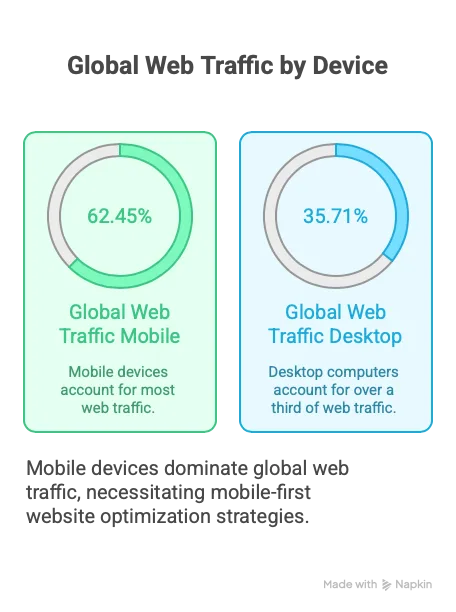
• Design Freedom, No Code Required: Unlike traditional template-based site builders, Webflow’s Designer gives you near-pixel-perfect control. You’re not stuck in a rigid template where your logo can only be this big and placed top-center. You can implement custom layouts, animations, and responsive behaviors all visually. Want a 3-column section that collapses to a slider on mobile? Or an interactive product grid with hover effects? In Webflow, it’s a few clicks, something that would typically demand a seasoned front-end developer.
Co-founder of Refokus, Stefanie Zakour, noted that this freedom is crucial for innovative design: “To create groundbreaking websites, you need time for design iteration... Webflow unlocks the freedom to build by reducing the time we spend on development.” In other words, Webflow cuts out the “translation” phase (design → code) that normally slows down projects. You design it and that is the live product. For small teams, this means the person with the vision (be it a designer, marketer, or founder) can shape the website directly without something getting lost in translation or delayed in a developer’s queue.
• Iterate and Experiment Faster: Because you don’t have to write code, you can try things and see them in real time. Tweak that hero image, add a testimonial slider, experiment with a different call-to-action color; it's all done in the visual editor. Webflow encourages a mindset of “designing in the browser”, which is a fancy way of saying you’re building the real website as you design it.
This is a superpower for small teams who thrive on agility. For example, the team at Flow Ninja (a Webflow expert agency) attributes a lot of their speed to this ability. Their CEO Uroš Mikić explained that using Webflow lets them “iterate on designs quickly, freeing up time to invest in creative storytelling and UX” rather than fighting through code deployments. In a small company context: imagine being able to test two versions of a page (say, one with a video header and one with a static image) the same day, without bugging a developer. That kind of rapid experimentation can lead to big wins in engagement and conversion, which you’d otherwise never even discover.
• Custom Code Flexibility (When You Need It): While Webflow is no-code, it doesn’t put you in a box. If you do have access to coding talent or eventually grow your team, you can extend Webflow sites with custom code snippets and integrations. But crucially, you don’t need to tap a coder for the basics and beyond.
Agencies like Refokus sometimes push Webflow to its limits with custom code for special effects, but only for icing on the cake the bulk of the site still comes together in Webflow’s visual builder. For a small team, it’s nice to know that if down the road you need something truly custom, Webflow won’t stop you yet it will never require you to code a thing for the vast majority of marketing site needs.
The bottom line: Webflow turns design into development. It gives small teams the ability to build what they dream up, immediately. You don’t have to compromise on quality or uniqueness just because you lack a coder; you can have a world-class looking site with the resources you have today.
Perhaps the most magical feeling as a busy marketer or founder is the first time you use Webflow’s Editor mode. You go to your live website, click an “Edit Site” button, and suddenly you can click on any text, image, or link and just change it right there, in context. No code, no backend form, no scary CMS UI you’re looking at your webpage, you click the text you want to change, type in new words or paste an update, and hit publish. It’s as direct as editing a Word document, but you’re editing the actual website.
This is a game-changer for small teams because it democratizes website updates. You no longer funnel all changes through a developer or “the one guy who knows WordPress.” Your marketing coordinator, your intern, even you as the founder can hop in and tweak content safely (with permissions controlled, of course). Let’s see why this matters:
• Goodbye, Gatekeepers: In traditional setups, marketing teams often lack direct access to edit the site either they don’t have the permissions or the CMS is so non-user-friendly that they fear breaking something.
Webflow fixes that with an editor experience so straightforward that content folks actually enjoy using it. Dean Maddocks, CMO of Smaller Earth, said that Webflow’s approach “allows our marketing team to quickly and continuously iterate on content to optimize conversion rates and deliver the most relevant information to our customers.”
The phrase “democratized editing experience” was used meaning the power to change the website is in the hands of the people who actually create the content and drive the campaigns. For Smaller Earth, this meant their marketers across 17 countries could finally localize and update their own pages without waiting for a developer, freeing the dev team to focus on bigger projects.
• Real-Time Updates, Zero Bottlenecks: Remember those minor changes that took weeks at Upwork? After implementing Webflow and its CMS, the team could make and publish changes in minutes. Molly Finn, a senior manager at Upwork, described how she was able to “easily swap imagery, update copy, update links, test the page, and publish” all on her own, with content all in one location for teammates to collaborate. No more filing a Jira ticket for a typo fix. In her words, “quickly develop new pages, and easily make updates… in real-time, without the assistance of engineers”. When small teams gain this ability, it’s like someone took the handcuffs off. Marketing can respond to opportunities on the fly got a trending topic to address?
Put up a blog post now. Need to change messaging after a product pivot? Do it today, not next quarter. One Webflow advocate said it perfectly: “You can update anything without waiting on a developer; this alone feels like a superpower once you experience it.” Small teams who have lived under the tyranny of slow CMS processes literally feel empowered (there’s that superpower word!) when they can suddenly control their site’s content directly.
• Safe Collaboration with Roles & Permissions: Webflow also acknowledges that even in a small team, not everyone should have full control of the website. Maybe you want the junior marketer to edit blog posts but not accidentally redesign the homepage. Webflow’s got you it allows fine grained roles: some team members can only edit certain parts or collections (like blog articles), while others can design layouts. This was a big draw for Smaller Earth’s CTO, who loved that Webflow “allows our marketing team to edit pages freely, but restricts design access to more technical teammates”.
In practice, this means your non-technical folks can’t “break” the site’s structure when they’re just trying to fix a comma or update a photo. The result is confidence team members actually use the tool because they trust they won’t mess things up. And new hires get onboarded faster; one person noted that instead of extensive training for every new team member, they just point them to Webflow’s excellent University tutorials and give them appropriate access.
In short, Webflow makes website editing as easy as social media. If you can update your LinkedIn profile, you can update your website. When small teams adopt Webflow, suddenly the website becomes a living, continuously improving asset, not a static brochure you’re scared to touch.
You’ll find yourself iterating copy, adding customer testimonials, tweaking FAQs, and keeping things fresh whenever they need it, without scheduling a “website update project.” The freedom to publish is entirely in your hands.
Editing content is one half of the equation, getting those changes live on your site is the other. In many setups, even after you make a change, there’s a deployment process. Maybe you save a draft in WordPress and have to hit a separate deploy button, or you commit code and then someone has to push it to a server, or there’s a nightly build. Small teams often get tripped up here: who’s managing hosting? Did the deployment succeed? Why isn’t the live site showing our changes?
Webflow simplifies this to essentially a single click. When you’re done editing or designing in Webflow, you hit “Publish” and your changes go live on Webflow’s managed hosting. It’s immediate (typically seconds to propagate), and you don’t have to worry about caching, CDNs, or any server admin stuff Webflow handles all that behind the scenes on its AWS-backed infrastructure. Here’s why this is a superpower:
• No More Deployment Anxiety: There’s a confidence that comes with knowing that when you press publish, what you see is what everyone gets. In traditional setups, publishing new pages or changes could involve error-prone steps. (Did we minify the assets? Did the DNS update? Is the plugin cached?) Webflow takes care of optimizations automatically minifying code, optimizing images, generating sitemaps, and so on.
Marketers at Upwork loved that they could “add and edit right on their live website and publish pages with the touch of a button.” The changes appear immediately, and if something’s not right, you can tweak and re-publish in moments. It encourages an iterative approach: no change is final forever; you can always refine tomorrow.
• Fast, Reliable Hosting Out of the Box: One often overlooked headache for small companies is website performance and uptime. Maybe you set up your site on cheap shared hosting and then it goes down the day you get a traffic spike from a big press mention.
Or it just loads slowly, hurting your Google rankings and user experience. With Webflow, you’re automatically on a globally distributed hosting network with great uptime and speed. For example, Refokus (the agency) often works with enterprise clients and noted that by using Webflow they “cut typical enterprise website build times in half” for faster go-to-market. Part of that speed is no doubt due to skipping the environment setup and going straight to Webflow’s cloud.
Another Webflow case study highlighted 93% faster speed to market for one company after switching. From a hosting perspective, you’re not filing IT tickets to set up staging vs. production or to allocate more server resources Webflow scales as you need it. Your small team site gets the same kind of backbone as sites run by large organizations on Webflow.
• Multi-language and Multi-site, No Extra Servers: If your small team is growing global or managing multiple brands, Webflow still has you covered without additional complexity. Need a German version of the site? Webflow’s localization and multi-domain capabilities mean you can manage that within the same interface.
For Smaller Earth, Webflow enabled them to launch 11 localized sites in 2 months (versus never-ending delays before). They even spun up a fully translated Spanish site in just 3 hours using Webflow’s new AI translation features, an incredible feat that would normally require separate hosting and CMS setup for each locale.
When it comes to landing pages or microsites, Webflow lets you create additional sites under your account easily (depending on your plan), so if you want a separate microsite for a campaign or a new product, it’s not a whole new technical project you can start building immediately.
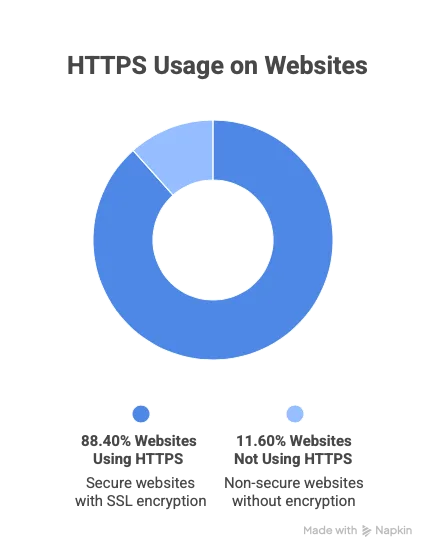
• Security and Maintenance Handled For You: Big companies have IT teams to worry about SSL certificates, DDoS protection, CMS security patches, plugin updates… Small teams have you. And you probably don’t have time or expertise to handle all that. Webflow’s platform approach means security is largely managed on their end. Every site gets HTTPS automatically.
There’s no server to get hacked via some outdated PHP script, no plugin updates to remember every Patch Tuesday. This doesn’t mean “set and forget” entirely; you should still follow good practices (strong passwords, etc.). You get enterprise-grade security by default (Webflow is SOC-2 compliant and used by Fortune 500s), which is peace of mind and time saved for a small outfit.
Essentially, Webflow’s publishing and hosting superpower is instant gratification paired with pro grade reliability. As a lean team, you get to move at the speed of your ideas when you’re ready to share something with the world, you click publish and it’s done. The web ops heavy lifting is invisible to you. In the words of a marketing agency blog, “Landing pages and campaigns ship dramatically faster, often in hours instead of weeks.” When you eliminate all the wait states and technical steps between an idea and a live webpage, you’ll be amazed at how much more your team gets done.
4. Effortless Design Updates and Rebrands (Keep Evolving Without Starting Over) Web design is not a one-and-done task. As your company grows or pivots, or just as you learn what messaging resonates, you’ll want to update the design and layout of your site. For many small teams, a full redesign is daunting; it might only happen once every few years (if that), because it’s expensive and slow if you need outside help. In between, the site starts to feel stale or off-brand, but you live with it because “if it ain’t broke, don’t fix it” (and you don’t have time to fix it).
Webflow challenges that status quo by making design updates something you can do continuously. It encourages a mentality of your website as a living, breathing product that you improve over time much like you iterate on your actual offering. Here’s how Webflow simplifies ongoing design changes:
• Reusable Styles and Components: Webflow has a system of Symbols (now evolving to “Components”) and global styles which lets you create design elements once and reuse them. For instance, you can design a CTA section or a pricing card as a Symbol.
If you decide to change its look or wording, you update the Symbol and it auto-updates everywhere it’s used. For a small team, this means you’re not manually editing 20 pages to change a tagline or a color, do it once and boom, site-wide consistency. Agencies like BRIX Agency emphasize this “atomic design” approach making Webflow sites modular and scalable so that any new page is just Lego blocks of existing components.
This drastically lowers the effort to maintain consistency. If a new designer joins your startup and gives the site a visual refresh (fonts, button styles, etc.), those global style changes ripple through the site instantly. You get a facelift without rebuilding from scratch.
• Design System in a Box: Even if you’re a tiny company without a formal design system, Webflow kind of forces you to create one implicitly. You define styles for headings, paragraphs, links, etc., as you design in Webflow.
Down the line, if you rebrand with a new typeface or color scheme, you can adjust those in your Style Manager and see the site update. This is how small teams can punch above their weight in design coherence. Your site can look like it was crafted by a professional top webflow agency because under the hood it has systematic styles.
In fact, many top Webflow agencies deliver a style guide page in Webflow for clients, so that the client (maybe a startup with no prior web presence) now effectively has a design system to follow. Finsweet, for example, has its “Client-First” style system that it uses to build very scalable Webflow sites. They’ve launched nearly 500 Webflow sites since 2017 with a focus on clean, maintainable structure. The benefit for clients (including small teams) is that their site is an organized collection of elements that can be easily changed or expanded. Small marketing teams can then add new sections or pages down the line without breaking the design the consistency is baked in.
• No Need to Trash Everything for a Redesign: Perhaps one of the biggest Webflow superpowers is that a “redesign” doesn’t mean rebuilding on a new platform. You can redesign within Webflow, incrementally. Many companies migrate to Webflow during a rebrand (to take advantage of the other benefits), and then continue evolving.
Take Edgar Allan, a Webflow agency that often helps enterprises migrate off legacy platforms to Webflow. In one case, a fintech firm’s website relaunch that Edgar Allan executed on Webflow led to “significantly higher time-on-page and a lower bounce rate” because the new design focused on storytelling and user scenarios.
Now, post-launch, that marketing team can keep tweaking and adding to the design without calling Edgar Allan for every change Webflow set them up for self-sufficiency. Another example: when Attentive (a tech company) moved from WordPress to Webflow, it was amid a major rebrand and the new Webflow site became a “catalyst for growth”, with a 27% traffic increase just one week post-launch.
They didn’t stop there; with Webflow they can continually optimize and adapt their pages as their brand and product messaging evolve, without undergoing another massive migration.
• Design Experiments Without Risk: Webflow’s preview and staging capabilities let you try substantial layout changes safely. You can duplicate a page, redesign the copy or structure, and show it internally or run it as an A/B test, all without affecting the live site until you’re ready.
This encourages creativity. A small team can take bold swings with design because the barrier to testing is low. Maybe you want to experiment with a whole new homepage design. In Webflow, you could build it as a draft page, gather feedback, even publish it at a temporary URL for a user test. If it fails, no harm done. If it succeeds, swap it in as the real homepage.
This “continuous improvement” mindset is something only the big companies used to do (with teams of developers supporting growth tests). Now a marketer with some Webflow chops can do it solo.
Case in point: Flow Ninja’s work with the fintech 21.co (21Shares). They did a sweeping overhaul of 21.co’s site in Webflow, which not only improved performance but made ongoing updates far easier. Before, 21.co’s team took ~1 month to roll out content changes; after Webflow, it was 1 week or less.
They saved over $300,000 a year in development costs, and the new design was more effective, user engagement metrics like retention and sign-ups went up thanks to better storytelling on the site. Now, 21.co’s small web team can keep that site fresh with new stories or product updates any time, instead of treating the website like a static product brochure that only gets updated at big intervals.
In summary, Webflow’s approach to design and updates means your website can continuously grow with your company. You’re not locked into a look-and-feel that slowly becomes outdated.
With far less effort than before, you can keep your site on the cutting edge reflecting your latest branding, your latest learnings about customers, and the latest web design trends if you want. Small teams gain the superpower of a “living” website that evolves, rather than a fossil that you replace occasionally.
As one agency quipped about Webflow’s effect on their clients: it allows “refreshing website sections without a full redesign” and shipping experiments quickly, so marketing teams spend more time creating and less time coordinating dev handoffs. That is a true competitive advantage when you’re operating with limited resources.
Launching landing pages whether for marketing campaigns, product launches, or events is the bread and butter of digital growth. For small teams, landing pages are critical to capitalize on opportunities. But as we discussed, the traditional process often makes launching a single landing page feel like a moon landing. Webflow flips this dynamic on its head, making it possible for a tiny team to roll out landing pages almost as fast as they can dream them up. Here’s how:
• Cloning and Templating: In Webflow, you don’t start every page from scratch. You can duplicate an existing page as a starting point or use pre-designed sections (Symbols/components) to assemble a new page quickly. Suppose you have a successful webinar signup page and now you need a similar page for a new webinar, just duplicate, swap out the text and images, and you’re done in minutes. Marketing teams love this: “With Webflow, campaign pages stop being a bottleneck.
Your team can spin up fully custom landing pages in hours, reuse sections, and publish the same day.”. That’s not a theoretical recall of Upwork's story: with Webflow CMS and templates, the Flow Ninja team enabled Upwork to create 1000+ new landing pages dynamically, empowering Upwork’s marketers to publish rich content without writing code. What used to be a laborious process is now a repeatable, fast workflow.
• All-in-One Workflow (Design to Publish): Because Webflow integrates design and content, a single person can take a landing page from concept to live URL. In the past, a marketer would request a page, a designer would make a mockup, a developer would code it, etc.
Now, whether it’s your in-house designer or a marketing generalist using existing components, the same person can design the page and publish it. Flowout, a Webflow dev shop, noted that some of their startup clients’ marketing teams are “very agile and always strive to launch pages quickly”, so using Webflow, Flowout converts designs to live pages fast, and then the marketing team can continuously iterate on those pages on their own. Essentially, Webflow removes the multi hand-off problem. For a small team, eliminating those hand-offs is huge; it means less team coordination needed and faster turnaround.
• Real-Time Collaboration for Speed: Webflow recently introduced features for collaborative editing (similar to how Google Docs allows multiple people). So your copywriter and designer can technically be in the Webflow page together, one tweaking text while the other adjusts layout, in real time.
This is rare in older CMS platforms. For a quick-turnaround landing page, your team can swarm on it and get it done. Contrast this with emailing a Word doc back and forth to update a copy, then waiting for dev. It’s night and day.
• Testing & Optimization Friendly: Once your landing pages are up, Webflow doesn’t lock them down. You can easily duplicate a page to create an A/B test variant, or use Webflow’s built-in form integrations to track conversions. If you’re a bit more advanced, you can embed A/B testing scripts or integrate with tools like Google Optimize (until it sunset) or others Webflow’s clean code and hosting play nicely with marketing tech. The key point: small teams can run growth experiments on their site without hiring a fleet of engineers.
For example, Veza Digital migrated a B2B SaaS (Chili Piper) from WordPress to Webflow and saw improved SEO performance optimization and efficiency that “powered revenue growth”. Part of that efficiency is the ability to iterate quickly on pages and optimize them for SEO and conversions without technical bottlenecks. Another Webflow case study of a company switching to Webflow praised that marketing could set up A/B tests or track interactions easily, and if something wasn’t working (say users not scrolling to a call-to-action), the team could adjust on the fly. The result: faster learning and better results from campaigns.
To illustrate the power of Webflow for quick launches, look at Veza Digital’s project with Concordium (a blockchain company). They had a critical, immovable two-week deadline to launch a completely redesigned website, an almost scary timeline for a big overhaul. Veza Digital used Webflow to pull it off on time, migrating tons of content and implementing a bold new design in that short window.
The new site went live in just 2 weeks (and exceeded the client’s expectations, by the way ), whereas a traditional approach might have taken months of design and dev. When speed matters, Webflow delivers. Another data point: Flow Ninja’s earlier-mentioned work with 21.co they reduced go-to market time for new content from a month to a week. That agility can be the difference between capturing a trend or losing out, especially in fast-moving industries.
If you’re running lean, imagine the difference in your marketing operations when a new landing page is “no big deal” instead of an “all hands on deck” ordeal. You can seize opportunities to spin up pages for that conference you decided to sponsor last-minute, create a seasonal promo page, personalize landing pages for different customer segments all without derailing your other work.
Webflow truly gives small teams big marketing agility. As one marketing lead said, it lets your team “launch campaigns, update pages, and scale without developer bottlenecks.” Shipping a new idea is as fast as dropping it in Webflow and hitting publish. That superpower speed in executing marketing ideas can directly translate to more leads, sales, and growth, which is ultimately the name of the game.
Now that we’ve covered the core ways Webflow empowers small teams (visual development, easy editing, one-click publishing, continuous design iteration, and fast landing pages), let’s look at some real-world examples of these superpowers in action. Nothing drives the point home better than hearing about teams like yours who dramatically improved their web operations (and results) by switching to Webflow. We’ll compare the experiences and outcomes of clients from various Webflow savvy agencies to see just what changed for them and by how much.
It’s one thing to tout features and possibilities, but does this actually translate into measurable success? The answer, resoundingly, is yes. Across countless case studies, small and mid-sized teams have seen faster launch times, higher conversion rates, and productivity gains after adopting Webflow. Let’s tour a few examples through the lens of agencies who are experts in implementing Webflow for clients. These agencies have worked with companies of all shapes and sizes, and their reported results give us concrete proof of Webflow’s impact. Here’s what they’ve seen:
• Flow Ninja Speed and Savings for 21.co: Flow Ninja (a top Webflow Enterprise Partner out of Serbia) helped fintech startup 21.co rebuild their marketing site in Webflow, and the numbers are jaw-dropping. The switch cut their go-to-market time for content updates from about 1 month to just 1 week, and saved the company over $300,000 per year in web development costs.
In other words, what used to require a month of developer effort now gets done in a few days by the marketing team. Plus, the new Webflow site performs better. By reorganizing around a storytelling approach, Flow Ninja’s redesign led to higher user retention on pages and more sign-ups for 21.co’s product. Faster and more effective! Flow Ninja has done similar magic for bigger clients too: they partnered with Upwork to build 1,000+ landing pages in Webflow, giving Upwork’s own marketers the ability to publish content-rich pages on their own without coding. That massive project (1000+ pages) would have been unthinkable for a small internal team before, but with Webflow’s CMS power and Flow Ninja’s expertise, Upwork’s team now controls a vast library of pages showing Webflow’s scalability.
• Refokus Higher Conversions and Engagement: Refokus, a Webflow agency from Germany, has a track record of using Webflow to deliver not just pretty sites, but sites that perform. According to a Webflow case study, Refokus’s projects have consistently yielded tangible business results: their clients report improved engagement, higher conversion rates, and stronger brand perception after their Luxury Personal Websites were built with Webflow. One client feedback from Refokus noted that the agency “enhanced our brand presence while driving user engagement and conversions”, highlighting that the design choices (enabled by Webflow’s flexibility) translated into real growth metrics. In practical terms, imagine your website suddenly getting more people sticking around and more of those people signing up or buying that’s what happened for Refokus’s clients.
On the efficiency side, Refokus leverages Webflow to cut development cycles dramatically. They’ve been known to cut enterprise build times in half by using Webflow, which means their clients (including startups and Fortune 500s alike) get to market faster. Faster launch = earlier ROI. And maintenance overhead drops too one Webflow Enterprise story (Dropbox Sign, implemented by Refokus) saw a 67% decrease in dev tickets after moving to Webflow, indicating far fewer requests bogging down engineering. Marketing and design teams were empowered to handle most changes themselves, exactly what small teams need.
• Finsweet Scalable Sites and Storytelling Wins: New York-based Finsweet is renowned in the Webflow community, not only for client work but also for contributing tools that others use. They’ve launched nearly 500 Webflow sites since 2017, working with everyone from scrappy startups to Fortune 100 firms. Finsweet often steps in when a website is underperforming.
They even have a branding service nicknamed “Webflow project recovery” for rescuing projects that lack structure or story. In one example, a SaaS company had a powerful AI product but a dull web presence. Finsweet reimagined the site around a story-driven information architecture; the homepage was redesigned to lead with a problem-solution narrative rather than a product list, etc. The result? Users finally understood and connected with the product after the Webflow redesign, because the narrative clicked.
It’s hard to put a number on “user understanding,” but that translates to more qualified leads and easier sales. While specific metrics are often confidential (many Finsweet projects are under NDA), they’ve hinted at clients seeing substantial conversion lifts after a Webflow revamp.
Also worth noting: Finsweet’s technical mastery means they ensure Webflow sites can grow with the client's modular CMS structures, integrations (they have an Attributes tool that adds functionality to Webflow), and rigorous optimization. So a small team that hires Finsweet might start with a modest site, but know that it can expand to hundreds of pages or advanced capabilities down the road without rebuilding on another platform. Scalability and better UX is a winning combo for long-term ROI.
• Creative Corner Big Impact on Small Budgets: Creative Corner Studio (with roots in Bulgaria and a presence in the US) focuses on Webflow solutions for clients with small-to-mid size marketing budgets. In other words, they cater to exactly the kind of teams we’re talking about: those who need results but can’t spend like an enterprise.
Thanks to Webflow’s efficiency, Creative Corner can keep costs down for clients: the “lightweight deployment”Webflow offers avoids a lot of the expense of traditional dev, so budget-conscious teams get high quality without breaking the bank. And the impact is tangible. In one case, Creative Corner delivered a complete marketing strategy and Webflow website for a client (Camino), focusing heavily on UX. The client could then easily implement and adjust content themselves.
The outcome was a site that is “much more user-friendly, which has led to increased traffic and sales.” Increased traffic and sales that’s music to any small business’s ears. By acting as an “all-in-one” partner (strategy, design, Webflow dev, even SEO), Creative Corner allows small teams to avoid juggling multiple vendors. Many clients mention how responsive and integrated the Creative Corner team is with their own effectively becoming an extension of the client’s team. For a small outfit, this is ideal: you get expert help setting up Webflow and a strategy, and then you’re empowered to run with it.
The site drives growth instead of needing constant babysitting. Creative Corner’s status as an official Webflow Professional Partner and their subscription-based offerings (like unlimited design/dev for a flat rate) also reflect a trend: making top-tier web design continuous and affordable for smaller firms. That wouldn’t be possible without the efficiencies of Webflow at the core.
• Veza Digital Lightning Launches and SEO Boosts: Veza Digital (Canada-based) is another agency that has embraced Webflow to deliver speedy turnarounds for clients, especially in the SaaS and tech space. We mentioned their Concordium case launching a complex new Webflow site in just 2 weeks. What happened after that launch? The new site “significantly enhanced” the company’s digital presence, and with on-site SEO optimization baked in, it boosted their visibility and user experience immediately.
Veza also migrated Chili Piper (a scheduling SaaS) from WordPress to Webflow, which resulted in better SEO, efficiency, and user experience, while powering revenue growth. That phrase suggests that conversion rates improved post-Webflow (since revenue went up, presumably not just from traffic). Another Veza client, Slash, saw a digital presence elevation with a custom Webflow build that improved performance (SEO) and visuals simultaneously. A big draw with Veza is they combine Webflow development with growth marketing services.
This means for small teams, a partner like Veza ensures that when your site goes live on Webflow, it’s not just pretty, it's optimized to rank on Google, load fast, and convert. One of their case studies boasted launching a redesigned site that immediately loaded under 2 seconds and jumped in search rankings due to cleaner code and faster speed.
And since Webflow generates clean, semantic code by default (unlike some page builders), SEO improvements are commonly reported. For example, a Webflow enterprise story noted a 98% improvement in technical SEO scores after migration. It’s not uncommon for Webflow sites to see organic traffic boosts thanks to better site structure and speed, crucial gains for a small company that can’t spend millions on ads.
• Edgar Allan Story-First Sites That Retain Users: Edgar Allan is an Atlanta-based agency (Webflow Agency of the Year 2022 & 2023) known for blending content strategy with Webflow builds. They often work with teams undergoing a content or brand transformation, and Webflow enables them to execute those in a way that the client can then manage.
In one project for a fintech client, Edgar Allan led with a narrative approach on the new Webflow site instead of technical jargon, the site told a relatable customer story. The outcome was dramatically better user engagement: users spent more time on the site and bounce rates dropped significantly after launch.
That’s exactly what you want to see when you’re trying to educate and convert visitors. Edgar Allan’s clients, which include large enterprises, often choose Webflow to replace old CMS platforms (they’ve migrated folks off WordPress, Sitecore, etc.) so that their marketing teams can move faster without as much IT dependency. A smaller company might not be on Sitecore, but the lesson holds: modernizing on Webflow gives non-engineers more control, which yields better content and a better customer experience. Edgar Allan’s success shows that even on big projects, the small team (on the client side) benefits. One of their startup clients could, after an Edgar Allan Webflow revamp, publish new case studies and edit messaging on the fly, a task that previously required a developer and thus lagged behind.
They’ve also highlighted that Webflow helps align design and copy from the start (since writers and designers can collaborate in the tool), ensuring the final site is cohesive. For a lean team, that’s like getting a unified content+design department in a box.
• 8020 Enterprise Quality at Small Team Speed: 8020 is a leading Webflow Enterprise agency that’s done some high-profile projects (like building Huberman Lab’s extensive podcast website and the accessible election guide site “Brink” on Webflow). What’s relevant to our discussion is how 8020’s work showcases Webflow helping small teams tackle big challenges.
The Brink project is a perfect example: Brink is a small non-profit team that needed a fully accessible website (meeting strict AA accessibility standards) in time for the 2020 election. 8020 used Webflow to build an AA-rated accessible site with no extra plugins or custom code all within Webflow’s visual builder.
The Brink team was amazed that this was possible without a huge engineering effort. And they loved that the Webflow site was accessible by design, not via some clunky overlay, which made it genuinely usable for their audience.
This underscores a point: even complex requirements like accessibility or localization are not out of reach for small teams using Webflow. 8020’s broader claim is that they use low-code (Webflow) to deliver impressive websites faster and Brink’s success attests to that. Another 8020 highlight: they helped the Huberman Lab team (which is a small content team around a hugely popular podcast) translate hundreds of hours of content into a dynamic website.
Using Webflow CMS, they built a site that one might think requires a custom app but nope, it’s all Webflow, organized so that the Huberman team can continually post new episodes, transcripts, and resources without needing a developer. When you have a lean staff but tons of content, that CMS power with ease-of-use is literal superpower stuff.
Finally, consider that 8020 and others often mention speed improvements like “9x faster execution” on projects with Webflow or 10x cost savings in agency fees for clients like NCR when using Webflow. Those efficiencies flow directly to small teams as either money saved or more output for the same effort.
That’s a lot of examples and we barely scratched the surface. The pattern is clear across all these stories: Webflow lets small teams do more with less. They launch faster, they iterate more, and they often see upticks in traffic, engagement, and conversion because their websites get better, more relevant content, updated more frequently, with better UX and SEO.
Crucially, these improvements don’t come by hiring a huge team or massive budget. They come from leveraging a tool that amplifies the team’s capabilities. A telling quote from a marketing VP after a Webflow project was, “Webflow allows us to scale much quicker and put control in the hands of our marketing team.” When control shifts to the people with the vision (and away from the bottleneck of scarce developers), the results speak for themselves in growth metrics.
To really drive home how Webflow can empower lean teams, let’s look at Blushush, a new boutique agency that itself is a small team but is delivering work on par with much larger agencies. Blushush (based in the UK was founded by Sahil Gandhi and Bhavik Sarkhedi, who came from branding and storytelling backgrounds. They chose Webflow as their primary tool to build sites for clients, and it’s been a force-multiplier for them.
Blushush’s philosophy is to approach each website as a storytelling canvas, not just a series of pages. They work with a lot of startups and founders who “refuse to blend in,” crafting bold, narrative driven websites.
Now, you might think such high-concept sites would require a big design team and a squad of developers. But Blushush’s core team is small, essentially a couple of founders and a handful of collaborators. How do they punch so far above their weight? Webflow is a big part of the answer.
Using Webflow, Blushush can execute visually rich, interactive designs without writing custom code from scratch. For example, they transformed a routine tech product page into a chronological story with on-scroll animations and testimonial “chapters” turning what was once a boring page into something that kept visitors scrolling, engaged, and emotionally connected. Every pixel had a purpose, and they could build those immersive effects directly in Webflow’s Designer.
The result impressed the client and the users, yet Blushush didn’t need a 20-person dev team to do it. Sahil Gandhi (co-founder) as a brand strategist ensures content and design work in tandem, and Webflow enables that integration seamlessly on the site.
Blushush is quickly building a portfolio of “impossible to ignore” brands across fintech, SaaS, and personal branding. They’ve been recognized in industry conversations as a rising star. Here’s the key point: Blushush’s success demonstrates that a small Webflow-skilled team can deliver big-agency caliber output.
They credit Webflow for freeing them from the typical constraints; they're not spending time wrestling with code or waiting on developers, so they focus on creativity and story. In fact, Sahil and Bhavik had previously built a Webflow-focused firm known for stunning yet strategic sites, so they’re doubling down on the model of lean teams + Webflow = top-tier work.
For the clients that Blushush serves (often themselves small startups with no web team), this means they get the benefit of a highly bespoke website that feels crafted by a much larger agency. Webflow helps Blushush keep costs reasonable and timelines short, which is passed on as an advantage to their clients.
It’s a case of a small team (Blushush) using Webflow to help other small teams. One founder they worked with effectively got to “operate like a big brand” online with a site that has custom animations, rich storytelling, and polish even though that founder’s internal team had zero developers and maybe one designer. Blushush could hand over a Webflow build that the founder’s team can then manage day-to-day (swap text, add a blog post, etc.) without always calling in help.
In sum, Blushush exemplifies the theme of this article in meta form: using Webflow, they as a small outfit can compete with bigger agencies, and they enable their small client teams to compete with bigger companies. It’s small teams helping small teams, all powered by Webflow’s leveling of the playing field. As Blushush likes to prove, “every design choice should tie back to the brand story”
Webflow lets them implement that philosophy without compromise, no matter their size. The co-founders' deep experience in content and strategy, supercharged by a no-code tool, shows what’s now possible. Ten years ago, a two-person agency could not easily build a complex interactive website without hiring out a lot of work. Today, that two-person agency can do it end-to-end in Webflow. If that’s not a superpower, I don’t know what is!
It’s clear that in the world of web development and design, Webflow has become the great equalizer. It gives small teams capabilities that used to be the exclusive domain of large organizations with hefty budgets and specialized personnel. In practical terms, Webflow turns a lean team into a multi-talented powerhouse:
• Need to update your site content daily? Webflow lets you do it without batting an eye no dev needed, no delay. Your marketing can iterate at Twitter-speed. ♀
• Want to refresh your design or launch a new campaign page? Webflow’s visual builder and reusable components mean you’ll be days ahead of competitors still fiddling with their legacy CMS. Your execution of ideas becomes lightning-fast.
• Have a tiny web team (or none at all)? Webflow acts as your silent extra team member, handling the heavy lifting of coding, hosting, and optimization. Your team can focus on messaging and growth, not tech minutiae.
• Trying to make a big impression with limited resources? As we saw with Blushush and others, Webflow empowers you to create a web presence that rivals companies 100x your size in polish and creativity. Your brand can punch way above its weight.
Beyond the specific features, what Webflow really provides is leverage. It multiplies what one person or a small group can do. In business, leverage is gold; it means better output without a proportional increase in effort or cost. Small companies often live or die by how cleverly they use leverage, because they can’t simply throw money or people at problems. Webflow is a leverage tool for the digital side of your business.
It automates what can be automated (like code generation, server management, etc.), it simplifies what can be simplified (like editing and publishing), and it brings otherwise disparate tasks into one flow. The result is synergy: your content, design, and marketing all work closer together, reinforcing each other. And as a bonus, engineers (if you have them) are freed to work on your actual product instead of firefighting the marketing site’s minor updates.
From an outcomes perspective, think of where you could redirect the saved time and money. If Webflow saves you thousands in dev costs and weeks of time on each launch, you can invest those resources into product development, customer acquisition, or maybe hiring that extra salesperson or creative that makes all the difference.
It’s a cascade: faster web updates → faster experiments → faster learning → faster growth. Numbers we cited, like 56% more form fills here or 20% higher site-wide conversion there (real results from Webflow case studies), illustrate the growth impact. Meanwhile, a 67% reduction in developer tickets or 10x cost savings illustrate the efficiency impact. With Webflow, you gain on both fronts effectiveness and efficiency. How often do you get to have your cake and eat it too?
One might ask, is Webflow the right choice for every scenario? Of course, there are cases where very complex web applications might outgrow a no-code tool (say, if you’re building the next Facebook but even then your marketing site could be Webflow!). But for the vast majority of marketing websites, landing pages, blogs, and even moderately interactive sites, Webflow is more than up to the task and constantly evolving with new features.
It’s telling that even enterprise marketing teams (who could choose anything) are opting for Webflow because it lets them act like startups nimble and experimental. That inversion of big companies trying to regain the agility of a small team is perhaps the strongest validation of Webflow’s value to small teams: you already have that agility; Webflow simply removes the shackles that were holding it back on the web front.
So, whether you’re a startup founder who’s been tearing your hair out because your website can’t keep up with your vision, or a one-person marketing team in a mid-size business that’s tired of saying “I’ll ask the developers… and get back to you next week,” or a small agency looking to deliver more value to clients with less overhead, check out Blushush services because Webflow is worth serious consideration. It’s not just a tool to make websites; it’s a platform to accelerate businesses. It gives you the superpower of scale: the ability to operate like a larger entity, with professionalism and complexity, while still being small and scrappy.
In the superhero comics, the underdog who gains superpowers uses them to save the day. In our real world narrative, Webflow is the radioactive spider bite (in a good way) that gives the underdog team powers to compete with the giants.
It won’t write your vision for you, and it won’t replace creativity or strategy (those are your domains!). But it will remove the friction in turning that vision into a living, breathing website that grows your business. And as we’ve seen, that can make all the difference.
Webflow has arrived, cape fluttering and small teams everywhere are flying higher because of it. Will yours be next?
Curious how this applies to your own project? See our Webflow Development services or explore everything we do.