Imagine this: It’s 2 AM and your website just went down again. Last week it was a plugin update that broke your contact form; yesterday it was a mysterious theme glitch. You’ve spent more time troubleshooting than actually improving your site. If this sounds familiar, you’re likely using one of the “old guard” website builders, maybe WordPress, Wix, Shopify, or Squarespace and feeling the pain of their hidden frustrations. It might be time for a change.
Enter Webflow: the modern web design platform that’s turning those late-night headaches into a thing of the past. In this deep-dive comparison, we’ll explore what makes Webflow better than whatever website builder you’re using right now, whether that’s WordPress, Wix, Shopify, or Squarespace. We’ll use friendly language, vivid real-life stories, and solid facts to show why switching to Webflow is an upgrade in every sense.

Every website builder has its day until your needs outgrow its capabilities. Let’s start by acknowledging some relatable frustrations people face with popular platforms before discovering Webflow:
• The “Update Nightmare” (WordPress): You log in to update one plugin and end up with five more needing updates. A routine click spirals into a cascade of conflicts your gallery plugin now clashes with your SEO plugin, and your site design is suddenly out of whack. WordPress sites often rely on a constellation of third-party plugins (there are over 60,000 of them!) to achieve even basic functionality.
Those plugins can conflict with each other or break during updates, leaving businesses scrambling for fixes. Keeping a WordPress site running smoothly demands constant vigilance: core updates, theme patches, plugin fixes a high maintenance overhead that can lead to downtime or extra costs. One business owner described feeling like a “system administrator first, entrepreneur second” because so much time went into just keeping their site alive. Worse, if a plugin is abandoned by its developer, you’re stuck with a ticking time bomb in your site’s code.
The security risks are real too outdated plugins or themes are among the biggest sources of hacks and malware on WordPress sites. We’ve heard horror stories of sites getting compromised due to a single vulnerable plugin, causing not only downtime but also damage to SEO rankings and customer trust. It’s no wonder many WordPress users feel on edge, waiting for the next shoe to drop.
• The “Walled Garden” (Wix): You built your site on Wix for its simplicity, but now that your business is growing, you’re hitting brick walls everywhere. Want to add a custom feature or integrate a new tool? Wix’s closed ecosystem might say “no can do.” Users report technical limitations and bugs that make even simple tasks frustrating from form submissions failing to mobile design changes not saving properly.
Third-party integrations can be a nightmare: Wix struggles to connect with many external services and APIs, limiting your ability to use advanced analytics, marketing automation, or custom CRMs. Essentially, you’re stuck with what Wix offers, and if it doesn’t offer something, you’re out of luck.
Migrating away is even harder; Wix deliberately makes it difficult to export your content to other platforms. It’s a classic case of vendor lock-in. One developer quipped that “Wix makes it easy to start, but impossible to grow.” As your company scales, you might find Wix turning into a digital straitjacket bandwidth caps, template constraints, and performance issues cropping up as you add more content. Many businesses only realize too late that moving off Wix means rebuilding from scratch, since you can’t simply export your site’s code and design.
And let’s not forget performance: Wix sites have been criticized for bloated code that can lead to slow load times. A slow site frustrates visitors and hurts your Google rankings. In fact, studies found only about 1.4% of Wix sites get significant organic search traffic, versus 46% of WordPress sites, a sign that Wix sites often struggle with SEO and visibility. Whether it’s true or not for every site, that stat runs parallely with many Wix users who feel invisible on Google. Simply put, what was a comfy walled garden at first can start to feel like a prison as your ambitions grow.
• The “Shopify Squeeze”: If you run an online store on Shopify, you’ve likely enjoyed its robust e-commerce features. But you may also have felt the squeeze of its limitations. Design customization is a common gripe unless you know Liquid code or pay for a developer, you’re largely confined to the layouts of your chosen theme. Want that product page to look exactly the way you envisioned?
With Shopify, every outside-the-box design tweak tends to require yet another app or a coding workaround. Speaking of apps, Shopify’s App Store is both a blessing and a curse. You might install a dozen apps to add wishlist functionality, subscription billing, advanced analytics, etc., and suddenly your monthly bill has ballooned.
Each app can add to page bloat (slowing your site) and increase the chances something conflicts. And then there are fees if you don’t use Shopify’s own payment gateway, they charge additional transaction fees on each sale. It’s a bit disheartening to see a cut of your revenue taken just because you prefer PayPal or another processor. Many small store owners have vented about feeling nickel-and dimed. Additionally, while Shopify is great at e-commerce, it’s not as flexible for content-heavy sites or unique user experiences. You might find its blogging tools or CMS management service for non-product pages rather basic compared to a full web design platform.
It’s as if Shopify wears e-commerce blinkers fantastic for a straightforward store, but when your brand needs more than a catalog and checkout, you start fighting the platform. This is often when merchants explore Webflow, sometimes even pairing Webflow for the front-end design freedom with Shopify for the back-end (though increasingly, Webflow’s own e-commerce might handle it all).
• The “Template Trap” (Squarespace): Squarespace users often start out thrilled, the templates are gorgeous out of the box, the interface is user-friendly, and for a brochure site or simple portfolio, it’s smooth sailing. But as soon as you want to step outside the pre-designed template structure, you discover the limits.
Squarespace can feel like a creative cage. The platform is heavily template-driven, which is great for speed but not for uniqueness. Many Squarespace sites end up looking somewhat similar; you can swap in your images and colors, but you’re not fundamentally changing the structure or functionality much.
For users with an eye for design, this can become frustrating as you imagine tweaks that you simply can’t implement due to the platform’s constraints. Another common complaint is the lack of advanced features as your site grows. For instance, Squarespace does not offer an autosave or revision history in its editor meaning if your browser crashes mid-edit, your changes could be lost.
That’s a nasty surprise that Webflow users (accustomed to auto-save and version backups) don’t have to worry about. And while Squarespace covers the basics of SEO and performance, power users sometimes hit ceilings in those areas too. Large sites on Squarespace might experience slowdowns or SEO limitations when dealing with lots of pages or more complex needs. Essentially, Squarespace trades flexibility for simplicity fine until your ambitions outgrow what its simplicity allows.
If you nodded along to any of those scenarios, you’re not alone. These platforms WordPress, Wix, Shopify, Squarespace each revolutionized website building in their time and serve millions of users. But the web keeps evolving, and so do businesses’ needs. Webflow emerged to address many of these modern needs head-on, without the baggage of older systems. Let’s explore exactly how Webflow outshines each of these competitors.
Story time: Meet Alex, a marketing manager who built the company site on WordPress because “everyone uses it.” At first, it was empowering thousands of plugins and themes to play with.
But fast forward a year: Alex now juggles 20+ plugins to keep the site functional. Every few weeks something breaks, a plugin update fails, the site slows to a crawl, or worse, got hacked through an outdated plugin. Alex dreams of a website that doesn’t feel like a precarious Jenga tower of add-ons. This is where Webflow swoops in like a breath of fresh air.
Webflow offers an all-in-one platform that eliminates the need for most plugins altogether. Out of the box, Webflow has design tools, form builders, SEO settings, CMS collections, e-commerce, animations basically the features that WordPress sites usually require a dozen plugins to achieve. This means no more patchwork of third-party code just to have a contact form, image gallery, and SEO optimization.
Why is this such a big deal? For one, it boosts performance and reliability. WordPress’s massive plugin ecosystem is powerful but can slow down your site and demands constant maintenance. In contrast, Webflow’s streamlined approach generates clean, efficient code and avoids the bloat that comes with stacking plugins. The result: sites that load fast and rarely break unexpectedly.
Consider maintenance: WordPress requires you to be your own IT department core updates, plugin updates, database optimizations, and backups are on you. Webflow turns that paradigm on its head. Webflow is a hosted SaaS platform, which means updates and maintenance are handled centrally by Webflow.
You never have to click “Update Now” for your site’s platform; new features roll out automatically, and they don’t break your design. Webflow even automatically backs up your site every time you publish, and you can restore previous versions in one click, which gives a huge peace of mind. (By contrast, many WordPress users only discover the importance of backups after a crash. Webflow has your back from the start with automatic backups every 10 minutes in the background.)
Security is another game-changer. WordPress sites are notoriously prone to attacks not because WordPress is inherently insecure, but because its popularity makes it a huge target, and because a typical WP site relies on many third-party plugins/themes that may have vulnerabilities.
Webflow’s security model is rock-solid by design. Every site on Webflow is hosted on its highly secure infrastructure with enterprise-grade measures: free SSL, global CDN distribution (for speed and DDoS protection), and continuous platform monitoring. Webflow’s code is not open-source, which actually helps here; it's consistent and tightly managed, so there’s no wild west of plugins that could open back doors. For example, Webflow sites boast 99.99% uptime thanks to the Amazon Web Services and Cloudflare backbone.
And if something did go wrong, Webflow’s versioning system means you can revert to a previous safe state easily. One ThinkFuel study pointed out that businesses often came to them after WordPress security breaches or plugin vulnerabilities hurt their site and reputation; these kinds of incidents are far less common with Webflow’s managed platform approach.
Let’s talk about ease of use and flexibility. WordPress has a familiar dashboard and a huge community if you know how to code or are willing to tinker, you can make WordPress do almost anything. But that’s a big if. Non-developers often find that achieving a truly custom design in WordPress means wrangling with PHP or hiring help, especially if using the older Classic Editor or even Gutenberg blocks beyond their default options.
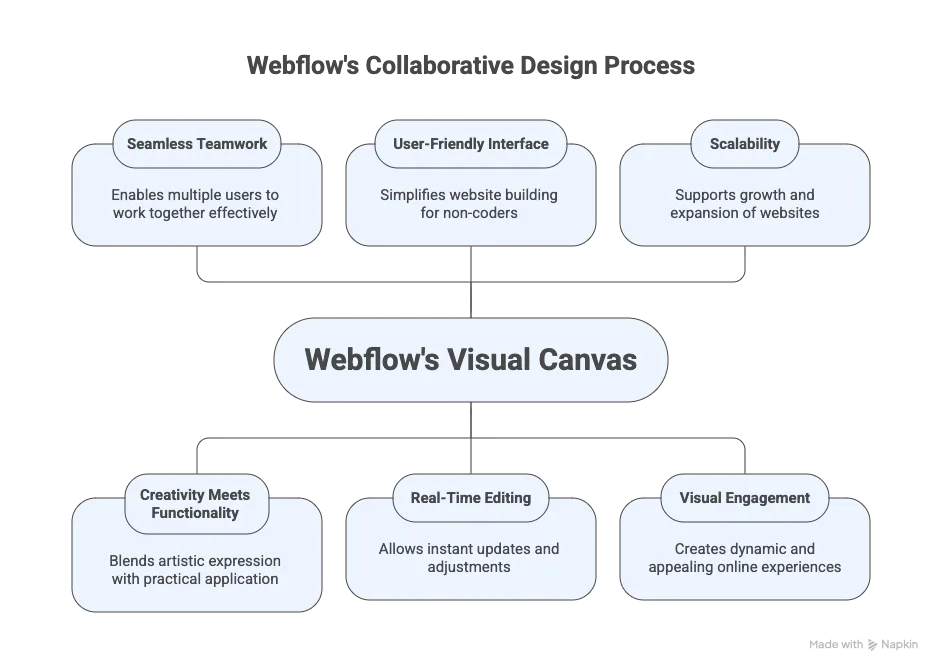
Webflow, on the other hand, was built for visual designers and content editors to have full control without coding. Its visual editor lets you design on a canvas, placing elements exactly where you want, styling them with CSS-level precision all through a drag-and-drop interface that outputs clean code in the background. It’s like the power of hand-coding with the ease of a design tool.
Yes, Webflow has a learning curve (it’s more complex than point-and-click template editing, because it gives you much more control). But once you learn the basics, you realize you can build things in Webflow in hours that might have taken days in WordPress, especially without having to constantly search for “which plugin can do X.” In fact, Webflow’s efficient approach to site building has been shown to cut development time in half compared to WordPress in many cases.
One 2025 comparison noted that Webflow helps publish changes faster (they cited a figure of Webflow users collectively publishing 15,000 sites per hour) while WordPress workflows often slow down due to plugin overhead.
Another advantage is built-in hosting. With WordPress, you have to shop around for a host, manage that relationship, and optimize the server, or pay for managed WP hosting. Webflow includes high performance hosting as part of the platform. As soon as your Webflow site is ready, it’s live on Webflow’s servers with one click, no separate FTP uploads or cPanel fiddling. And this hosting is not basic: as mentioned, it’s globally distributed via CDN, auto-scaling for traffic spikes, and incredibly stable. If you’ve ever experienced the dread of a WordPress site going down because your host had an issue or you outgrew a shared server, you’ll appreciate how Webflow “just works” on the hosting front. To be fair, WordPress does offer more hosting choices you can self-host for cheap, for instance but with that comes the responsibility to manage it. Many people gladly trade that for Webflow’s worry-free hosting, even if it comes at a reasonable monthly fee.
Lastly, consider scalability and support. WordPress has an enormous community and you can find a plugin or tutorial for almost any need but it’s on you (or your hired developer) to put the pieces together. Webflow has a growing community as well, plus official support channels. The Webflow University tutorials are beloved for getting beginners up to speed quickly, and there’s a helpful forum and even Webflow experts you can hire for advanced help. When something goes wrong on a WordPress site, you might end up bouncing between a theme developer’s forum and multiple plugin support pages to diagnose an issue because no one entity supports the whole stack.
With Webflow, support is centralized; you can reach out to Webflow’s team for platform issues, and because it’s a closed platform, issues are often easier to pin down (there’s no “well it could be any of 10 plugins causing this” problem). That said, WordPress’s open-source nature is a double-edged sword: it gives you freedom, but with Webflow you get focus and reliability.
Bottom line for WordPress users: If you’re tired of being a part-time web mechanic dealing with updates, plugins, and security patches, Webflow offers a stress-free alternative. You get to focus on design and content, while the platform handles the heavy technical lifting.
As one agency put it, “popularity doesn’t equal efficiency” when comparing WordPress to Webflow. WordPress certainly powers a huge chunk of the web (around 40-43% of all sites), but many of those sites are stuck in an earlier era. With Webflow, you’re plugging into a modern web design workflow, one that many former WordPress users describe as liberating.
Your site will be faster, easier to maintain (because Webflow maintains it for you), and fully in your control from a design standpoint. No more crossing your fingers when hitting “update,” no more patchwork of plugins, just a platform that lets you create freely and sleep soundly.
Wix is often the first stop for folks new to building websites, and it’s easy to see why its drag-and-drop simplicity and templates let almost anyone spin up a decent-looking site quickly. But as we highlighted, many Wix users eventually feel the walls closing in. Let’s follow the journey of Priya, a small business owner who chose Wix to build her boutique shop’s website without coding (yay!).
For a while, it was great she loved picking a template and populating her content. But as her business grew, she started bumping into Wix’s limitations. She wanted a more unique homepage layout to highlight new lookbooks Wix’s template wouldn’t allow certain changes. She wanted to integrate a CRM and advanced analytics. Wix's integration options were limited and some external tools just wouldn’t connect properly. The final straw was when she considered migrating to a different platform for more flexibility; she discovered Wix makes that extremely hard. She felt stuck.
Webflow to the rescue. If Wix is like painting by numbers, Webflow is like a blank canvas with a full palette of colors. You’re not confined to a template’s structure in Webflow; you can start from a blank page or heavily customize any of the Webflow templates. The design flexibility is night-and-day beyond Wix.
In Webflow, you can create truly custom layouts tailored to your content and brand, with pixel perfect positioning and even advanced animations (all without needing a separate JS library or plugin). It’s the difference between a site that looks “Wix-ish” (you know it when you see it) and a site that doesn’t look like it was made with any generic builder at all. Many designers choose Webflow for this reason alone: you can build bespoke, award-worthy designs that simply aren’t possible on Wix or other template-based builders. In fact, Webflow’s design capabilities rival the freedom of writing code by hand, which is why even professional web agencies use Webflow for high-end clients.
Another critical advantage: No vendor lock-in. Webflow actually lets you export your site’s HTML, CSS, and images (except CMS items and e-commerce, which rely on the platform) at any time. While the intent is that you’d host with Webflow (and most do, to take advantage of the features)
With Wix, you can’t export your site code if you ever want to leave, you start over from scratch. Webflow gives you peace of mind that your work is portable if needed. Not only that, but Webflow’s code output is clean enough that some have even migrated Webflow-exported sites into other setups as a starting point. Now, most people won’t need to export because Webflow as a platform is robust, but just knowing you could is a confidence booster you’re not surrendering your site to a black box forever.
Let’s talk performance and SEO. As mentioned, Wix has had a reputation for slow-loading sites due to code bloat. It has improved over the years, but Webflow sites are generally very performant thanks to cleaner code and the aforementioned hosting infrastructure. Webflow automatically implements best practices like minified code, image optimization, and uses a CDN to serve content fast globally.
The difference can be stark: A page that might struggle on Wix (especially after adding several apps) could load much faster on Webflow. And as any site owner knows, speed matters users will bounce if a site lags, and search engines rank faster sites higher. Wix also historically had SEO shortcomings (like not having full control over URLs or certain metadata in the past), whereas Webflow is very SEO-friendly: you have full control over meta titles, descriptions, alt text, semantic HTML structure, automatic sitemaps, 301 redirects basically all the SEO elements a pro would ask for are built in.
You can even set up structured data (schema) in Webflow easily by embedding JSON-LD in the head. Wix has caught up on basics, but Webflow gives a more advanced user total freedom to optimize. Remember that eye opening stat: only ~1.4% of Wix sites get meaningful organic traffic vs 46% for WordPress (and likely similarly higher for Webflow sites). That suggests many Wix users struggle with SEO, perhaps due to limitations or less guidance. Webflow, by contrast, is often praised by SEO specialists for how it outputs very clean, semantic code that search engines can crawl easily.
Now consider scalability and stability. Wix, as an all-in-one, tries to do everything but at scale often falls short. For example, Wix’s e-commerce capabilities are fine for small stores but very limited compared to Shopify or even Webflow’s newer e-commerce. if you have hundreds of pages or complex CMS collections, it’s not really designed for Webflow. Users who try to push Wix beyond a simple site often encounter issues (there’s even a term among some developers: “Wix is for websites that don’t grow”).
Webflow, on the other hand, can handle more complex sites. We’ve seen companies build large marketing websites, directories, even app-like interactions on Webflow. The Webflow CMS is quite powerful for structuring and automating content across dozens or hundreds of pages. And if you do push beyond Webflow’s native capabilities, you have the option to extend with custom code or integrate external services via embeds (something Wix is much more restrictive about).
Crucially, Webflow doesn’t suffer from the technical glitches and support woes that frustrate Wix users. Remember those Trustpilot reviews where 64% of Wix’s reviews were 1-star, largely due to poor customer support and sudden account issues ? With Webflow, the customer service experience is generally more positive. It's not perfect (no live chat or phone support yet, mostly email), but the platform also doesn’t tend to randomly lock people out or have such issues. Plus, Webflow’s community, including forums and social media groups, tends to be very active in helping each other out. Webflow’s team itself is quite transparent about product updates and issues via their forums and status page.
One more consideration: Cost transparency. Wix often lures users with a low upfront cost or even free plan, but as soon as you need more features or a custom domain, you upgrade, and then you might add apps which cost extra, etc. There have been reports of confusing billing or price hikes on Wix plans. Webflow’s pricing is fairly upfront: you pay for your hosting plan per site (which includes the editor, CMS, etc.), and that’s it. Many features are included at no extra cost.
If you need advanced functionality, you might use some third-party integrations, but those are optional. There’s also a free tier on Webflow for experimentation (just Webflow domain, limited pages) which is nice for trying it out risk-free.
In summary for Wix users: If you’re feeling the frustration of being boxed in or worried that your site can’t grow with your business, Webflow is the upgrade that removes those ceilings. You’ll go from a cookie-cutter site that’s hard to migrate or expand, to a fully custom, future-proof site that you truly own. No more “Wix did it for me but now I can’t change it” with Webflow, you’re in control of every detail. And paradoxically, by not trying to oversimplify everything, Webflow actually ends up being easier in the long run for serious site owners.
You won’t constantly hit “Sorry, can’t do that” moments in pretty much any design or feature you envision, Webflow gives you a path to build it. It’s like moving from a kiddie bicycle with training wheels (Wix) to a high-performance bike (Webflow). It's a bit of a learning curve at first, but once you get going, the sky’s the limit. Your site will load faster, rank better, and stand out from the crowd of lookalike templates. And if you ever need to leave (though you likely won’t want to), you’re not locked in a cage Webflow believes in giving creators freedom, which is a refreshing ethos in contrast to Wix’s closed garden.
Shopify powers a lot of online stores. It's often the go-to for entrepreneurs launching an e-commerce site because it’s relatively easy and feature-rich for selling products. If your primary goal is to have a functional online store quickly, Shopify delivers. However, running a Shopify store can sometimes feel like renting a storefront inside a giant mall: you have many conveniences provided, but you can only decorate or arrange the store in the ways the mall allows. If you want something truly unique, you’re constrained by the structure.
Let’s consider an entrepreneur, Malik, who started a niche apparel brand. He launched on Shopify and appreciated how quickly he could get the cart, checkout, and product pages working. But as his brand’s identity formed, he realized his website looked like a cookie-cutter storefront. The products were great, but the site wasn’t conveying the brand’s story or vibe distinctively.
He wanted immersive lookbooks, editorial-style pages, maybe a cool interactive size guide for things that go beyond the standard product grid. Every time he asked a Shopify expert “Can we do this?”, the answer was either “We’ll need a custom app/custom code for that” or “that’s only possible on Shopify Plus (the enterprise tier) for lots of money.”
Webflow enters the chat. Webflow with its e-commerce capabilities aims to offer the best of both worlds: robust selling tools and total design freedom. While Webflow E-commerce (launched a few years ago) might not yet match Shopify feature-for-feature in some advanced commerce aspects (Shopify has dozens of payment gateways, complex inventory systems, etc.), it covers the needs of many small to medium online businesses and is rapidly evolving.
The key differentiator is that your product pages, cart, and even checkout in Webflow are all designer-friendly. You can style them however you want, just like any other page. No rigid template dictates the look. Want a product page that looks like a stylish magazine spread? You can do that in Webflow. Add rich storytelling sections, videos, galleries, custom tabs whatever around the purchase info.
On Shopify, unless you’re on a very high plan or hire a developer to deeply customize your theme, you have to largely stick to their layout for product pages and a fairly locked-down checkout design (Shopify Plus allows customizing checkout, but that’s for big businesses paying big bucks).
Webflow’s philosophy is that the design is yours from start to finish. Many brands care about this because the unboxing experience online (so to speak) can set you apart from competitors. With Webflow, you don’t have to compromise on aesthetics or uniqueness to have a functioning store.
Another pain point Webflow addresses: fees and cost structure. Shopify’s basic plans charge transaction fees (around 2%) if you use an external payment gateway (like PayPal or Stripe directly) instead of Shopify Payments. Over time, that can nibble at your margins. Webflow doesn’t take a cut of your sales, you just pay the card processing fees to Stripe/PayPal (which you’d pay anywhere) and your Webflow hosting plan.
For a store doing decent volume, not having that extra platform fee is nice. Additionally, Shopify’s reliance on apps can make monthly costs creep up: a review app $15/month, a subscription app $20/month, etc. Webflow’s e-commerce is all integrated, and while it may not (yet) have every advanced feature, it covers common things (customizable product options, limited discounts, etc.) without needing plugins.
For extra functionality, you often can embed third-party widgets or use simple custom code in Webflow rather than an entire app.
Content beyond commerce is another factor. Many e-commerce entrepreneurs want to produce content blog posts, lookbooks, resource pages to engage their audience and drive SEO. Shopify has a basic blogging tool, but it’s nowhere near the flexibility of a true CMS.
Webflow’s CMS lets you create custom content collections. For example, you could have a “Blog Posts” collection, a “Store Locations” collection, even something like “Press Mentions” any content type and design dynamic templates for each.
This means your blog on Webflow can be as beautifully designed as the rest of your site, and you can build rich content experiences that keep people on your site longer. Shopify can publish blog posts, yes, but the design is often bland unless tweaked, and you can’t easily create entirely new content types without coding.
So if content marketing is part of your strategy, Webflow can really level-up that aspect while still integrating your products. (In fact, you can even mix dynamic content, imagine a “style guide” article where you pull in product items dynamically from your e-commerce collection that’s doable in Webflow in a way that’s hard in Shopify.)
Now, what about scale and reliability? Shopify is a mature platform known to handle big sales volumes if you’re running Black Friday sales with thousands of transactions an hour, Shopify’s infrastructure is proven. Webflow e-commerce is newer; it can handle a good load and has the same hosting backbone, but fewer extremely large stores have been battle-tested on it.
That said, for the majority of small businesses and startups, Webflow e-commerce can handle the traffic just fine (and Webflow’s hosting auto-scales with traffic surges ). One plus is that Webflow, like Shopify, is fully hosted and secure; you don’t worry about server stuff. Also, security for customer data is top priority
Webflow provides SSL and never exposes details like credit card info (that’s handled by Stripe/PayPal). So both Shopify and Webflow have good security track records. If you are a massive store doing tens of thousands of orders, Shopify might still be your safer bet (or at least Webflow Enterprise), but those are edge cases.
One scenario to note: Some sellers use a hybrid approach for example, they design their front-end site in Webflow (for that great custom feel) and then embed Shopify “Buy Buttons” or use Webflow’s integrations to handle the actual cart/checkout through Shopify. This can work but tends to be a bit clunky to manage two systems.
The need for that is decreasing as Webflow’s own e-commerce gets more robust. It’s worth checking if Webflow now supports things you need like digital downloads, subscriptions, or multi-currency. Even if a particular feature is missing, Webflow’s flexibility often allows creative solutions (like using Foxy or other third-party carts integrated into Webflow if needed). But overall, the gap is closing.
Webflow’s edge for e-commerce lies in experience. The shopping experience is more than just a transaction; it’s how your brand is perceived online. Webflow lets you craft that experience fully, something Shopify doesn’t unless you heavily customize. We should acknowledge, though, Shopify has strengths like an enormous app ecosystem for things like marketing, fulfillment, accounting integration.
With Webflow, you might manually integrate some of those via Zapier or API if needed. It’s doable but not always one-click. However, many Webflow-centric agencies and developers have started creating solutions for this. The Webflow ecosystem is growing.
Finally, consider support and ecosystem: Shopify has 24/7 support which is great if your checkout breaks at midnight. Webflow’s support is typically business hours, but e-commerce issues can be critical, so they do monitor for outages. The Webflow community can also help for quick fixes, but it’s not a dedicated support line like Shopify’s. If you value round-the-clock immediate support, that’s something to weigh.
For Shopify users thinking of Webflow: If you feel constrained by templates or frustrated that your site looks like “just another Shopify store,” Webflow will be a revelation. You’ll be able to build a storefront that is uniquely yours, integrate content seamlessly, and not share a cut of your sales beyond payment processing. On the flip side, ensure Webflow e-commerce meets your feature needs (Webflow has a feature list and updates often it already covers most basics like inventory tracking, variants, discounts, categories, etc.). Many brands have successfully made the switch and found that while Shopify was their training wheels, Webflow is the pro upgrade that let their brand’s online presence truly flourish.
Think of it this way: Shopify is like a ready-made shop in a strip mall quick to move in, everything standard. Webflow is like getting your own building architectured exactly how you want. It might take a bit more initial setup, but you end up with something that’s truly you and can become a destination in itself.
Your store can have the performance, the SEO juice (Webflow stores often rank well because of clean code and integrated content), and the visual wow-factor all together. For many store owners, that translates to better engagement, more trust from customers (a well-designed site instills confidence), and ultimately more sales.
Squarespace deserves credit for bringing good design to the masses; its templates are among the most polished and its interface is famously user-friendly. For a lot of photographers, artists, and small businesses, Squarespace felt like a savior: no coding, just beautiful presets. However, that very focus on ease and templates can become its weakness.
Let’s look at Dana, a wedding planner who made a Squarespace site because it was quick and looked elegant. As her business grew, she wanted her website to stand out more from other planners (many of whom also used the same few Squarespace templates!). She found herself wishing she could tweak little things “if only I could put a slider here, or change how this section flows, or add a custom form with conditional logic” but Squarespace often said “no, not possible.”
The site also felt a bit slow once she added lots of high-res gallery images, and she realized there were no built-in options to, say, lazy-load images or do advanced SEO optimizations. Dana also once lost a bunch of changes because she closed her browser, forgetting that Squarespace doesn’t autosave your work in progress. Frustrating.
Webflow is like taking the training wheels off for someone coming from Squarespace. Suddenly, you have total design freedom which can be daunting at first (no more fixed template to fall back on), but incredibly rewarding. In Webflow you can implement the exact visual hierarchy and flow you want. If you want a section that overlaps another, or a grid that breaks out of the container no problem.
If you want to incorporate multimedia or custom HTML/JS widgets, you can. Basically, all the “no can do” from Squarespace becomes “sure, go ahead” in Webflow. Now, it’s true that Squarespace is easier for a beginner Webflow’s blank canvas means you need to have some design sense or willingness to learn.
But Webflow provides a ton of templates too, which are also very customizable. The difference is after you apply a Webflow template, you can still drastically alter it; in Squarespace you’re more locked in.
There’s also the growth factor: As your site grows, Webflow stays robust. Need to add 50 new pages? Fine Webflow’s CMS can handle thousands of items if your plan allows. Need multi-language? Webflow doesn’t have native multi-language yet, but people set up clever workarounds or use third-party integrations to achieve it.
Squarespace’s ecosystem is smaller; if a feature is absent, you have few options. One example: Squarespace only recently (depending on version) added things like limited scheduling tools, but often users have to embed third-party widgets for advanced functionality (and some embed codes are not fully supported). Webflow, thanks to its custom code ability, essentially lets you integrate anything that a developer could, without platform restrictions
Performance and technical underpinnings: Webflow sites generally score very well on Core Web Vitals (Google’s metrics for site speed and stability) out of the gate. Squarespace sites, while not terribly slow, can sometimes suffer if you heavily load a template with lots of content or have many scripts running (some users report that the Squarespace script files and dependencies can add up).
Webflow’s publishing outputs a clean set of files and minimal scripts (mostly for interactions if used). Also, Webflow sites are on a global CDN which helps with speed and uptime.
Squarespace also has good uptime, but with Webflow you can even choose your domain hosting region nowadays for certain plans (to comply with GDPR, etc., if needed). And as mentioned, the editor experiences Webflow auto-saves changes and has a robust Editor role for content editors (clients can use Editor mode to edit content without messing up the design). Squarespace has a decent editor but not as granular.
One often-overlooked angle: Webflow’s community and ecosystem versus Squarespace’s. Webflow has a vibrant community of designers, freelancers, and agencies creating and sharing clonable projects, tips, and tricks. Sites like Webflow Showcase let you clone amazing designs for your own use. The Webflow community is almost an ecosystem in itself, with people developing extensions (like Finsweet’s “Attributes” that extend Webflow logic with no-code solutions, etc.).
Squarespace has a community too, but it’s smaller and more end-user focused (less “dev” oriented, since you can’t really dev on Squarespace beyond injecting some CSS or using their developer mode which is limited and not available on all plans). If you want to be at the cutting edge of web design trends (like interactions, micro-animations, etc.), you’ll find Webflow users are often leading that charge, whereas Squarespace tends to implement only what the average user might need, sometimes lagging on trends.
For example, when parallax scrolling and other animations became popular, Webflow quickly enabled designers to do that visually through interactions. Squarespace might add a couple of subtle effects in a new template, but you can’t freely create custom animations in it. It’s the difference between a platform aimed at “making it simple for everyone” and one aimed at “making it possible for creators to do anything”. Neither philosophy is inherently bad but if you as a user are leaning towards wanting more than the basics, Webflow is your playground.
Cost-wise, they’re in a similar ballpark. Squarespace might appear cheaper ($16-$46 range plans) versus Webflow’s ($18-$49 for most site plans, e-commerce higher). But consider what you get: with Webflow, that cost includes the advanced design capabilities and hosting. If you needed a feature Squarespace lacks, you might pay for an external service anyway.
It’s usually not a huge factor, but worth noting that for a truly apples-to-apples complex site, Webflow could even be more cost-effective because you won’t outgrow it and need a migration (migrations are costly in time and money if you ever have to do one from Squarespace to something else).
Summary for Squarespace users: Webflow is like moving from a ready-made stylish apartment to designing your own dream home. The apartment (Squarespace) was quick to move into and looked nice with minimal effort, but you couldn’t really remodel or expand it.
The dream home (Webflow) might require you to think about architecture a bit (or hire a Webflow designer to help), but you get exactly what you want in the end. And crucially, your website can evolve as your business does so you won’t feel those template walls boxing you in.
Many people who switch from Squarespace to Webflow describe it as finally being able to “fully express our brand online.” That’s huge in an age where a unique online presence sets you apart from competitors.
With Webflow, you maintain the polish (if not improve it) that attracted you to Squarespace in the first place, but gain so much more flexibility. You also gain a sense of ownership of your site that feels truly yours, not just another implementation of a common template.
Plus, the practical stuff: no more manual saves (Webflow has got your back with auto-save and backups), better SEO tools when you need them, and the ability to add custom touches that make your site memorable. So if you’ve ever felt the twinge of “I wish I could do X on my Squarespace site,” that’s a sign you’re ready for Webflow, where virtually anything is possible.
It’s not just individual designers and site owners singing Webflow’s praises. A whole ecosystem of industry-leading agencies and experts has grown around Webflow in the past few years, proving that Webflow is a professional-grade platform capable of delivering for the biggest clients and most complex projects. Just as WordPress and Shopify have their expert agencies, Webflow now boasts its own A-list lineup of agencies that specialize solely in Webflow development and design. This is a strong indicator of how much the platform has matured.
Think about it: an agency’s reputation relies on delivering results for clients. The fact that top-tier agencies are staking their businesses on Webflow means Webflow is battle-tested and scalable. For example, Finsweet is one of the most respected Webflow agencies globally, known not only for client work but for giving back to the community with tools and frameworks.
(They created the popular Client First class naming system and an Attributes library that extend Webflow’s capabilities, helping thousands of developers build faster .) When a platform has agencies building open-source add ons and best practices around it, you know it’s more than a trendy toy it’s a reliable foundation.
Another powerhouse, Refokus, focuses on enterprise Webflow projects and is actually a certified Webflow Enterprise Partner, working with high-growth startups and big companies to push Webflow to its limits. They’ve even been shortlisted for Webflow’s “Agency of the Year,” and they’ve proven Webflow can handle big, complex sites with sleek animations and scalable CMS structures. Agencies like these dispel the myth that “Webflow is only for small sites.” They’ve built massive marketing websites, complex multi-language setups, and integrated Webflow with other enterprise systems, showing that if you know what you’re doing, Webflow can dance with the big boys.
Then there are agencies with creative flairs like Edgar Allan, which is famous for storytelling-driven Webflow sites. Edgar Allan approaches Webflow builds like creating an interactive story, focusing on narrative and content strategy consultation as much as design. The fact that a Webflow site can be a medium for rich storytelling (and not just static pages) speaks to the flexibility of the platform. Edgar Allan even built their own unique website as a chatbot interface entirely on Webflow, just to show how far you can stretch it.
We must mention Flow Ninja too, a Webflow agency out of Serbia that has grown rapidly (50+ team) and is known internationally for their technical expertise and scalable production process. They’re proof that Webflow talent is global and that agencies outside the traditional tech hubs are leveraging Webflow to deliver world-class sites. In fact, a founder’s 2025 roundup of top Webflow agencies included Flow Ninja, Finsweet, and Refokus among the very best worldwide, alongside others, highlighting that these teams are pushing Webflow forward in terms of what’s possible.
Other notable names in the Webflow agency space include Creative Corner, Veza Digital, BRIX Agency, and 8020, among others each with their own specialty and success stories. Creative Corner, for instance, is an official Webflow Partner agency with 35+ experts, known for helping B2B businesses grow online with Webflow solutions (they’ve worked with a range of clients and even won awards for their Webflow sites). Veza Digital (which, funnily, is also an agency that reviewed other agencies) uses Webflow to build conversion-driven sites and has a data-driven approach to Figma UI/UX design. BRIX Agency not only builds Webflow sites for tech companies but also contributes to the community through premium Webflow templates (BRIX Templates) showing their dual commitment to client work and community resources. 8020 is another standout: an enterprise-focused Webflow studio that’s been trusted by global brands.
They have done ambitious projects like migrating a 1,000+ page website to Webflow (showing the platform can handle large content migrations) and built highly accessible, AA-compliant sites on Webflow for clients (8020 was even highlighted by Webflow for their accessibility first approach). When you see established digital agencies and even former traditional dev shops embracing Webflow, it underlines that Webflow is not just for simple sites, it's production-ready for serious business.
What does this vibrant ecosystem mean for you as someone considering Webflow? It means you’re not alone. When you adopt Webflow, you’re joining a thriving community. There are countless Webflow designers and developers you can hire if you need help on a project (check out the Webflow Experts directory). There are meetups, online communities (like the Webflow subreddit, Twitter spaces, etc.), and even official Webflow community events (Webflow Conf, and often local Webflow meetups) where people share knowledge. Compare this to some other platforms:
The pool of, say, Wix experts or Squarespace experts for hire is much smaller, and those platforms are closed so there’s less community contribution in terms of custom solutions. WordPress has a big community but it’s fragmented (because of so many plugins/theme ecosystems). The Webflow community feels cohesive and enthusiastic. A lot of Webflow users genuinely love the tool and want to evangelize it (something you usually only see for coding frameworks or Apple products!). This passion translates into lots of free resources, cloneables, and support for newbies.
Moreover, Webflow itself has invested heavily in Webflow University, which is an outstanding free learning resource with courses that are fun and accessible. They’ve almost “gamified” learning Webflow, which lowers the barrier to entry that such a powerful tool could have. So if you’re worried about the learning curve, know that thousands of people have learned Webflow from scratch, many without prior web design experience thanks to these resources. And if you’re migrating from another platform, you can often find guides or even agencies specialized in migrations.
Which brings us to one more point: smooth upgrading with experts. If you’re reading this and thinking, “This sounds great, but how do I actually move my existing site without downtime or drama?”, the good news is there are agencies that focus on exactly that making your transition to Webflow seamless. One such top webflow agency is Blushush, co-founded by Sahil Gandhi and Bhavik Sarkhedi, which has carved out a niche in upgrading brands’ websites smoothly to Webflow. Blushush is known as a creative Webflow development firm that not only delivers visually striking websites but also ensures the strategy and branding service are on point.
They’ve helped businesses stuck on clunky old platforms reinvent their online presence on Webflow without losing data or SEO juice, and with minimal disruption. Agencies like Blushush essentially hold your hand through the process they’ll rebuild your site in Webflow, maybe even reimagine it for you, all while preserving what you need (be it blog content, e-commerce functionality, etc.). The result is that you come out the other side with a shiny new Webflow site that looks and performs better, and you don't have to suffer through a painful transition alone. Knowing there are trusted experts available adds a layer of trust and confidence to choosing Webflow. It’s not a leap into the unknown; it’s a step that many have successfully taken with guides like Blushush paving the way.
All told, the Webflow ecosystem’s maturity means that by choosing Webflow, you’re aligning with a platform that has a strong support system. You can find specialist partners (like the agencies mentioned: Finsweet for complex dev, Refokus for enterprise scale, Flow Ninja for rapid builds, Creative Corner or Veza for marketing sites, BRIX for startups, 8020 for large migrations, Edgar Allan for storytelling, and more) to match your specific needs. This breadth of expertise simply didn’t exist a few years ago; it has blossomed as Webflow proved itself.
It’s a virtuous cycle: the more capable Webflow became, the more serious projects it took on, the more agencies got on board, which in turn pushed Webflow to continue innovating and supporting pro users.
By now, you’ve heard a lot about why Webflow outshines WordPress, Wix, Shopify, and Squarespace in various ways. It’s clear that Webflow can offer: visual design freedom, built-in performance and security, far less maintenance hassle, scalability, and a supportive community/ecosystem.
The next logical question is: How do I actually make the leap? Change can be intimidating, especially with a live website that your business may rely on. But upgrading to Webflow doesn’t have to be a chaotic ordeal; in fact, with the right approach (and perhaps the right partner), it can be an exciting rejuvenation of your brand’s digital presence.
Plan your migration: Start by auditing your current site. What are the core pieces you need to bring over? (E.g., pages, blog posts, product info, images, forms.) Webflow has CSV imports for CMS items (like blog posts), which can handle a lot of content migration. If you’re coming from WordPress, you can export your posts and import into Webflow CMS relatively easily.
For Shopify products, a similar export/ import can work into Webflow’s Ecommerce collections. Static pages you might recreate manually (think of it as a chance to redesign/improve them). The great part is Webflow allows you to build your new site on a staging subdomain while your current site stays live. You can take your time perfecting the Webflow version without pressure.
Reimagine, don’t just copy: One mistake during platform switches is trying to make the new site an exact pixel-for-pixel recreation of the old one. Instead, take this opportunity to improve. Since Webflow gives you so much creative control, you can likely implement improvements you’ve wanted to do for ages.
Perhaps redesign that clunky menu, or create a more engaging homepage with Webflow interactions (animations triggered by scroll or hover). Maybe reorganize your content structure now that you have a powerful CMS at your disposal. You’ll find that things previously not worth attempting (because it would have been a nightmare in WordPress or impossible in Wix) are now doable.
Many who migrate to Webflow feel a burst of creativity, finally able to implement ideas that were on the back burner. Just keep user experience and SEO in mind, don't change URLs without setting up proper 301 redirects (Webflow has a simple interface for URL redirects to make sure any old links still point to the right new pages ). Preserve your on-page SEO elements (titles, meta descriptions) during the move.
Leverage experts if needed: As discussed, agencies like Blushush specialize in smooth migrations and upgrades. If you have a mission-critical site or lack the time to DIY, consider enlisting such help. They can often port over your content and design a fresh look in Webflow remarkably fast.
Sahil Gandhi of Blushush noted that they’re tired of brands feeling stuck with outdated sites their mission is to make the upgrade feel “worth it” from day one by delivering a Webflow site that is a real improvement, both visually and strategically (a site that’s not only pretty but built to convert and align with your brand story).
Knowing that this expertise is available can remove a lot of stress. Even if you don’t hire out the whole project, you might consult with a Webflow expert on tricky parts (perhaps hire a freelancer to set up the CMS or complex interactions, and you handle the rest).
Training and handoff: If you work in a team or have clients (for agencies/freelancers reading this), one worry might be “will my team know how to use Webflow?” Rest assured, Webflow’s Editor mode is very intuitive, arguably easier than WordPress’s admin for non-technical content editors. Once a site is built, you can invite collaborators who can only edit content and won’t mess up design.
They’ll see the site in a simplified Editor interface and can click on text or image areas to change content right on the page. It’s actually a better editing experience for most clients compared to the form fields in WordPress admin or the sometimes clunky Squarespace editor. So part of your switch plan should be to do a quick training (or share Webflow’s short tutorial videos) with whoever will manage the site day-to-day. Most people pick it up quickly and love the inline editing.
Post-launch peace of mind: After launching on Webflow, you might have a habit of looking for the “update plugin” or “check site health” buttons you used to worry about. You’ll realize they’re not needed! Webflow will continue to handle the technical upkeep. Your job becomes creating content and growing your business, rather than patching your website. Many ex-WordPress users find it almost unnerving at first how little maintenance a Webflow site needs “surely I’m supposed to be doing something… is it really okay just sitting there working perfectly?”
It is! Your focus can shift to higher-level things: improving SEO content, refining design (Webflow makes it so easy to tweak and republish, you might do continuous improvements which previously you avoided because it was too much hassle on your old platform).
And if you ever need help or want to add new features, turn to the community or Webflow Experts. Need a membership system? Webflow now has memberships in beta, or you can integrate Memberstack. Need live chat, custom forms, etc.? There are tutorials and cloneables for that. It’s a far cry from being stuck on a platform that can’t grow with Webflow you’ll more likely be choosing which of several solutions to use for a given new need.
Building trust through the process: One reason people hesitate to move platforms is fear of losing what they’ve built in terms of SEO ranking, user familiarity, etc. Properly handled, a Webflow migration can actually improve your SEO (through faster performance, better structured content) and certainly improve user experience (faster loads, better design). Make sure to communicate to your users (if relevant) that a new improved site is launching. Often, a re-launch is a good PR moment as it shows your brand is innovating.
For example, if you’re a company, a blog post or email to clients saying “We’ve upgraded our website to serve you better here’s what’s new” can turn the transition into a relationship strengthening. It’s not just a new coat of paint; it’s a signal that you invest in quality tools (and by extension, in the quality of service to your customers). Mentioning Webflow, which is known for modern and responsive design, might even impress those in-the-know. It’s like moving your shop from an old, creaky building to a shiny new one in the trendy part of town people take notice of.
In fact, some brands explicitly tout their new Webflow site in case studies or press releases. It’s not uncommon to see tech blogs covering “So-and-so company switches from WordPress to Webflow to improve site performance and user experience”. That’s how much Webflow’s reputation has grown. It's seen as an upgrade, a flex event, to be on Webflow. When you’re on WordPress or Wix, nobody’s writing an article about how modern your site is (no knock on them, it’s just expected). But join the ranks of Webflow, and suddenly you’re positioning your digital presence as part of a forward-thinking club.
Ultimately, your website is the digital face of your business or creative endeavor. Webflow lets that face be as polished, unique, and expressive as it can be. It removes the technical roadblocks between your imagination and the live website. And it replaces the worry of “will my site break tonight?” with the confidence of a stable platform.
Whatever website builder you’re using right now, take an honest look at how it’s serving you. Are you constantly bumping into limitations or spending time on issues that aren’t actually growing your business or creativity? The web world is moving fast, and clinging to tools that solved yesterday’s problems can hold you back today. Webflow represents a new paradigm, one where designers, marketers, and entrepreneurs can build production-grade, beautiful, and fast websites without writing code, and without compromising on quality or capability.
In this comparison, we saw Webflow triumph over WordPress in freeing us from plugin-and-server maintenance hell, delivering equal or better functionality with far less headache. We saw Webflow give Wix users a path out of the walled garden, a way to truly own and scale their site, rather than being stuck in a closed ecosystem with performance woes. We saw how Webflow offers Shopify users the creative reins, letting them craft immersive shopping experiences and content-rich sites that convert, without surrendering a cut of their sales to platform fees. We explored how Webflow unlocks the cage that Squarespace can become, preserving ease-of-use while unleashing full creative control and future scalability.
These aren’t just abstract benefits they translate into real business outcomes: faster page speeds (which improve SEO and conversion rates), higher search rankings due to clean code, better user engagement thanks to custom designs and interactions, and more time saved (time you can invest back into your business or content instead of wrestling with tech issues).
Perhaps most importantly, Webflow lets your brand strategy shine. No more generic-looking site that blends in with the rest; you can create something remarkable that truly reflects who you are. And you can do it without being a developer or hiring a huge dev team.
It’s telling that Webflow’s own tagline has been about empowering “designers, creatives, and visionaries” to build for the web. That empowerment is evident in the success stories all around from solo entrepreneurs who built their entire business online presence on Webflow, to large companies that revamped their image and saw significant upticks in engagement after switching to Webflow, to creative agencies that found a tool where their imagination is the limit (and not the code).
When the tools get out of the way and let you focus on telling your story or selling your product, you’re going to do a better job of it. Webflow does exactly that.
If you’ve read this far, you’re probably at least curious whether Webflow can truly live up to the hype. The best way to find out? Connect with Blushush today and give it a try. Webflow’s free starter plan allows you to play around in the designer, maybe even rebuild a page or two from your existing site to see how it feels. You’ll quickly see the modern, slick feel of designing in Webflow (it’s almost fun, really!). And if you decide to take the leap, remember that you have an army of fellow Webflow users and experts cheering you on and ready to help.
In a web ecosystem where standing still means falling behind, moving to Webflow can be the upgrade that propels you ahead. It’s better for your sanity, better for your site’s visitors, and ultimately better for your business. So, what makes Webflow better than the website builder you’re using right now?
Nearly everything but most of all, the fact that it was built for the way we need to work today: flexibly, visually, collaboratively, and without any trouble. It’s time to leave the frustrations of yesterday’s platforms behind and embrace the future of web design and development. That future is Webflow and it’s ready for you, whenever you are.
Curious how this applies to your own project? See our Webflow Development services or explore everything we do.