When I sit alone I often think about some of the most breathtaking ads that are emotional and make perfect sense. For example, look at the Fevicol ads that have been going around since the late 90s or the Meri Maggi campaign which never talks about the healthy ingredients of Maggi but the feel that you get from having it.
If you’ll look closely you will realize that is one way of making your business and brand look bigger than what it really is. Afterall, Fevicol is only an adhesive, Maggi is nothing but packaged noodles.
This is exactly what Webflow does to your business. You can never say that the product or service that you manufacture or deliver is one in a million. Of course, there is a market and when there is a market, there will be competition.
So here is what we say that perception matters online. Before anyone reads your copy or understands your offer, your website signals credibility for them.
Webflow sites tend to feel polished by default. Clean layouts. Smooth interactions. Thoughtful spacing. The kind of details people associate with established brands. This is about removing visual malarkey that makes visitors question your legitimacy.
When John Patel first launched his small consulting firm, his website was a simple do-it-yourself template. It loaded slowly, looked generic, and barely reflected his brand. Potential clients would visit and then vanish, some even asked if he really had a “real” company. John realized that on the internet, first impressions are everything. A polished website can make a one-person startup look like a seasoned industry leader.
In fact, research shows 75% of people judge a company’s credibility based on its website design. With a subpar site, John’s business looked tiny and untrustworthy. But after rebuilding his site on Webflow with a sleek design, intuitive layout, and lightning-fast performance, everything changed. Visitors started saying, “Wow, your company looks so professional!” One prospective client even admitted, “I thought you were bigger” upon seeing the new site. John’s small firm suddenly felt like an established player.
This storytelling blog will explore how a platform like Webflow can elevate your business’s online presence, making your brand appear bigger, more professional, and more established than ever.
We’ll use simple language and real examples from design makeovers and layout improvements to speed enhancements and branding consistency to show how Webflow helps even the smallest business punch above its weight. You’ll hear business owner stories, see before-and-after transformations, and even catch real user reactions that prove the point.
We’ll also peek at how top Webflow agencies (like Finsweet, Refokus, Creative Corner, Flow Ninja, Veza Digital, BRIX Agency, Edgar Allan, and 8020) produce sites that ooze professionalism. Along the way, we’ll subtly highlight studios such as Blushush (co-founded by Sahil Gandhi & Bhavik Sarkhedi) that are known for boosting Brand Audit perception through thoughtful Webflow builds.
By the end, you’ll understand why design, layout, speed, and branding on Webflow can elevate the perception of your business and how a tiny venture can look as credible as a Fortune 500 company. Let’s dive in!
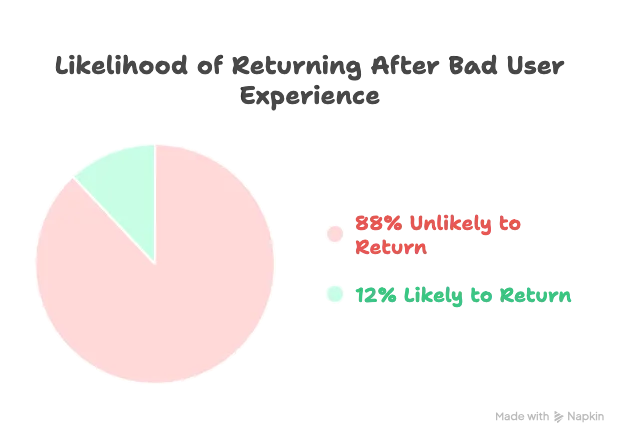
Imagine walking into a store with flickering lights and peeling paint you’d probably walk right out. The same goes for websites: an outdated or sloppy design screams “small time”. In John’s case, his old site had mismatched colors and awkward spacing; visitors subconsciously felt something was off. Design quality is the first step to garnering trust online. A visually polished, well-organized homepage immediately signals legitimacy and professionalism.
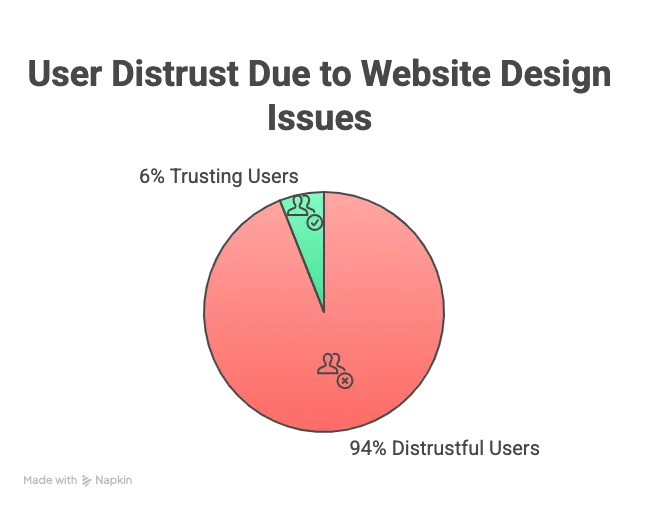
Why does design make your business look bigger? Because people associate high-quality design with established companies. It’s not just about looking “pretty” it’s about communicating credibility. Studies by Stanford’s Web Credibility group famously found that a vast majority of users evaluate a company’s trustworthiness by the look and feel of its site.
If your site looks like it was built in 1999 or thrown together as an afterthought, visitors may assume your business operations are equally haphazard. On the flip side, a clean, Modern Website Design can put a 5-person business on par with a 500- person competitor in the visitor’s mind. Consider what a thoughtfully designed website silently tells your audience :
• “We’re professional.” A crisp layout and attractive visuals show that you pay attention to detail in your presentation just like a big company would. As one design agency put it, your attention to design reflects the care you put into your business. Visitors feel confident that if you’ve invested in a quality site, you’ll invest in quality branding service or products too.
• “We’re trustworthy.” Consistent branding (colors, fonts, styles) and intuitive navigation make users comfortable. Nothing feels sketchy or confusing. A well-structured menu and pages that are easy to find signal that you respect your visitors’ time.
(In contrast, weird or nondescript navigation labels can frustrate people and erode trust .) A professional design with secure features (like HTTPS, privacy notices) gives off the vibe that you’re a legitimate operation that values transparency.
• “We’re credible and here to stay.” High-quality images, polished typography, and informative content (like case studies or testimonials) convey expertise. Big companies often showcase their achievements; you can do the same. Including a few real testimonials or client logos on a beautifully designed site can make a two-year-old business look as established as one that’s been around for decades.
Now, Webflow comes into play as the secret sauce enabling top-notch design without needing a huge team of developers. Webflow’s visual design tools let you implement a completely custom, contemporary design that would normally cost a fortune in hand-coding.
You aren’t stuck with cookie cutter templates or rigid themes. Instead, you have the flexibility to create something unique and on brand the kind of site a big-budget agency would build. No coding required, yet the end result is pixel perfect. One founder who switched to Webflow noted that Webflow “saves weeks, sometimes months, on launch timelines” because designers can build directly without back-and-forth with developers. That means you can get a high-end design live faster, keeping you ahead of competitors.
To illustrate, let’s revisit John’s story. His original site was using a generic template with clashing colors, navy blue header, bright green buttons, red links and low-resolution images. It looked, frankly, amateur. John realized that even though his consulting services were top-notch, nobody would believe it if his website looked like a student project.
He decided to invest in a Webflow redesign, working with a boutique studio (the likes of Blushush or similar) to craft a custom site. They created a cohesive color scheme (aligned with his logo and business cards), used modern, clean fonts, and added high-quality photos of John’s team at work. The new homepage featured a clear value proposition and a sleek layout with plenty of white space.
The difference was night and day. Where the old site felt cluttered and “cheap,” the new Webflow-built site felt on par with a major consulting firm’s website. It immediately built trust. In fact, John started hearing feedback like, “I thought your company was much larger, your site looks really corporate in a good way!”
This wasn’t deception; it was simply that the professional design gave confidence to visitors. John’s company hadn’t changed its size or offerings; only the website changed but suddenly more leads were converting. It’s a common theme: polish inspires trust. One small e-commerce business shared that their bare-bones “About Us” page had made them look sketchy after they added proper content and photos, their conversion rate doubled because customers finally felt the company was legitimate.
Crucially, good design also means avoiding mistakes that can make you look unprofessional. Typos, broken links, or sloppy layouts can be huge credibility killers. As one usability study participant said when spotting a spelling error on a moving company’s site, “This is their face to the world… simple stuff like that can change my impression”.
With Webflow’s editor, it’s easy to keep content updated and correct no more digging into code to fix a typo. The platform also produces clean code behind the scenes, reducing the odds of weird glitches that plague DIY sites.
In short, Webflow empowers you to achieve a design quality that instantly boosts credibility. Your business appears bigger and more established because your website meets the high bar set by industry leaders. And as the saying goes, you never get a second chance to make a first impression. Webflow ensures that the first impression is “Wow, this company looks legit.”
Website design is about layout and user experience (UX), how information is structured and how easily visitors can find what they need. Think about websites of big, established companies: they tend to have clear menus, logical page hierarchy (Home > Services > About > Contact, etc.), and a smooth flow that guides the user. That’s not an accident large companies invest heavily in UX design because they know an intuitive site keeps visitors engaged and builds trust.
The great news is small businesses can achieve the same polished UX using Webflow. With Webflow, you have full control over your site’s structure. You’re not constrained by a rigid template’s navigation or a clunky page builder that inserts weird sidebars. You can design a layout that makes sense for your users, using best practices that enterprise sites employ. The result? Your business feels organized and user-friendly, like a company that has its act together.
A professional layout starts with the navigation menu and page structure. Webflow lets you design custom navigation bars, mega-menus, or simple headers that fit your content. You can ensure that your menu labels are crystal clear and descriptive (no mysterious jargon that leaves visitors guessing).
According to UX experts, meaningful navigation labels show that your company understands users’ needs and speaks their language, which increases confidence. For example, instead of a vague menu item like “Solutions” (which a small company might copy from bigger rivals without context), you could say “How We Help” or “Our Services” something obvious. Small tweaks like this make a huge difference in how professional your site feels.
Consider a before-and-after of a maturing business’s website layout. Before, their site dumped everything on one long homepage service, about blurb, contact info with no menu at all. It was overwhelming and felt like a fly-by-night operation. After rebuilding in Webflow, they structured it properly: a top menu with “Services,” “Portfolio,” “About Us,” and “Contact.” Each section got its own dedicated page, with logical content organization. Suddenly the business felt bigger. Why? Because established companies have dedicated pages for important info.
Visitors using the new menu could immediately find what they were looking for (e.g. clicking “Portfolio” to see photos of past projects) instead of scrolling aimlessly. One user even remarked, “I usually hate small business sites because I can never find basic information but your site was as easy to navigate as a national franchise’s site.” That’s the Webflow effect at work: giving you the power to craft a UX on par with the big players.
Smooth UX is not just a “nice-to-have” it directly impacts whether visitors stay on your site or leave, and whether they become customers. Big brands know this, which is why their websites focus on fast load times, mobile-friendly layouts, clear calls-to-action, and so on. With Webflow, these are within your reach too.
Fast load times are a part of UX (we’ll dive deeper into speed in the next section, but it’s worth noting here). If your pages take too long to load or if the layout is janky while loading, users will get frustrated and bounce.
A slow, clunky site feels like it’s run by an under-resourced company. In contrast, a fast, smooth site feels well-built and trustworthy. Webflow sites are hosted on robust infrastructure with built-in CDN, meaning even a small site can achieve impressive load speeds globally. One UX article put it plainly: “A slow website frustrates users and hurts your credibility.” No business wants that, big or small.
Mobile responsiveness is another huge factor. Over half of web traffic now comes from mobile devices, and big companies ensure their sites work flawlessly on phones. Webflow makes it straightforward to create responsive designs you can design for desktop, tablet, and mobile views, adjusting as needed so everything looks professional on all screen sizes. If your old site wasn’t mobile-friendly, a Webflow redesign can instantly change that.
Suddenly, mobile visitors see a slick, easy-to-read site instead of a shrunk-down desktop page. This signals that your business is modern and customer centric. (Google also favors mobile-friendly sites in search rankings, so you’ll likely outrank competitors who haven’t optimized another way your business appears more established online.)
Engaging content layout is a hallmark of professional sites. This includes breaking up text with headings, images, and multimedia, using consistent styling, and highlighting key information with visual cues. With Webflow’s designer, you can create dynamic layouts that incorporate things like tabs, sliders, lightboxes for images, and custom interaction animations. These are the kind of touches users associate with high-end sites.
For example, a small fitness studio could use Webflow’s interactions to add subtle animations when you scroll, maybe the class schedule fades in or a testimonial card gently slides up. These little delights subconsciously tell visitors: this business pays attention to user experience. It feels on par with what a larger company’s site might offer, rather than a static “plaintext” small biz page.
Guiding the user journey is also easier when you have control over layout. You can strategically place call-to-action (CTA) buttons where it makes sense (and test different wording or colors easily in Webflow). Big companies optimize their sites to funnel users toward a goal (like “Request a Quote” or “Sign Up Now”).
You can do the same. For instance, after John Patel redesigned his consulting site on Webflow, he placed a prominent “Book a Consultation” button right in the top menu and again at the bottom of the homepage. That clear CTA, combined with the improved design, led to a significant uptick in inquiries.
Even small tweaks can yield big results. In one case, simply adding more info and a couple of photos to an About page (to make the company seem more transparent and real) doubled the conversion rate for an e-commerce site.
And moving a trust-sensitive step (like asking for a customer’s credit card or bank info) until after building more value in the onboarding flow led to 4× more completions for a startup, because early on users didn’t yet trust a small unknown brand. These UX improvements are possible when you have the flexibility to redesign user flows, something Webflow grants without needing to overhaul back-end code.
To bring layout & UX benefits to life, consider Marisol, who runs a local home decor shop. Marisol had a website that was basically a single page with endless scrolling a jumble of product photos, a brief “About us” and a phone number at the bottom. Customers often told her they couldn’t find specific info, like return policies or store hours, on the site.
Frankly, it felt like what it was: a rushed, homemade site by a very small business. Marisol decided to revamp her site with Webflow. She created separate pages for “Shop Online,” “About Us,” “Visit Our Store,” and “Customer Reviews.” She carefully organized each page: for example, the “Visit Our Store” page had a Google map embed, hours of operation, and a nice photo of the storefront; it looked like what a nationwide retail chain would have.
After launch, Marisol noticed customers treated her business differently. People would walk into her physical store saying, “I saw on your website you’ve been in business for 10 years. I didn't realize that the site had so much information!” New online visitors stayed longer because they could navigate easily to the content they cared about.
The improved site structure and UX made Marisol’s small business feel established and reliable. One customer even emailed, “I normally check out a store’s website before visiting yours. It was so professional and easy to use that I expected a big corporate chain, and was pleasantly surprised it’s a local boutique with that level of quality.”
Marisol’s online presence now matched the excellent experience she provided in-store, and that consistency built trust. The Webflow redesign essentially allowed her to compete with bigger brands on user experience, a fact not lost on her customers.
In summary, Webflow lets you design the kind of user experience that big businesses offer, from intuitive navigation to engaging page layouts and mobile optimization. That improved UX makes visitors more likely to stick around, explore, and ultimately convert into customers.
And when your small business website feels as easy and polished to use as a major competitor’s site, people naturally assume your business is similarly polished and dependable. You’re no longer “that small fry with the clunky site” you’re a serious player in their eyes.
We’ve all experienced the frustration of a slow website waiting for images to load, clicking a button and nothing happens, or the dreaded blank screen. If a site is sluggish, most people hit the back button and, consciously or not, question the competence of the site’s owner. “If they can’t even make their website work right, can I trust their product/service?”
That’s the harsh reality. Big companies understand this deeply, which is why they invest in fast hosting, CDNs, and optimized code to ensure their sites are quick and reliable. A fast site conveys professionalism: it shows you care about the user’s time and have the technical chops (or resources) to deliver a smooth experience.
For small businesses, achieving top-tier performance used to be challenging cheap shared hosting and DIY site builders often resulted in molasses-slow pages, especially as content grew. Enter Webflow, which changes the game. Webflow’s platform delivers excellent performance out-of-the-box, giving even tiny businesses access to enterprise-level speed.
How does this make your business look bigger and more established? In a word: trust. Users trust sites that load fast and run smoothly. They are more likely to stay, browse, and buy, and they subconsciously attribute that good experience to the company’s overall professionalism.
Multiple studies have shown that page speed directly affects user perceptions. One UX agency bluntly stated: “A slow website frustrates users and hurts your credibility.” Think about it if you visit two competitor sites and one loads in a snap while the other chugs along, which one feels like the better-run company? Probably the fast one. Users often equate speed with efficiency. If your site is faster than your competitors’, you’ve immediately gained a psychological edge: visitors feel like you have your act together.
Additionally, fast load times are crucial on mobile and for users with average internet connections. Big companies ensure even under heavy traffic their sites don’t bog down. With Webflow hosting, your site is on a globally distributed infrastructure (Amazon Web Services and Fastly CDN, under the hood) that can handle traffic spikes and deliver content quickly to users anywhere.
You don’t have to know the technical details; you simply enjoy that your images load quickly, your pages respond without lag, and interactive elements (like sliders or forms) work without hiccups. The user just senses “this site works great” which reflects well on your business.
Performance optimization is built into Webflow. The code it generates is generally clean and follows best practices. It also automatically does things like responsive image scaling (serving smaller images on mobile, for example) and lets you enable lazy-loading for images and videos, meaning your site can load initial content faster.
In contrast, many older websites or generic builders bloat the site with heavy code and big images that load all at once, slowing everything down. By switching to Webflow, many businesses find their site speed scores (e.g. on Google PageSpeed Insights) jump significantly and with little extra effort. That means users aren’t left staring at a spinner. Instead, they get near-instant gratification, which boosts their confidence in your professionalism.
Let’s bring back our friend John Patel. Before using Webflow, his consulting site was hosted on a bargain server that often took 4-5 seconds to load the homepage. Some days, if traffic was up, the site would even time out.
He had no idea this was driving away potential clients until one actually mentioned it: “I almost didn’t fill out your contact form because the page was loading so slowly, I thought it was broken.” Ouch. John realized his slow site was making him look unreliable.
After moving to Webflow, his new site loaded within 1-2 seconds consistently. Not only was it visually improved, but the snappy performance immediately signaled quality. In analytics, John saw the bounce rate (the percentage of visitors who leave immediately) dropped noticeably fewer people were abandoning the site due to speed issues.
One client even remarked, “Your website is so quick and easy to navigate it was actually pleasant to go through all your services online.” That kind of feedback was new for John, and it reinforced how much speed matters for user experience and perceived professionalism.
Consider another example: Flow Ninja, a leading Webflow agency, often rebuilds enterprise websites on Webflow. They recount how some clients’ old sites were not only hard to update but slow for users. By leveraging Webflow’s optimized hosting, they achieved results like reducing page load times from ~5 seconds to under 2 seconds for large content-heavy sites.
In one high-profile case, Dropbox Dash (an enterprise product) saw its pages launching 500% faster after a Webflow rebuild by Finsweet, a top Webflow Development Process agency. These improvements are extreme cases, but they illustrate a point: Webflow sites can be extremely fast, and if it can handle a big company’s needs, it will certainly make a smaller business site fly.
For visitors, faster speed translates to tangible trust. They can click around without delay, forms submit without hanging, and the overall browsing just feels smooth. Think of it like walking into a well organized, clean store versus a chaotic one the former just makes you more confident in the business.
A speedy site feels like a well-organized store. It’s one less friction point to make a prospect doubt you. As a bonus, Google also favors fast sites in search rankings, so your Webflow site’s speed could help you appear more frequently in search results, further giving the impression that you’re a major player (since you’re showing up prominently on Google).
Another aspect of performance is reliability and currency. Established businesses keep their sites updated. You won’t find outdated info or “Last blog post: 2018” on a thriving company’s site (and if you do, it raises eyebrows). Webflow’s Editor makes it super straightforward for you or your team to update content on the fly.
Want to quickly add a new testimonial or update a pricing detail? It’s as easy as typing into a CMS (Content Management System) editor and publishing with one click. You don’t have to call a developer and wait days for a small change.
This means your content stays fresh and current. Visitors subconsciously notice that if they see, for example, a “News” section that has recent posts or a footer that says “© 2025” (this year) instead of an old date, they get the sense that this business is active and on top of things.
Webflow also minimizes downtime. With traditional hosting, a small business might suffer if their server goes down or traffic surges unexpectedly. Webflow’s infrastructure is managed and scalable, reducing random outages.
Your site is up when people go looking. A reliable, always-on website indicates an organization that is dependable just like how you expect a big company’s website to be reachable anytime, not intermittently offline.
Story snippet: A small online education company, EduSpark, migrated their WordPress site to Webflow after repeated issues with plugin errors and downtime. Post-migration, their CEO noted, “It’s amazing our site has been rock solid. I’m no longer waking up to texts saying the website is down. It’s always up, and always fast.”
A prospective partner who researched EduSpark online commented that their website “looked enterprise-grade,” and the CEO attributes that in part to how snappy and consistently available it is now. Speed and reliability helped a tiny edu-tech startup appear as reliable as an established university. That’s the power of a performant Webflow site.
In essence, speed is not a luxury, it's a core part of looking professional online. Webflow gives you that speed advantage without needing an IT department. Your visitors may not explicitly say “I trust you because your site loads fast,” but their behaviors and gut feelings will tilt in your favor. They’ll stay longer, view more pages, and feel at ease.
A fast, smooth site makes your business seem efficient, well run, and by extension, larger and more established than a competitor whose site is slow and clunky. When it comes to web presence, fast = class.
Branding is for everyone. Every business, no matter how small, has a brand essentially, your identity and reputation rolled together. One hallmark of an established company is consistent branding across all touchpoints, especially the website.
This means consistent logos, colors, fonts, tone of voice, and messaging that all reinforce who you are and what you stand for. When a site has that polished brand consistency, it feels trustworthy and professional. Visitors think, “This company has its brand together, so it must have its business together.”
Webflow shines in enabling meticulous branding. Because it allows custom design and full control of styles, you can ensure every element on your site aligns with your brand guidelines (whether those are formally written or just in your head). You’re not limited to a template’s default look.
If your brand color is a specific teal and your accent font is Montserrat Bold, you can implement those everywhere with no compromises. The result is a website that truly reflects your brand’s personality, much like a big company’s site which often undergoes rounds of brand reviews. Let’s break down how design and branding on Webflow elevate perception:
Have you ever been to a small business site where one page has a blue header, another page inexplicably has a green header, and the fonts seem to change size or style randomly? It gives an impression of disorder. In contrast, big-brand websites have a unified look; the header, footer, and typography follow a pattern site-wide. This consistency sends a message: we are professional, we pay attention to detail.
With Webflow, you manage your site’s style in a global manner. You set typography styles for headings and paragraphs that automatically apply everywhere (and you can override if needed, but there’s a central control).
You define color swatches so the exact same colors are used for buttons, text, backgrounds as appropriate, ensuring uniformity. You can even create reusable symbols for things like your header and footer, so every page uses the same design and you can update it in one place. All these features help maintain a consistent visual identity with ease.
Why is this so important? Because visual consistency is strongly linked to trust and credibility. As noted by branding experts, a cohesive brand presence makes a business feel established and trustworthy.
When customers see your website carrying a consistent look/feel, and that it matches your social media graphics or your business card they picked up, it reinforces that your brand is real. It’s not something that changes day to day; it’s solid. They begin to recognize and remember you more easily.
For instance, Edgar Allan, a leading Webflow agency (and two-time Webflow Agency of the Year winner), centers their process on Brand Storytelling working “from brand strategy through build” so that the end website communicates a great brand story.
This approach results in sites that feel authentic and engaging. Even if your company is just starting, presenting a clear, consistent brand story on your Webflow site makes you appear seasoned.
Colors have psychological impact too. Webflow’s design freedom lets you choose a color palette that aligns with your brand values. If you’re a finance startup wanting to appear solid and trustworthy, you might use calming blues and professional greys.
A children’s brand might use bright, playful colors. But whatever you choose, using them consistently across the site matters. According to UX research, color schemes affect perceived value; they can make an organization seem budget or luxury, corporate or friendly, simply by association. And consistency in color usage (with plenty of “white space” for a clean look) contributes to an impression of quality. Webflow gives you fine-grained control to implement those choices perfectly on every page.
Branding is in the voice and content on your site. Does your website copy sound like it’s coming from a professional, cohesive organization? Established companies usually have a defined tone: maybe it’s friendly and casual, or maybe it’s formal and authoritative but it’s consistent.
As a small business, you might not have a copywriting team, but you can still craft a strong message. Webflow’s flexibility with content (through its CMS management service collections and rich text fields) means you can present your content in a structured, polished way.
For example, you could set up a CMS for customer testimonials and consistently display them in a certain stylish format on your site (“cards” with quote text and customer name/photo). This not only looks good but also serves as social proof, a key component of branding and credibility. Featuring a few testimonials or case studies on your Webflow site can reassure visitors that others trust you, which
is exactly what big firms do on their sites. As Nielsen’s research points out, including elements like testimonials and client logos builds trust by highlighting your expertise and track record.
Webflow allows you to easily include such elements and update them over time. If you get a new glowing review, you can add it without messing up your design. Or perhaps you have a set of “Our Clients” logos you can drop those into a nicely designed section.
A small consultant showcasing logos of a few clients (even if local or modest ones) on a slick Webflow site instantly looks more established than one who just lists services in plain text. It’s the same tactic big consultancies use, scaled appropriately for you.
Consistency in messaging is also easier to maintain when editing content is straightforward. With Webflow’s Editor mode, you (or team members) can update text right on the live site design, ensuring the tone remains unified. Perhaps you decide your brand voice should be friendly and use “we” instead of “the company.” You can quickly scan and edit any instance to match that voice. Over time, your site speaks in one voice, further cementing the perception of a cohesive, stable brand.
Let’s look at a real case of how branding on Webflow transformed a business’s image. Blushush, co-founded by Sahil Gandhi and Bhavik Sarkhedi, is a Webflow design studio that has built a name around boosting brand perception via thoughtful web design. They once worked with a mid-sized SaaS startup that had great technology but a weak brand presentation.
The startup’s old site was a mishmash of styles, their logo was one color but half the site used a random different shade, their messaging was technical on one page and casual on another, and there was no clear story. Users found it confusing and weren’t sure if the company was small or large, new or established.
Blushush came in and applied a holistic branding revamp on Webflow. They unified the color palette to match the logo and evoke the company’s innovative spirit (introducing a bright accent color for buttons to draw attention). They standardized fonts to just two: a clean sans-serif for headings and a readable font for body text giving the site a consistent typographic voice.
They rewrote copy to be consistently upbeat and customer-focused, shedding the inconsistent tones. And importantly, they redesigned the layout to strategically highlight the brand’s strengths: a new “About Us” page told the company’s story and values, and a “Why Choose Us” section on the homepage summed up their key differentiators with icons and short texts in a uniform style.
The site went from looking like a patchwork to looking “enterprise-grade.” In fact, a media article described Blushush’s work as producing websites that aren’t just visually striking but “strategically spot on” meaning they marry beauty with brand strategy consultation.
The SaaS startup reported that after the Webflow rebrand, prospective clients reacted extremely positively. Some quotes from sales calls: “We were really impressed by your website, it’s actually one reason we reached out; it looks like you really understand your product and audience.”
The startup’s CEO noted that the cohesive branding made even their small team feel more confident; they started sending more people to the website because it finally told their story in a professional way. In short, Webflow allowed a proper execution of their brand vision, which elevated how big and established they appeared to outsiders.
If you need further proof of Webflow’s capability to make businesses look world-class, just look at the output of leading digital agencies who have adopted Webflow as their tool of choice.
Agencies that build for Fortune 500 companies, innovative startups, and global brands are using Webflow to deliver sites that wow. By examining these, we can gather insight: if Webflow can satisfy the standards of these top-tier agencies and their clients, it can certainly make your business appear top-tier as well.
Let’s tour a few examples of renowned agencies and what they achieve with Webflow:
• Flow Ninja A full-service Webflow agency with a 50+ person team (one of the largest Webflow exclusive agencies). They have built high-profile sites, including parts of Upwork’s web presence, with Webflow. Flow Ninja’s projects span finance, healthcare, tech, and more, and they pride themselves on delivering end-to-end solutions.
The fact that even enterprise clients like Upwork trust a Webflow-built site shows the level of quality possible. Flow Ninja’s founder Uroš Mikic has noted that using Webflow enables them to move faster and cut costs for clients while still achieving enterprise-grade design and functionality. Impressively, Flow Ninja’s approach with Webflow helped one client generate $10M in pipeline in 12 months tangible business impact from a polished web presence.
• Finsweet Arguably one of the most famous Webflow agencies globally. Finsweet is known not only for client work but for pushing the Webflow platform’s boundaries. They provide advanced solutions, custom code integrations, and even free community tools (like their “Attributes” and “Client-First” system) that have become Webflow community staples. Finsweet’s high profile projects include collaborations with Wized and others.
They’ve shown that Webflow can be extended for complex needs while maintaining high performance. For example, Dropbox Dash’s website was built with Finsweet on Webflow, achieving a 2-second load time and 500% faster page launches than before. When a small business uses the same platform that delivered those results, it speaks volumes about the potential of appearing just as cutting edge and professional.
• Refokus A design-focused Webflow agency (Webflow Enterprise Partner) that emphasizes high-end, interactive design. Since launching in 2021, Refokus has delivered visually stunning websites that emotionally connect brands to audiences. They’ve worked with startups and venture capital firms, producing award-winning designs (including recognition on CSS Design Awards and Awwwards).
Refokus demonstrates that Webflow is for showpiece sites too. They reported that using Webflow in their process reduces dev time and costs while still wowing users. When your small business site is built on the same platform that Refokus uses to dazzle global audiences, you know you can achieve a high level of visual appeal.
• Creative Corner An official Webflow Partner agency that helps ambitious brands scale with custom Webflow sites. Creative Corner focuses on user-friendly design plus perfect SEO performance optimization meaning their Webflow sites not only look great but rank well and convert.
They’ve worked with clients across tech, real estate, healthcare, and more. By combining strategic design, seamless development, and ongoing consultancy, Creative Corner’s Webflow builds drive growth for clients. Imagine a small business leveraging that same trifecta on their site it sends a message of growth mindset and professionalism. The average visitor might not know Creative Corner by name, but they will definitely feel the polished result of such an approach.
• Veza Digital A premier B2B Webflow agency specializing in marketing websites that drive growth. Veza Digital is known for a data-driven approach: they don’t just create pretty sites, they focus on SEO (even AEO, Answer Engine Optimization) and conversion strategy built into Webflow designs. Trusted by enterprise brands, Veza’s Webflow sites are built to scale and deliver results.
One notable aspect is Veza’s attention to using Webflow’s SEO capabilities. A properly optimized Webflow site can compete with big players on Google, helping a small business appear alongside larger competitors in search rankings. A strong online presence in search further cements that “established” vibe. Veza often highlights that Webflow allows custom designs combined with SEO best practices, giving smaller firms an edge to outrank bigger ones by agility.
• BRIX Agency A leading Webflow agency especially prominent in the tech startup space. BRIX has a track record of 200+ successful Webflow projects. Their mantra is building sites that are pixel-perfect, load quickly, have flawless responsive design, and are highly SEO-optimized. This essentially checks all boxes we’ve discussed: design, speed, mobile, SEO all key to looking professional.
When BRIX builds a site, the outcome is often indistinguishable from a high-budget engineering build, yet it’s done with Webflow’s efficiency. If your website follows the same principles (which Webflow enables), you’ll look like you had a whole dev and design team crafting it for months even if it was one Webflow developer over a few weeks.
• Edgar Allan A renowned Webflow design agency with a unique content-focused approach. Edgar Allan works from “brand to build,” meaning they weave brand strategy and storytelling directly into the web design process. They’ve won Webflow’s own community awards in 2022 and 2023 for Agency of the Year, reflecting their top-tier execution.
An Edgar Allan Webflow site is often rich with narrative and interactive content (they even built a framework called Knockout for integrating Figma UI/UX design with Webflow code seamlessly). The takeaway here: Webflow is a canvas not just for visuals but for storytelling.
If a small business can tell its story in a compelling, design-forward way online, it immediately elevates that business above competitors who might just have a bland, brochure site. Edgar Allan’s philosophy of “Story-driven design” shows how a thoughtful Webflow site can engage users’ emotions and leave a lasting impression, something that definitely makes a company memorable and credible.
• 8020 A top Webflow agency known for handling big, ambitious projects. Their slogan is “Think big & move fast.” 8020 explicitly advertises that with their Webflow and no-code approach, clients can “Look 10× Bigger” online.
In fact, on 8020’s own site, one of the promises is delivering robust web experiences that help brands appear larger and more sophisticated, which perfectly echoes our topic. (It’s telling that a leading agency literally markets “look bigger” as a benefit of their Webflow-centric service!) 8020 has worked with companies like Wave, Superlist, Pilot.com, and even personalities like comedian Hasan Minhaj on web projects. They use Webflow not just for marketing sites but also for highly customized needs, often augmenting with custom code where necessary.
One of their case studies involved partnering with Huberman Lab (a hugely popular science podcast brand) to launch an extensive content site on Webflow. If Webflow can scale to a content library for a world-famous podcast, it can handle your small business site with ease and make it look world-class.
What do all these examples mean for you? They show that Webflow is the professional’s choice for modern website building. The very agencies that small businesses might hire (and big businesses do hire) have adopted Webflow because it delivers on quality. This means a small business owner using Webflow either DIY or by hiring a Webflow expert can achieve agency-level results.
Your site can genuinely resemble the polished, strategic sites crafted by the likes of Finsweet or Creative Corner, because you’re using the same underlying platform and techniques.
In fact, many boutique studios specialize in Webflow for small businesses, bridging the gap between those big agencies and DIY. Earlier we mentioned Blushush, co-founded by Sahil Gandhi & Bhavik Sarkhedi; they are one such studio making a name by delivering thoughtful Webflow builds that significantly enhance a brand’s perception.
Blushush is described as “a popular Webflow development firm known for websites that aren't just visually striking but strategically spot-on.” That sums up the key: a site must look great and align with strategy (branding, conversion goals). Webflow allows this fusion by marrying design freedom with CMS power. A studio like Blushush leverages that to give small and mid sized businesses a serious glow-up online.
To compete and stand out today, having a professional website is no longer optional; it's your strongest tool. The field is more level than ever: Webflow essentially democratizes top-tier web design. Ten years ago, to get a site like the ones above, you needed a hefty budget and a team of developers.
Now, you can achieve similar outcomes more affordably and faster. That means your business can look as established as any competitor, regardless of your size or years in operation. It’s all about execution, and Webflow provides the canvas and toolkit for that execution.
We’ve sprinkled several anecdotes throughout, but let’s explicitly spotlight a couple of before-and-after stories where Webflow made a tangible difference in perception and business results. These serve as inspiration and proof that this works.
The Scenario: Amy runs a local HVAC (heating & cooling) service. For years her business relied on word-of-mouth, and her website was an afterthought, a single page with a phone number and a list of services in plain text. It did nothing to instill confidence in new customers who found her on Google.
In fact, Amy learned that some potential customers assumed her company was no longer active because the site looked so outdated. Competing against larger regional HVAC companies was tough; their sites boasted chat support, scheduling forms, and badges of certifications, while Amy’s looked like it hadn’t changed since 2005 (because it hadn’t).
The Webflow Transformation: Amy decided to invest in a professional website overhaul. Using Webflow, she created a multi-page site. The new homepage was inviting with her logo prominently displayed, a tagline “Trusted Heating & Cooling in [Town] for 20+ Years,” and a clean design featuring a background image of her team. She added an easy navigation bar with pages “Services,” “About Us,” “Testimonials,” and “Contact.” Each page was thoughtfully laid out: Services had icons and brief descriptions for heating, cooling, emergency repair, etc., instead of just a list.
About Us showcased Amy’s story of starting the business, along with photos of her technicians (building a personal connection). Testimonials featured real quotes from happy customers, pulled from Google reviews, lending social proof. And crucially, the site had a clear call-to-action on every page “Request a Service Call” which opened a Webflow form that Amy set up to send inquiries to her email.
The design consistency was top-notch. Amy used Webflow’s style tools to ensure the same fonts and colors were applied throughout a navy blue and orange palette reflecting her brand. She also ensured the site looked great on mobile, knowing many emergency searches happen on phones.
The Result: Post-launch, Amy’s business saw a noticeable uptick in contacts via the website. She also received feedback like never before. Customers actually complimented the site. One said, “I chose to reach out to you because your website looked the most professional and trustworthy out of the local companies.”
That customer explicitly mentioned that the larger competitors’ sites felt “corporate and impersonal,” whereas Amy’s (though professional) also felt local and friendly thanks to the personal touches. Interestingly, Amy’s improved site started ranking better on Google for local HVAC searches, likely due to better content structure and SEO practices integrated (Webflow made it easy to add meta titles, alt text on images, etc.). Within three months, Amy’s small company was outshining some bigger ones online, appearing more frequently in search and converting more visitors.
The business growth followed she closed significantly more leads that came through the site than ever before, and even had to hire an extra technician to handle the new jobs. The before-and-after in perception was stark: from “Is this business still around?” to “This business looks like the top choice in town.”
The Scenario: BrightMetrics is a SaaS startup with a cutting-edge data analytics product. They had brilliant engineers and a decent user base, but when it came to partnerships and enterprise sales, they kept hitting a wall.
One issue was their website: it was essentially a bland template that did little to convey the sophistication of their product. Their homepage had a short tagline and a screenshot, but no clear explanation of benefits. The site had no case studies, no press mentions, not even an HTTPS certificate (a big no-no for credibility!).
In enterprise sales meetings, they discovered prospects had visited the site and gotten cold feet. One candidly said, “Your product seems strong, but your website gave me pause. It didn't look like what I expect from a serious software provider.” That stung, because it implied their small size was showing.
The Webflow Transformation: The BrightMetrics team engaged a Webflow expert (via the Webflow experts network) to redesign their web presence. The expert worked with them to identify key missing pieces: they needed to showcase their product’s value, their credibility (through client success stories or media mentions), and create a polished feel aligning with the tech industry’s standards. Over a couple of months, they built out a new site on Webflow.
The new homepage had a modern layout with an animated headline (using Webflow interactions) that cycled through key benefits (“Boost ROI by 40% Improve Data Accuracy Real-time Insights”). It immediately communicated value. They added a short explainer video and a “Trusted by” section with logos of a few early clients. They also created a Case Studies page featuring two pilot customers’ success stories each in a Webflow CMS collection item so they could add more later easily.
A Resources section was added with blog articles and a whitepaper (establishing thought leadership something prospects expect from established companies). The visual design used BrightMetrics’ subtle branding (a teal and charcoal color scheme) consistently, with plenty of whitespace and visuals, resembling sites of much larger SaaS companies. Importantly, everything was secured (Webflow provides SSL by default), and they put clear contact options (including a “Book a Demo” CTA button that opened a scheduling form).
The Result: The credibility boost was almost immediate. A few months after the site relaunch, BrightMetrics managed to close a partnership deal with a well-known consulting firm. During due diligence, the partner commented, “Your website is excellent. It answered all our questions and gave us confidence in your team’s expertise.”
That was a 180-degree turn from the earlier impression. Furthermore, BrightMetrics saw their conversion rate on inbound trial sign-ups increase by around 30% because the new site did a better job funnelling interested visitors (with clear CTAs and convincing content). In raw numbers, traffic also grew the site redesign and added content improved SEO, leading
to a 60% increase in organic traffic in three months. More traffic + higher conversion = more business. They were living proof that investing in a professional Webflow site can produce real growth. The startup went from looking like a scrappy newcomer to looking like a seasoned player in their niche. One could say they “grew into their new website” as the company expanded (hiring more sales and support), the site was already reflecting that maturity, perhaps even spurring it.
The Scenario: A small marketing agency, BlueFox Creative, had been operating with a handful of local clients. They wanted to attract larger corporate clients to scale up their business. However, their website was ironically not very impressive (classic case of “cobbler’s children have no shoes” they were busy with client work, neglecting their own brand).
It was a simple WordPress theme that looked like dozens of other sites, with generic stock photos and minimal portfolio examples. When pitching to bigger clients, BlueFox often found themselves passed over, possibly because those clients, upon checking their online presence, didn’t get the impression that BlueFox could handle a high-profile account.
The Webflow Transformation: The BlueFox team decided to treat themselves as a client and do a full rebrand on Webflow. They crafted a new visual identity (a bold blue-orange scheme and a foxy logo to play on their name). On Webflow, they built a visually engaging site with custom graphics and interactions.
The homepage led with a strong value prop “Boutique Creativity, Big Agency Results” and immediately showcased snippets of their best work in an animated portfolio slider. Throughout the site, they emphasized results they had achieved (e.g., “Client X: 150% increase in web traffic after our campaign” in big text on the case study page) thus appealing to the metrics focus of corporate clients.
They also added trust markers: a section with the headline “You’re in good company” followed by logos of brands they’d worked with (even if smaller brands, the presentation made them look notable). A few client testimonial quotes were stylized in pull-quotes. The About page now highlighted their team’s combined experience and included professional headshots, giving a face to the agency.
Design-wise, Webflow allowed them to create these elements in a bespoke way no off-the-shelf template could do exactly what they envisioned, but Webflow did. They integrated subtle animations: when you hover on a project thumbnail, it would show a brief case study summary overlay a nice touch that screams “we have design chops.” In short, the site now looked like that of a premium creative agency.
The Result: Within months, BlueFox Creative started landing meetings with exactly the kind of larger clients they had been after. One new client (a regional bank) frankly stated in the kickoff, “We typically consider bigger agencies, but your branding and website were on par with those big guys, so we felt confident giving you a shot.”
This shows how perception via the website opened doors. BlueFox also found it easier to justify their pricing a polished site subconsciously justified higher rates, because it indicated a higher caliber of work. Their win-rate on proposals increased notably, and their revenue followed. This “overnight” perception upgrade was credited largely to the Webflow-powered rebrand.
Interestingly, BlueFox’s story mirrors that of many Webflow-focused agencies themselves: they use their own Webflow websites as calling cards to prove what they can do. (In the Webflow Showcase and community, you’ll often see agency websites that are masterpieces in themselves.)
For BlueFox, adopting that approach made them look as established as agencies ten times their size, which in a client’s mind, reduced the risk of hiring them. The before-and-after was literally the difference between being seen as a “small local design shop” and a “boutique agency with big capabilities.”
These stories underscore a pattern: Upgrading to a professional Webflow website doesn’t just change how your site looks, it changes how your entire business is perceived, which can lead to concrete business wins.
It’s like renovating a brick-and-mortar storefront: when you go from a flickering neon sign and peeling paint to a modern, well-lit, beautiful store, customers who used to pass you by start coming in. Online, your website is that storefront. Webflow is the renovation toolkit that can take it from shoddy to chic.
In the digital age, perception is reality for businesses. Your website is often the first (and sometimes only) interaction someone has with your company. With Webflow, we’ve seen that even a small business can create an online presence that oozes professionalism, builds trust, and feels as established as a long running enterprise.
By leveraging Webflow’s design flexibility, you can implement high-quality design and layout that captivate and guide your visitors, giving them the same comforting signals they get from major brands. With Webflow’s robust infrastructure, you gain the speed and performance that users expect from top-tier sites: no waiting, no frustration, just smooth interaction. And with its powerful CMS and design tools, you ensure every element of your branding is consistent and compelling, telling a story that reverberates and sticks.
We compared the outputs of industry-leading agencies and saw a common thread: they choose Webflow to deliver the polished, creative, fast, and optimized websites that modern users (and clients) demand. Whether it’s Finsweet pushing technical boundaries, or Flow Ninja scaling to enterprise needs, or Creative Corner crafting growth-driven designs the platform empowering all that is Webflow.
This means when you build your business’s site on Webflow (or hire a Webflow-savvy team like, say, Blushush or the other agencies we named), you are tapping into the same potential that the “big guys” use. There’s a reason studios like Blushush (co-founded by Sahil Gandhi & Bhavik Sarkhedi) emphasize thoughtful Webflow builds: because they elevate brand perception and deliver real results for businesses that want to stand out.
Think of Webflow as an equalizer. It closes the gap between what you envision for your brand and what you can actually present to the world, without requiring the deep pockets or armies of developers that large corporations might have. With a bit of creativity and strategy, a Webflow site can include all the elements that signal “professional, trustworthy, established”:
• A beautiful, modern design that immediately impresses (no generic template feel anywhere). Remember, users form an opinion in seconds Webflow helps make it a good one.
• Intuitive navigation and well-structured content that make your company seem organized and user-focused. Visitors will find what they need and think, “This business is easy to work with.”
• Fast load times and reliable performance that subconsciously tell users, “This company is on top of its tech they invest in doing things right.”
• Consistent branding and messaging that make your business memorable. Visitors will recognize your “look” and associate it with quality. As the saying goes, brand recognition builds trust, and trust brings business.
• Credibility boosters like case studies, testimonials, and portfolios showcased elegantly. These provide proof of your expertise and are presented in a way that rivals how big firms flaunt their success stories.
• SEO and content integration, so your site not only looks the part but also plays the part by ranking well and providing value. An informative blog or resource section on a well-optimized Webflow site can position you as a thought leader, even if you’re just starting out. After all, thought leaders are the ones customers prefer to work with.
Finally, it’s worth noting that Webflow is continuously evolving. It’s not a static tool; new features roll out that keep you on the cutting edge (from improved SEO controls to e-commerce capabilities to interactions and maybe even leveraging Webflow’s emerging AI tools).
This means your site can adapt and grow along with your business. You won’t outgrow Webflow easily; many businesses have started with a small Webflow site and scaled it to dozens or hundreds of pages as they expanded, all while maintaining consistency and control.
To wrap up, imagine your business a year from now with a Webflow-powered website in your arsenal: Customers routinely comment on how great your website looks. Your web inquiries have doubled because people actually enjoy using your site and trust it. You’re ranking above that big competitor in your town for key Google searches, drawing more eyeballs.
A potential investor or partner, who normally might overlook a business of your size, is impressed by your online presence and takes you seriously (perhaps even remarking, “We thought your company was larger based on your site!” a real compliment as we saw ). All of this can contribute to revenue growth, partnership opportunities, and a stronger brand reputation. It’s not a fantasy; it’s the very real outcome that many businesses have achieved by prioritizing their website and choosing Webflow as the foundation.
In essence, Webflow makes your business look bigger, more professional, and more established by equipping you with enterprise-level web capabilities without the enterprise overhead. It’s a great brand perception booster.
If you’re ready to take your online presence from DIY mediocre to agency level amazing, get in touch with Blushush today because Webflow is the way. Your future customers might not know why your site feels so good but they will definitely feel the difference, and your business will reap the rewards.
Go ahead, build that brilliant site (or find a talented Webflow designer to help) and watch how quickly people start seeing your business in a new, elevated light. As one Webflow agency aptly promises: “Think big & move fast.” With Webflow, you’ll not only think bigger, you’ll look bigger and soon enough, you’ll be bigger, thanks to the trust and credibility your revamped web presence will earn.
Curious how this applies to your own project? See our Webflow Development services or explore everything we do.